Mentorship-android: Bug: Save not working when no changes detected in Edit Profile
Describe the bug
When the profile undergoes no change, then the user will want to save the current state of the app
To Reproduce
Steps to reproduce the behavior:
- Go to 'Profile'
- Click on 'Edit'
- Click on "Save"
- See error
Expected behavior
The user should be able to exit the dialog box on clicking save, without any changes being performed
Screenshots
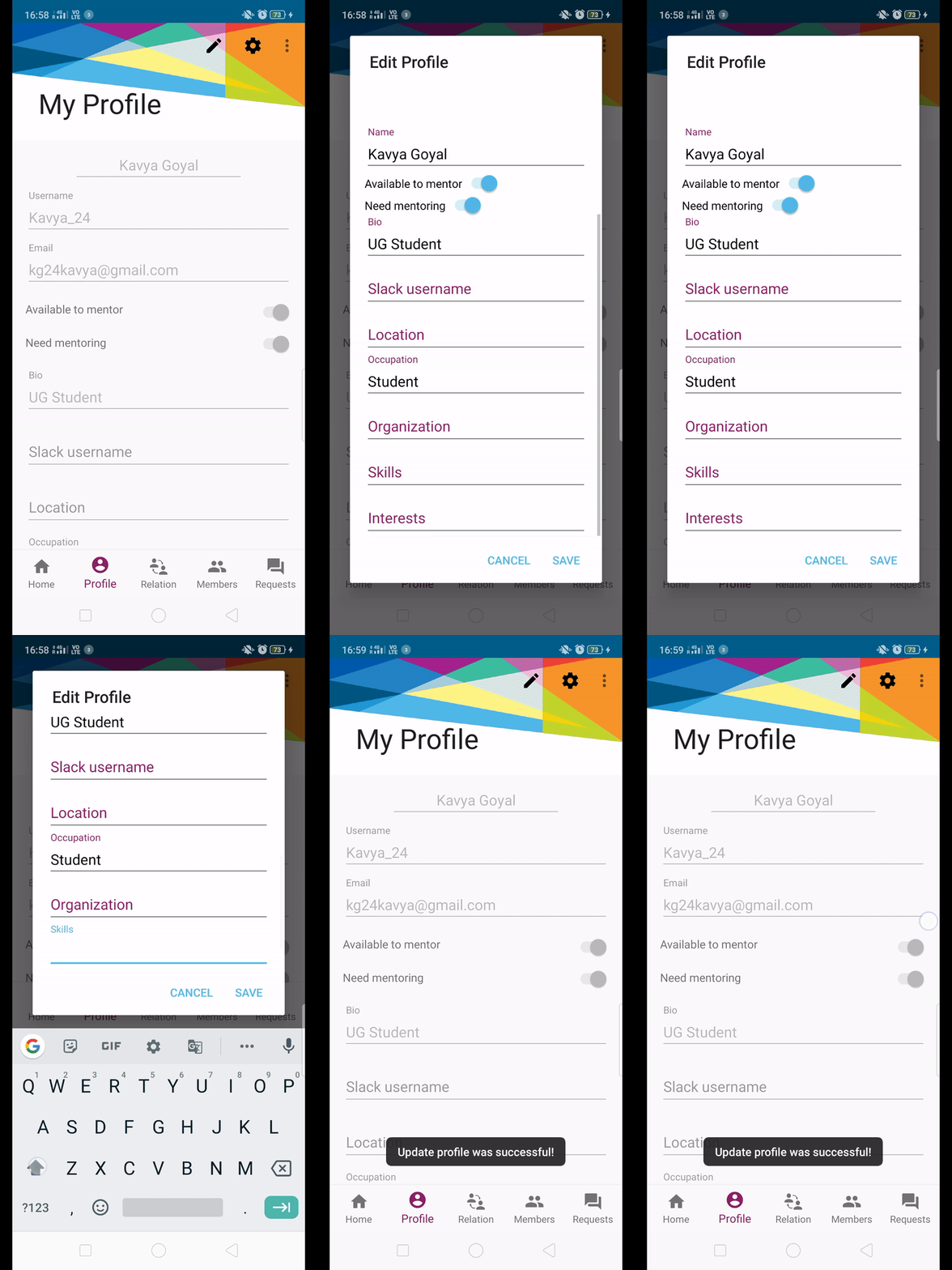
Smartphone (please complete the following information):
- Device: [OPPO F11 09]
May I work on fixing this?
 Kavya-24
All 10 comments
Hey @Kavya-24
I think this issue should be solved by disabling the save button when no changes have been made.
This would help improving the user experience as save button on no data change can be a little misguiding.
Correct me if I am wrong @isabelcosta @m-murad
 Priyansh-Kedia
on 31 Mar 2020
Priyansh-Kedia
on 31 Mar 2020
Hi @Kavya-24 @Priyansh-Kedia its not an error , after saving the modification, there is a REFRESH button at the top right corner where three dots are there, so if you press that refresh button , you will see all the changes will get reflected In your profile .
 robotjellyzone
on 1 Apr 2020
robotjellyzone
on 1 Apr 2020
When the user clicks at the edit profile option, and does not make any changes in it, then on clicking the "save" button, he should be able to save the data. In other words the dialog box should simply dismiss. #680 is on that.
Kavya-24
on 1 Apr 2020
Oh!! @Kavya-24 my bad, I didn't understand it well. But I think if there is no change in your profile then it would be fine to just use a Cancel button but yeah, you then never know the behavior of your user of the app
robotjellyzone
on 1 Apr 2020
@Kavya-24
I think the save button should be disabled if no change have been made as enabling the save button even if the user has not made any changes can be a little misguiding.
What do you think?
Priyansh-Kedia
on 1 Apr 2020
Oh!! @Kavya-24 my bad, I didn't understand it well. But I think if there is no change in your profile then it would be fine to just use a Cancel button but yeah, you then never know the behavior of your user of the app
Yes, the user might expect the "Save" to work as well
Kavya-24
on 1 Apr 2020
@Kavya-24
I think the save button should be disabled if no change have been made as enabling the save button even if the user has not made any changes can be a little misguiding.
What do you think?
Yes, it can be ambiguous to have "save" enabled in case no change is observed. "Save" can be disabled in that case. Or, the edit dialog box can be simply dismissed on no change when "save" is clicked :D
Kavya-24
on 1 Apr 2020
@isabelcosta @m-murad @foongminwong Can I work on this?
Kavya-24
on 10 Apr 2020
@isabelcosta Can I work on this?
Kavya-24
on 29 Apr 2020
Yes you can work on this @Kavya-24 ! I read the discussion, and I am not sure about the best away to do it. But I like @Priyansh-Kedia on disabling the button for sure.
 isabelcosta
on 2 May 2020
isabelcosta
on 2 May 2020
Related issues
 ghost
·
5Comments
ghost
·
5Comments
 annabauza
·
8Comments
isabelcosta
·
4Comments
Kavya-24
·
8Comments
annabauza
·
7Comments
annabauza
·
8Comments
isabelcosta
·
4Comments
Kavya-24
·
8Comments
annabauza
·
7Comments
Most helpful comment
Yes you can work on this @Kavya-24 ! I read the discussion, and I am not sure about the best away to do it. But I like @Priyansh-Kedia on disabling the button for sure.