Meilisearch: download_latest script randomly fails on GH actions with macos-latest
In this really specific case:
- in CI
- using
macos-latest
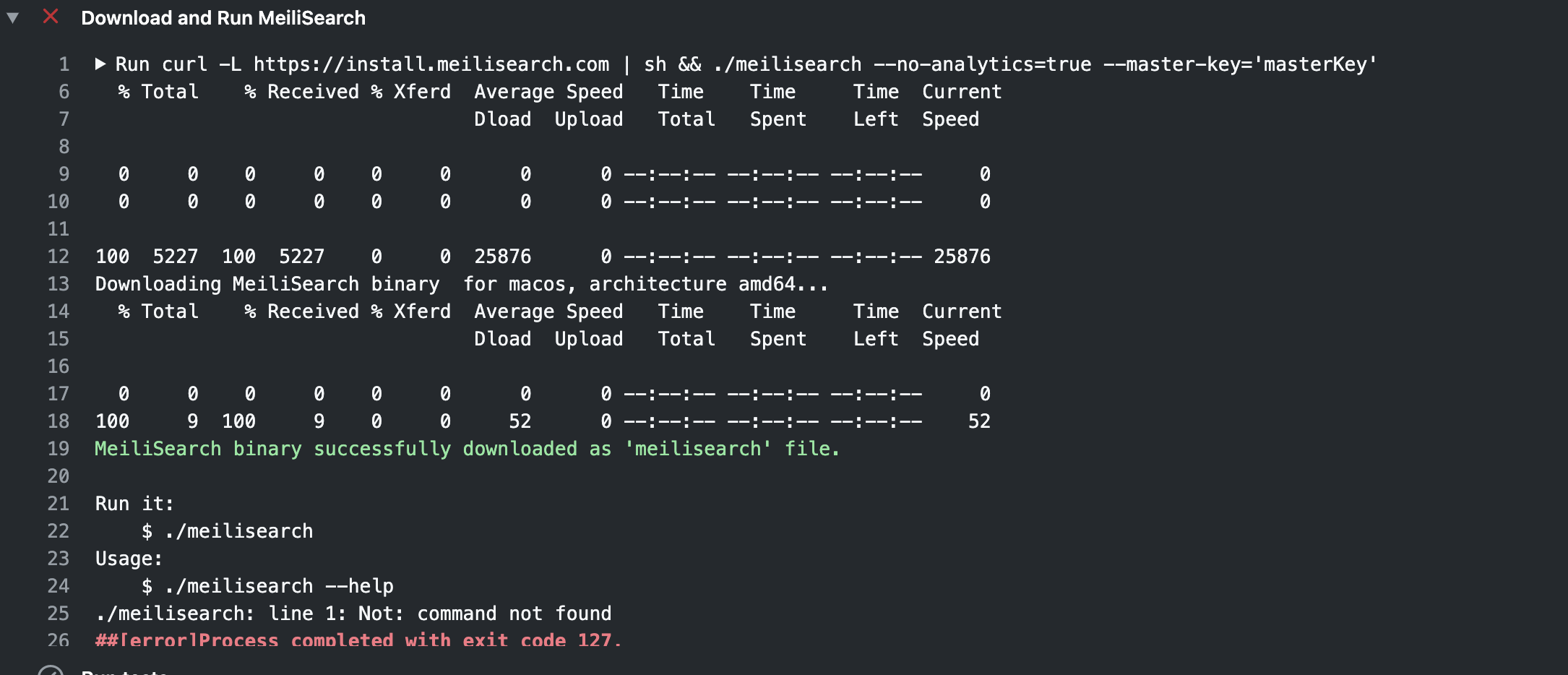
The script randomly fails because the download_latest.sh script is not able to identify the latest version.
This fix would be useful for the meilsearch-swift CI.
 curquiza
All 5 comments
A temporary solution is:
name: MeiliSearch

on: push

jobs:
  download_latest:
    name: Download MeiliSearch latest
    runs-on: macos-latest
    steps:
      - uses: actions/checkout@v2
      - run: brew update && brew install meilisearch
      - run: meilisearch --no-analytics=true &
      - run: curl 'http://localhost:7700/version' #example
Hum... I am not sure what happens here? Could you tell me more about that, please?
 Kerollmops
on 12 Aug 2020
Kerollmops
on 12 Aug 2020
The download_script.sh does not work every time (so fails randomly) in this GH Action configuration (notice the macos-latest usage):
name: MeiliSearch

on: push

jobs:
  download_latest:
    name: Download MeiliSearch latest
    runs-on: macos-latest
    steps:
      - uses: actions/checkout@v2
      - run: |  # In the case it fails:
        curl -L https://install.meilisearch.com | sh # downloading MS with the script
        ls -la .  # the meilisearch binary is here
        head -1 meilisearch # the binary file contains "Not Found"
The script is able to detect the OS and the archi but, sometimes, not what is the tag of the latest (I don't know why...), so the download URL is incorrect, that's why there is "Not Found" in the downloaded binary file.
curquiza
on 13 Aug 2020
So the temporary solution would be to download meilisearch from brew? But isn't it just related to the meilisearch-swift repository?
Kerollmops
on 13 Aug 2020
The solution for a user in the same situation as the meilisearch-swift repository (= using macos in a GitHub CI) is to use brew instead of the download_latest.sh script
curquiza
on 13 Aug 2020
Related issues
curquiza
·
3Comments
Kerollmops
·
3Comments
 ayalon
·
3Comments
ayalon
·
3Comments
 mzperix
·
4Comments
mzperix
·
4Comments
 trevyn
·
4Comments
trevyn
·
4Comments
Most helpful comment
The solution for a user in the same situation as the meilisearch-swift repository (= using macos in a GitHub CI) is to use brew instead of the download_latest.sh script