Medusa: start-stop-daemon: matching only on non-root pidfile /var/run/PyMedusa/Medusa.pid is insecure
Describe the bug
Unable to stop the medusa service after updating Debian to Buster
To Reproduce
Steps to reproduce the behavior:
- Start medusa:
root@bananapi /etc/init.d # service medusa start
service medusa start  25.54s user 1.70s system 94% cpu 28.690 total
- Try to stop medusa:
root@bananapi /etc/init.d # service medusa stop
start-stop-daemon: matching only on non-root pidfile /var/run/PyMedusa/Medusa.pid is insecure
Expected behavior
Medusa service should stop

Medusa (please complete the following information):
- OS: Linux bananapi 3.4.113-bananian (it's a debian fork)
- Branch: master
- Commit: d0c136d7a528a471b51676140bd35d24d97f65c6
- Python version: 3.7.3
- Database version: 44.14
Debug logs (at least 50 lines):
Doesn't apply.
Additional context
I'm using the default runscript. Copy & pasted from here just to be sure: https://github.com/pymedusa/Medusa/blob/master/runscripts/init.debian
When trying to restart the service instead of stopping it I get another (similar) error:
root@bananapi /etc/init.d # service medusa restart
start-stop-daemon: matching only on non-root pidfile /var/run/PyMedusa/Medusa.pid is insecure
start-stop-daemon: matching on world-writable pidfile /var/run/PyMedusa/Medusa.pid is insecure
I don't have a file called /etc/default/medusa... so that might be the cause? Don't know what to write in that file though.
This issue might somehow be related: https://github.com/pymedusa/Medusa/issues/7562
Any help is appreciated! :)
 noodle-
All 14 comments
Adding the $USER to the stop command in the init.d script should fix the issue according to answers that I've found on the internet, but I didn't manage to get that working at all.
noodle-
on 9 Jan 2020
You should be using systemd with that Debian version: https://github.com/pymedusa/Medusa/blob/master/runscripts/init.systemd
It's all written in the installation guide: https://github.com/pymedusa/Medusa/wiki/Medusa-installation-Debian-Ubuntu
 medariox
on 9 Jan 2020
medariox
on 9 Jan 2020
Thanks for the reply!
My system doesn't use Systemd/systemctl, it still uses the SysVinit method.
When trying to use Systemd method:
root@bananapi /etc/systemd/system # chown root:root medusa.service
root@bananapi /etc/systemd/system # chmod 644 medusa.service
root@bananapi /etc/systemd/system # systemctl enable medusa
zsh: command not found: systemctl
There are some other files in that directory which confused me
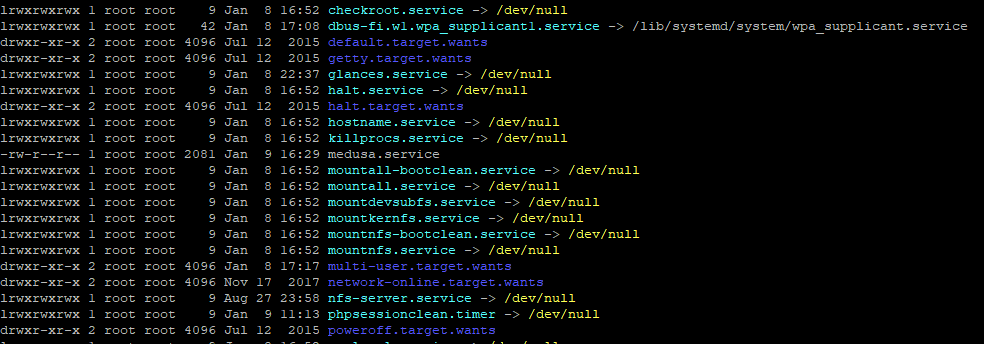
But those are symlinks that don't seem to be doing anything and I don't think installing Systemd/systemctl alongside SysVinit is a fun idea.
Somehow the update only screwed up Medusa, and not syncthing or sabnzbd and any other service, those are all still working fine.
noodle-
on 9 Jan 2020
You shouldn't have both installed of course.
Stop Medusa and delete Medusa.pid from:
/var/run/PyMedusa/Medusa.pid
If it doesn't work, make sure you run Medusa with the same user you have configured in your init file: https://github.com/pymedusa/Medusa/blob/master/runscripts/init.debian#L53-L57
medariox
on 9 Jan 2020
Deleting the .pid file didn't help.
Well, good point. I'm issueing the command through CLI from root, but the service is using a user called "medusa". Don't see why stopping the service the same way I'm starting it doesn't work though.
And I haven't found a working way to issue a command as a different user yet, I'll continue later.
Restarting and shutting down Medusa does work through the web interface by the way, it's just the CLI won't co-operate.
By the way I vaguely remember this being relevant?
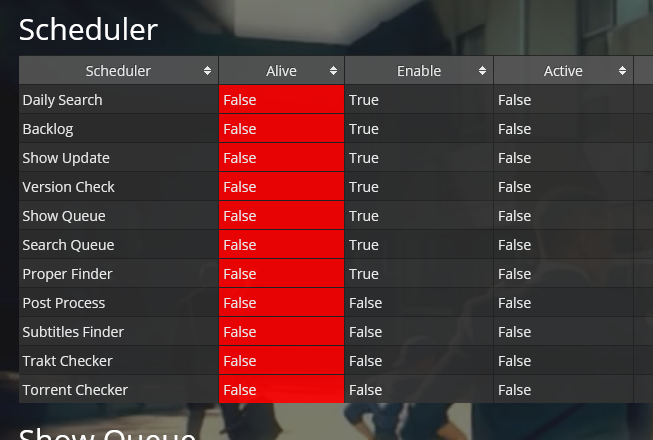
Don't care much about that info not being accurate though.
noodle-
on 9 Jan 2020
When trying to run a command as a different user I get errors without any explanation
root@bananapi ~ # su medusa
1 root@bananapi ~ # su Medusa :(
su: user Medusa does not exist
1 root@bananapi ~ #
su medusa returns an error - without explanation..
su Medusa returns user Medusa does not exist - so the previous command was good, but somehow failed
So I don't know how to continue debugging why I'm unable to stop/restart the service from root. From within the WebUI everything, besides restarting Medusa automatically after an update, works.
Is there an example for /etc/defaults/medusa file that I could use? Mine is currently still non-existent and I can't find any examples on here.
noodle-
on 14 Jan 2020
Try to use this run-script: https://gist.github.com/medariox/70e92c372537ef9cefb6d338f02a9db6
medariox
on 14 Jan 2020
root@bananapi /etc/init.d # rm /var/run/PyMedusa/Medusa.pid
root@bananapi /etc/init.d # service medusa start
service medusa start 14.07s user 0.89s system 99% cpu 15.035 total
root@bananapi /etc/init.d # service medusa stop
start-stop-daemon: matching on world-writable pidfile /var/run/PyMedusa/Medusa.pid is insecure
Replaced run-script, removed .pid file, starting the service still works, stopping it creates the same error
noodle-
on 14 Jan 2020
There is a bug in the daemon code, but you should be able to fix it with:
sudo chown medusa:medusa /var/run/PyMedusa/Medusa.pid
medariox
on 14 Jan 2020
I tried the chown command once while medusa was stopped and once while it was running. Sadly both scenarios resulted in the same errors.
root@bananapi ~ # chown medusa:medusa /var/run/PyMedusa/Medusa.pid
root@bananapi ~ # service medusa start
service medusa start 14.45s user 0.92s system 99% cpu 15.464 total
root@bananapi ~ # service medusa restart
start-stop-daemon: matching on world-writable pidfile /var/run/PyMedusa/Medusa.pid is insecure
start-stop-daemon: matching on world-writable pidfile /var/run/PyMedusa/Medusa.pid is insecure
2 root@bananapi ~ # chown medusa:medusa /var/run/PyMedusa/Medusa.pid :(
root@bananapi ~ # chown medusa:medusa /var/run/PyMedusa/Medusa.pid
root@bananapi ~ # service medusa status
[ ok ] Medusa is running.
root@bananapi ~ # service medusa restart
start-stop-daemon: matching on world-writable pidfile /var/run/PyMedusa/Medusa.pid is insecure
start-stop-daemon: matching on world-writable pidfile /var/run/PyMedusa/Medusa.pid is insecure
2 root@bananapi ~ #
Still using the run-script from your previous reply by the way.
noodle-
on 14 Jan 2020
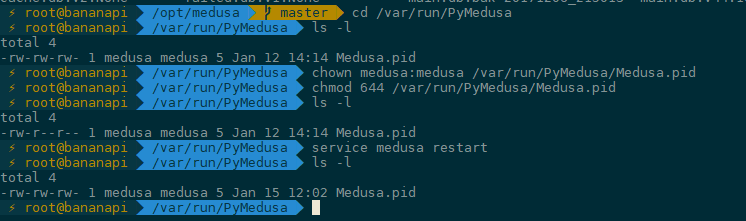
Try to also change permissions:
sudo chown medusa:medusa /var/run/PyMedusa/Medusa.pid
sudo chmod 644 /var/run/PyMedusa/Medusa.pid
That worked! Temporarily :)
noodle-
on 15 Jan 2020
Yeah, I will push a fix in the future. I hope that's an acceptable workaround for the time being.
medariox
on 15 Jan 2020
This is fixed in the current release.
medariox
on 16 Jun 2020
Related issues
 xorinzor
·
4Comments
xorinzor
·
4Comments
 fernandog
·
4Comments
fernandog
·
4Comments
 Rouzax
·
3Comments
Rouzax
·
3Comments
 wimpyrbx
·
5Comments
Rouzax
·
3Comments
wimpyrbx
·
5Comments
Rouzax
·
3Comments
Most helpful comment
Try to also change permissions: