Medusa: Edit show is broken, at least for Anime
Version : 0.2.6 (through docker)
Basic stuff tried : Ive tried to reboot, rebuild the container from the last image, same result.
TL;DR : After adding a new anime show, if I edit the show, parameters are set to something else, and if corrected and saved, File location is lost.
Step 1 : I've added a new anime show, with "HD1080p" as quality and anime and scene numbering options, and unchecked folder for seasons (like 20 sec before the screen shot) I didn't choose to whitelist a release group since it's currently bugged (in another issue) :

Step2 : I click on "Edit" on the show page :
On tab "MAIN" : there "HD1080p" is replaced by "Custom" without any quality option checked, "default status episode" is empty. Also, the name of the Show is missing.
On tab "Format" : almost everything is wrong
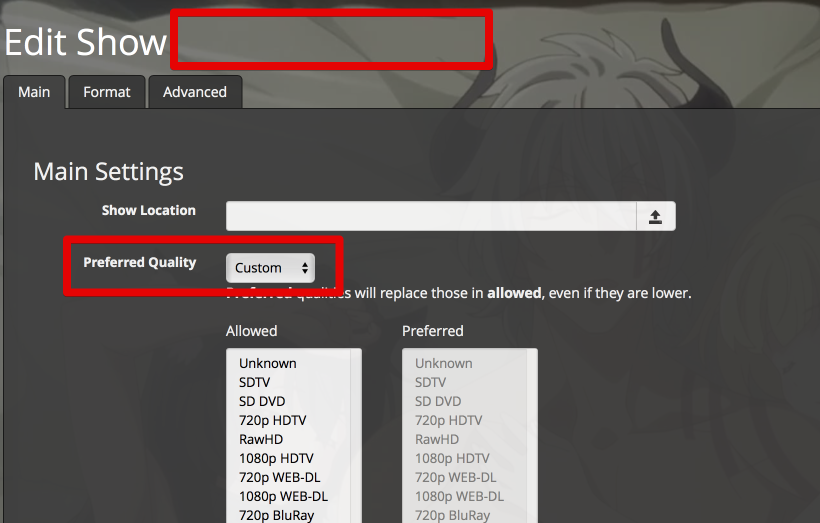
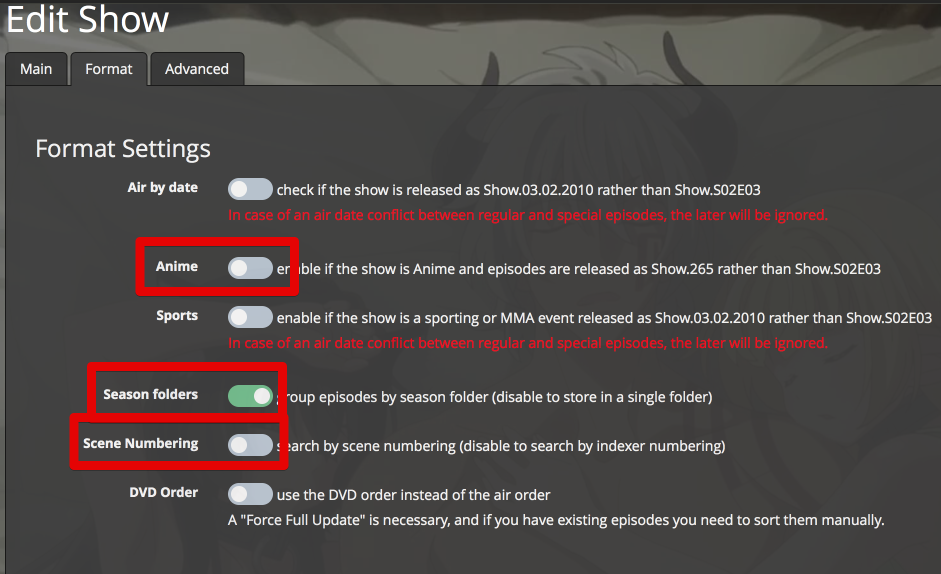
Step3 : once I've corrected everything and click "Save", I go back to the show page and now Location is missing ...

I've tried it with 3 different anime, same result.
Bonus : if you can whitelisted release group while adding the show (if you can because it's currently with the old UX which is bugged), for exemple "HorribleSubs" you could end up like me with "H","o","r","i","b","l","e","S","u","b","s" :)
 hergonoway
All 35 comments
Any errors in browsers console?
Also maybe a slow connection? Like you sure you gave it the time to load?
 p0psicles
on 8 Jul 2018
p0psicles
on 8 Jul 2018
Hello, thanks for your quick answer. I've tried to reproduced the problem, but something changed from yesterday.
Yesterday I tried to add the following show :
- Shichisei no Subaru (Main title) ; Seven Senses of the Re`Union (Official Title)
- Isekai Maou to Shoukan Shoujo no Dorei Majutsu (Maint title) ; How Not to Summon a Demon Lord (official title)
At the time, only TMDB indexer returned something for both shows and only while using the Main Title, Official title didn't returned anything on all indexer. And problems where encountered from there on these added shows with TMDB.
Today these 2 shows doesn't give result while searching with Maint title anymore, but TMDB return something on the Official title, and now TVDB and TVMaze return something also. Also XEM show up on the Show page, which wasn't the case yesterday.
From now the problem doesn't show up anymore, in the meantime I did'nt restart the server or anything else, tested and retested the issue on Safari, Firefox and Chrome like yesterday. Cache on webbrowser were's touched or cleared. And client (me) and server discussing over Lan, through direct local IP.
It a very strange behavior, do you think that maybe these show where too fresh (in indexer repository) and since there's obvious change made on TMDB between yesterday and today (It doesnt respond to the same title) it could had an impact on Medusa while it tries to build up the show from TMDB infos ?
hergonoway
on 8 Jul 2018
I really dont know. Hard to say if we cant reproduce it.
On a sidenote i would only use tvdb. The searching makes heavy use of xem. And that only works with tvdb.
p0psicles
on 8 Jul 2018
Last time we had an issue like this it was a bad character encoding on our end (#4248, #4260).
@hergonoway
You didn't get any errors in the logs?
 sharkykh
on 8 Jul 2018
sharkykh
on 8 Jul 2018
I have the same version and this is also happening to me.
1º Added New Show without setting "Anime"
2º Edit works!
3º Edited Show to "Anime" and Saved
4º Edit does not works
editShow endpoint is pending without response.
No errors in Logs with debug active.
 gilfrade
on 8 Jul 2018
gilfrade
on 8 Jul 2018
@sharkykh Unfortunatly logs don't come back this far, already generated 5 files of 10mb of logs till this morning .... I've changed that to 10 files of 50mb for the next time, sorry.
hergonoway
on 8 Jul 2018
@gilfrade
Which show is that?
I just tried Seven Senses of the Re'Union from TMDB with your steps and it works for me?
Also please check the browser's developer console (F12 key or CTRL+SHIFT+I) for errors.
sharkykh
on 8 Jul 2018
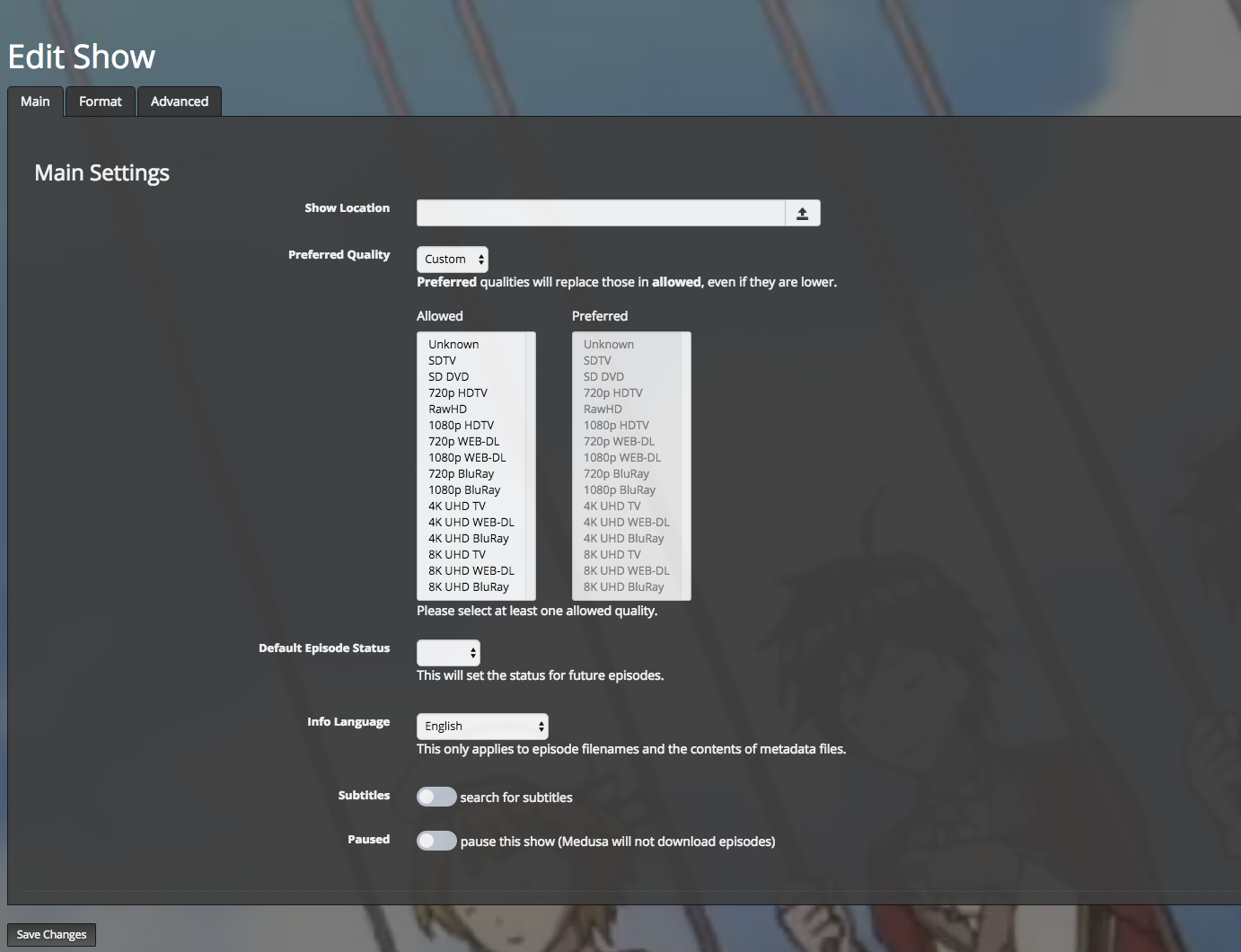
Seeing the exact same problem with 'Yume Oukoku to Nemureru 100-nin no Ouji-sama' (100 Sleeping Princes & The Kingdom of Dreams). Added as anime, the edit button doesn't present a usable page.
Have deleted and added multiple times. Full updated multiple times as well. Used Safari, Chrome, Oprea, Firefox with cleared caches.
 alron
on 24 Jul 2018
alron
on 24 Jul 2018
I'm still unable to reproduce this.
@alron
Please check the browser's developer console (F12 key or CTRL+SHIFT+I) for errors.
If there aren't any, check the Network tab, refresh the page and then search for /api/v2/series (on the Network tab), and post the response it got here.
sharkykh
on 25 Jul 2018
@sharkykh
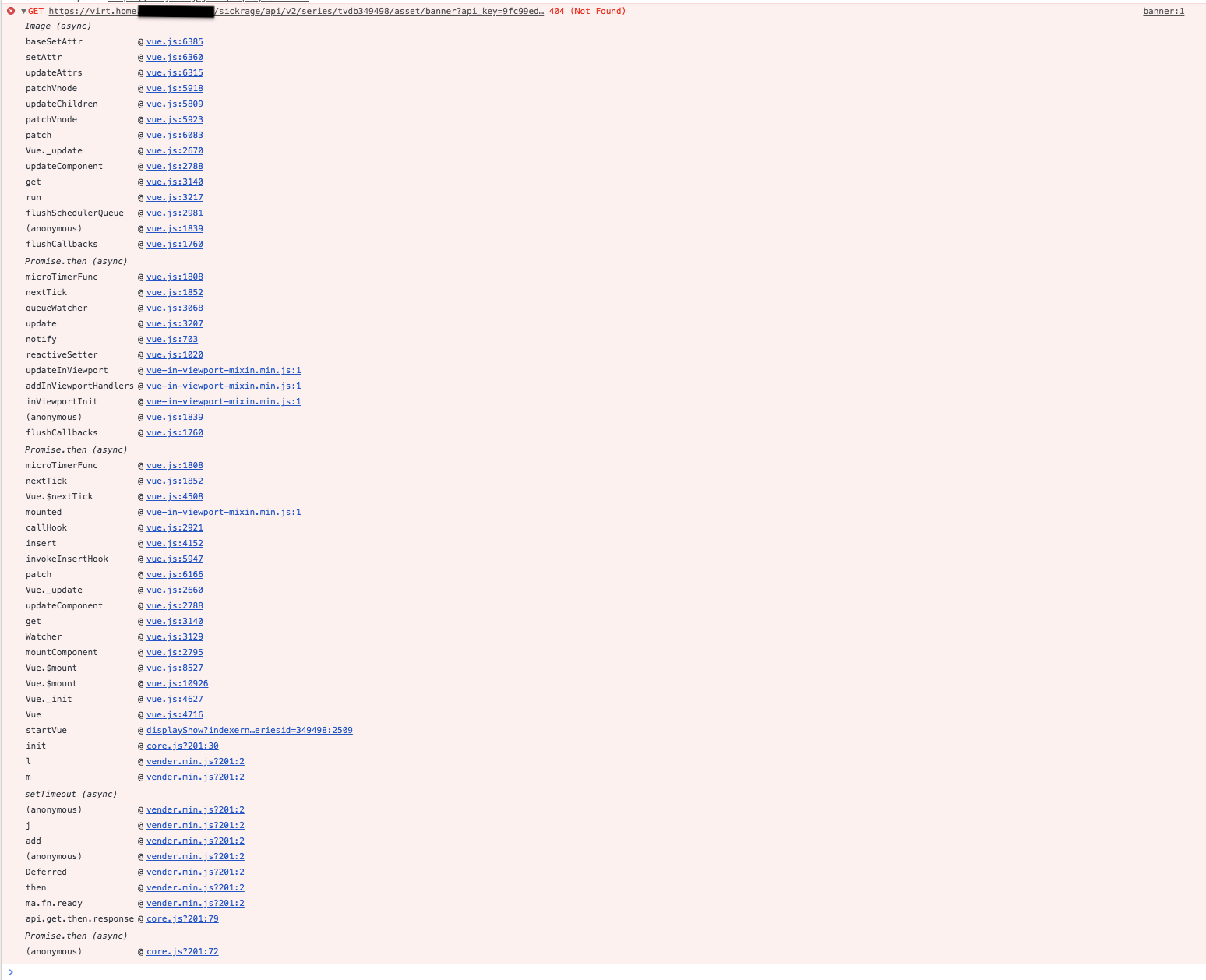
The only error showing on edit page is a 500 series error. Same error on network console (of course).
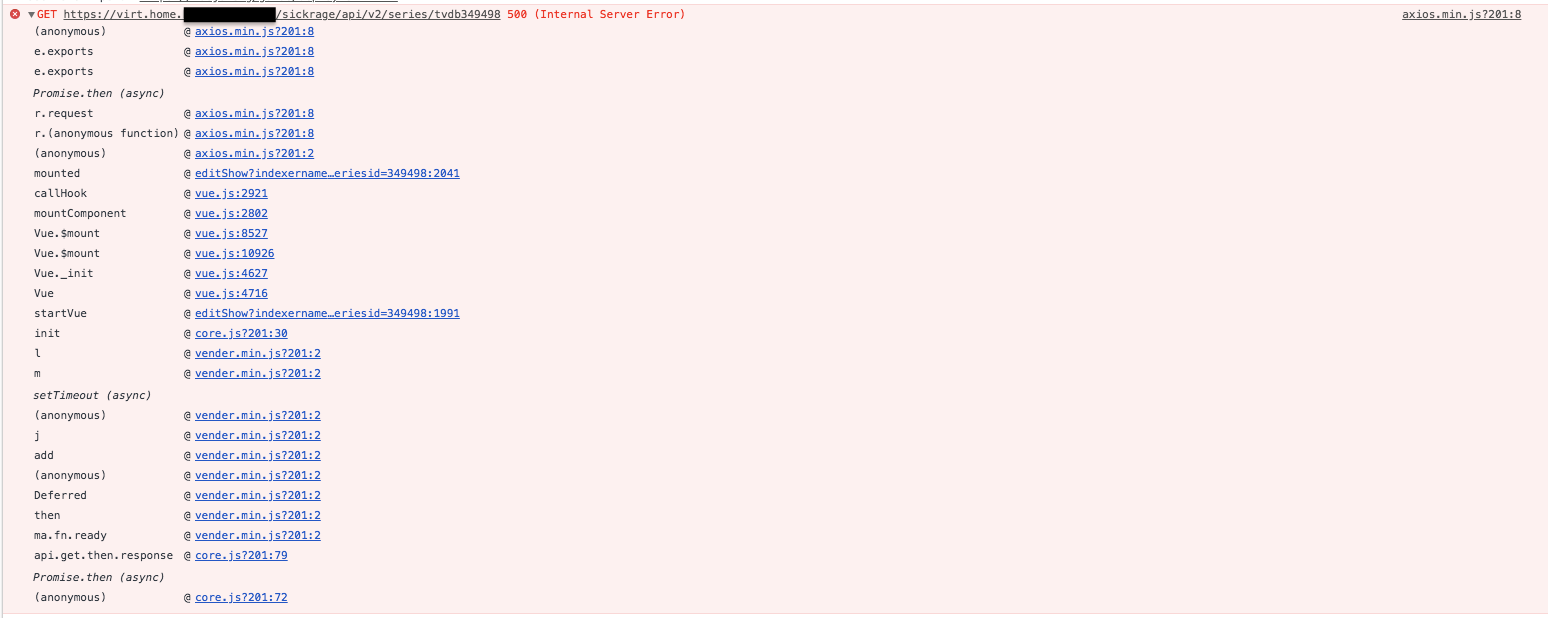
Seeing a 404 error on the show page itself. But this appears to be for the banner.
alron
on 25 Jul 2018
Ok then we really need some debug logs at time of the 500 error
p0psicles
on 25 Jul 2018
@p0psicles @sharkykh
Looks like an exception in the tornado side of things.
Errors didn't start showing up in debug log until I enabled logging for tornado.
Let me know if there is anything else I can provide.
alron
on 25 Jul 2018
That's good to know.
I have a workaround for it, but it won't fix the underlying issue.
sharkykh
on 26 Jul 2018
@alron If you don't mind, I'd like your help in finding the issue. It requires some code editing.
Open this file:
https://github.com/pymedusa/Medusa/blob/e7c4ff3bc9a48b47c932b0e40a539d62e3a62f64/medusa/tv/episode.py#L1056
And replace that line with (note that the indentation is important):
        try:
            data['airDate'] = self.air_date
        except Exception:
            ep_data = [
                'season: ' + repr(data['season']),
                'episode: ' + repr(data['episode']),
                'id: ' + repr(data['id']),
                'airdate: ' + repr(self.airdate),
                'airs: ' + repr(self.series.airs),
                'network: ' + repr(self.series.network)
            ]
            log.exception('Failed to convert air date for:\n{0}', '\n'.join(ep_data))
Save the file, restart Medusa, and navigate to the edit show page again.
The page will now load correctly, and you should get errors in the server logs.
Please post them here.
If you can do this, it will help a lot in figuring out the issue.
@hergonoway
@gilfrade
You are welcome to try this too, just in case the errors you're getting are different.
sharkykh
on 26 Jul 2018
@sharkykh Roger that. I'll give it a whirl. Will post results shortly.
alron
on 26 Jul 2018
@sharkykh Looks like that handled the exception a bit better and made the edit show page work.
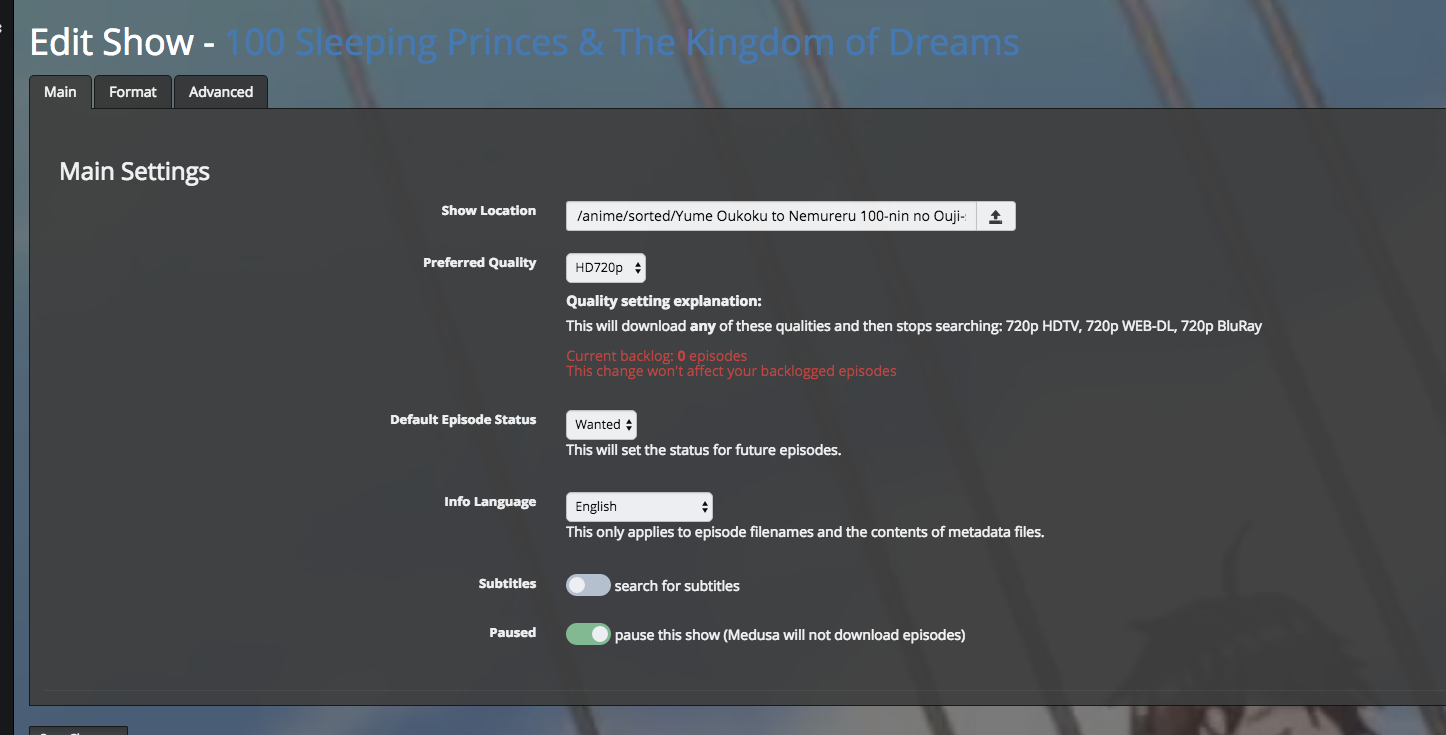
Log:
error.txt
edit:
also verified that saving edits work. was able to successfully set the wanted group.
alron
on 26 Jul 2018
@alron
Thank you.
I'm still unable to reproduce this error, which makes it very hard for me to find the actual issue.
Maybe this is related - I'm running Medusa on Windows 7, what OS are you running?
sharkykh
on 26 Jul 2018
@sharkykh
Docker 18.06.0~ce~3-0~ubuntu using the pymedusa/medusa image.
Base system docker lives on is Ubuntu Linux 18.04, kernel 4.15.0-24-generic.
Using nginx as HTTPS proxy for the UI.
alron
on 26 Jul 2018
Huh, Docker too. Just like OP. Interesting.
I'll set up a Docker environment to test this.
In the meantime, if could you do one more code change please...
https://github.com/pymedusa/Medusa/blob/e7c4ff3bc9a48b47c932b0e40a539d62e3a62f64/medusa/tv/episode.py#L404-L410
Change these lines to:
        airdate = date.toordinal(self.airdate)
        airtime = network_timezones.parse_date_time(airdate, self.series.airs, self.series.network)
        apptime = sbdatetime.convert_to_setting(airtime)
        return apptime.isoformat(b'T')
Same deal, save file, restart Medusa, go to edit show page and check the error logs.
sharkykh
on 26 Jul 2018
Modified, restarted, triggered.
alron
on 26 Jul 2018
I still can't reproduce it, even inside a Docker container.
Could you change
        apptime = sbdatetime.convert_to_setting(airtime)
        return apptime.isoformat(b'T')
to:
        apptime = sbdatetime.convert_to_setting(airtime)
        log.warning('Airtime is: {0!r}', apptime)
        return apptime.isoformat(b'T')
Could you also check your timezone inside the container?
Maybe it's related...
sharkykh
on 26 Jul 2018
alron
on 26 Jul 2018
I still think it's somehow related to timezone setting, because I don't get the error.
Can you please run the following command inside the container?
python -c "import time; print time.timezone, time.altzone, time.tzname"
root@a8874e476ce7:/$ python --version
Python 2.7.14
root@a8874e476ce7:/$ python -c "import time; print time.timezone, time.altzone, time.tzname"
28800 25200 ('PST', 'PDT')
Alright, now I'm getting somewhere:
I assume you set the timezone using (for example):
export TZ=America/Los_Angeles
I did that too. Then I did the following:
cd /app/medusa/ext
python -c "import datetime; from dateutil.tz import tzlocal; print datetime.datetime(1, 1, 1, 0, 0, tzinfo=tzlocal()).isoformat(b'T')"
Then I got the same error. Please try that on your container to make sure.
sharkykh
on 26 Jul 2018
Yep. That'd be the timezone.
I also have /usr/share/zoneinfo/US/Pacific:/etc/localtime:ro as a mount, so the zoneinfo is correct.
root@a8874e476ce7:/$ cd /app/medusa/ext
root@a8874e476ce7:/app/medusa/ext$ python -c "import datetime; from dateutil.tz import tzlocal; print datetime.datetime(1, 1, 1, 0, 0, tzinfo=tzlocal()).isoformat(b'T')"
Traceback (most recent call last):
  File "<string>", line 1, in <module>
  File "dateutil/tz/tz.py", line 210, in utcoffset
    if self._isdst(dt):
  File "dateutil/tz/tz.py", line 282, in _isdst
    if self.is_ambiguous(dt):
  File "dateutil/tz/tz.py", line 244, in is_ambiguous
    (naive_dst != self._naive_is_dst(dt - self._dst_saved)))
OverflowError: date value out of range
Also if you look on the footer of each page on Medusa, is the "Now" time correct for you?
sharkykh
on 26 Jul 2018

Looks correct.
alron
on 26 Jul 2018
Try on the container:
cat /etc/localtime
You very much so don't want me to cat /etc/localtime. It is binary TZ data.
alron
on 26 Jul 2018
Then less. I just want to make sure everything is set correctly.
What I'm trying to figure out is where a timezone setting is missing.
By the way for me, on the newly created container /etc/localtime is UTC, so it's small.
root@328005d0485e:/$ cat /etc/localtime
TZif2UTCTZif2UTC
UTC0
I don't use Linux regularly so sorry if I'm being meticulous with my checks.
sharkykh
on 26 Jul 2018
Ok, nevermind. I think I know why it doesn't work.
sharkykh
on 26 Jul 2018
I'm pretty positive I have my dockers all set up properly. :)
My localtime is a docker filesystem mount of my host system /usr/share/zoneinfo/America/Los_Angeles (via the /usr/share/zoneinfo/US/Pacific symlink).
Have the first and last lines of the file. Pretty sure the last line is what you care about anyways.
root@a8874e476ce7:/$ strings /etc/localtime
TZif2
...
PST8PDT,M3.2.0,M11.1.0
@alron Thank you for your help. I was able to figure it out.
Some or most of the active developers here live on the eastern hemisphere with positive timezones, that's why it was so hard to reproduce.
Basically it was trying to subtract your timezone's UTC offset of 7 hours, from the smallest possible datetime (year 1, month 1, day 1, hour 0, minute 0, etc...), that's why it was causing an "overflow" issue.
For example I live in Israel where the current timezone is UTC+3, so it was adding to it...
Thank you again :)
sharkykh
on 26 Jul 2018
@sharkykh That makes perfect sense. Can't go before epoch.
alron
on 26 Jul 2018
Related issues
 Rouzax
·
4Comments
Rouzax
·
4Comments
 a10kiloham
·
3Comments
a10kiloham
·
3Comments
 elpedriyo
·
4Comments
Rouzax
·
4Comments
hergonoway
·
4Comments
elpedriyo
·
4Comments
Rouzax
·
4Comments
hergonoway
·
4Comments