Medusa: postprocessing says it works, but doesn't
Before submitting your issue:
Enable debug logging in Medusa settings, reproduce the error (be sure to disable after the bug is fixed)
Branch/Commit: master/7b9111eef5836a6846499ef257ffff3f1f35df8f
OS:* DSM 6.1.4-15217 Update 5*
*What you did: Clean install, added one show - tried to post process 1 ep*
*What happened: *according to postprocessing succeeded, according to show info ep is added, but no file is copied
*What you expected: File to be copied to the right folder*
**Logs:
2017-12-27 15:42:07 INFO     Thread-16 :: [7b9111e] Successfully processed.
2017-12-27 15:42:07 INFO     Thread-16 :: [7b9111e] Processing succeeded for /volume1/Downloads/transmission/Sonarr/...
2017-12-27 15:42:04 WARNING  Thread-16 :: [7b9111e] Unable to write file to /volume1/video/Series/---: Permission denied: [Errno 13] Permission denied: '/volume1/video/Series/---
 tvvaek
All 11 comments
The user running Medusa needs to have the correct permissions to access/read/write to the show folder.
 medariox
on 27 Dec 2017
medariox
on 27 Dec 2017
Yes, and this user is installed when installing the package the sickbeard-custom user
I tried installing normally, I've also tried installing using this method
Remove the Sickbeard-Custom & Git & Python package.
Remove (if exist) the sickbeard-custom User & SC-Media Group.
Create a new DSM user called sickbeard-custom and add it to the Administrators Group.
Go to the packages and install Sickrage with the sickbeard-custom Package. (uncheck starting after the installation)
Start the sickbeard-custom Package in the Package Center.
If it doesn't run than check if the sickbeard-custom User is added to the SC-Media Group.
Final step, do a restart of your Syno.
But no change
tvvaek
on 27 Dec 2017
@nicoleoca help here?
 fernandog
on 27 Dec 2017
fernandog
on 27 Dec 2017
Maybe you need to chown the Series folder and all dirs beneath it? Check if folder where it tries to write to is owned by the correct user?
 p0psicles
on 27 Dec 2017
p0psicles
on 27 Dec 2017
Except for the sickbeard-custom account there is only one account on the nas.
which user should own the folder?
tvvaek
on 27 Dec 2017
You can change the series folder to 777. If it after works its an issue with the user account. You can also wait for a synology user to come help you out.
p0psicles
on 27 Dec 2017
I've changed the owner of the folder to sickbeard-custom and now it works
tested with a second show and all works right now
Wouldn't have tought about that. I had a stable sickrage setup running for almost 4 years, but with synology changing their user system in dsm 6 it all went to /self-censored/
I have some knowledge , but was seriously getting out of my comfort zone using putty trying to fix it.
For future reference, used method:
What I've found in my searches:
Remove the Sickbeard-Custom & Git & Python package.
Remove (if exist) the sickbeard-custom User & SC-Media Group.
Create a new DSM user called sickbeard-custom and add it to the Administrators Group.
Go to the packages and install Sickrage with the sickbeard-custom Package. (uncheck starting after the installation)
Start the sickbeard-custom Package in the Package Center.
If it doesn't run than check if the sickbeard-custom User is added to the SC-Media Group.
Final step, do a restart of your Syno.
What I've added
rightclick your output folder in file station and go to properties
set owner to the earlier created sickbeard-custom
set group to administrators
I don't know if the last step was neccesary, but I'm not changing it now
Now I can start rebuilding my library
Thanks for the support
tvvaek
on 27 Dec 2017
@tvvaek Hopefully someone can suggest a method without requiring the user to be in administrators. If you hear of one please let us know.
 labrys
on 28 Dec 2017
labrys
on 28 Dec 2017
I don't think creating a user with such high priviledge is necessary.
It's all about the permissions on the Series folder as suggested by @p0psicles
if Chown is too complicated for certain users, permissions can be given into Configuration Panel / Shared folders by modifying the properties of the very folder.
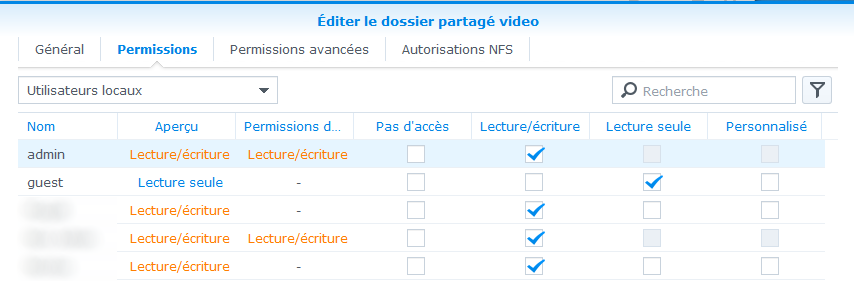
However, my Medusa isn't installed on my NAS anymore, I can't be more precise
 NicoLeOca
on 28 Dec 2017
NicoLeOca
on 28 Dec 2017
I'm now reloading my complete library and it's taking some time. After that is all complete and I find some time. I'll try reducing the rights of the sickbead-custom user and I'll keep you posted.
(could be as late as next tuesday, because I won't be home for the weekend)
tvvaek
on 28 Dec 2017
As promised, I tested it
I removed the sickbeard-custom user from the administrators group and the post-processing still works
the sickbeard-custom user is now only a member from following groups: sc-media and users
tvvaek
on 2 Jan 2018
Related issues
 wimpyrbx
·
5Comments
wimpyrbx
·
5Comments
 Rouzax
·
4Comments
wimpyrbx
·
5Comments
Rouzax
·
3Comments
Rouzax
·
4Comments
wimpyrbx
·
5Comments
Rouzax
·
3Comments
 elpedriyo
·
4Comments
elpedriyo
·
4Comments
Most helpful comment
I don't think creating a user with such high priviledge is necessary.
It's all about the permissions on the Series folder as suggested by @p0psicles
if Chown is too complicated for certain users, permissions can be given into Configuration Panel / Shared folders by modifying the properties of the very folder.
However, my Medusa isn't installed on my NAS anymore, I can't be more precise