Medusa: Files in post process dir are not deleted with API call
Medusa Info: | Branch: master Commit: ca2c5c4c92888f2f588c74c6770cfa12c6db7f40 Version: v0.1.19 Database: 44.8
-- | --
Python Version: | 2.7.13 (v2.7.13:a06454b1afa1, Dec 17 2016, 20:53:40) [MSC v.1500 64 bit (AMD64)]
SSL Version: | OpenSSL 1.0.2j 26 Sep 2016
OS: | Windows-10-10.0.14393
Locale: | nl_NL.cp1252
|
Sorry for the barrage of issues, just switched to Medusa so running into a few things.
Because of issue #3325 I'm unable to use move during post process.
In my setup I have a Post Process folder were torrents are extracted to from qBittorrent, after that I use a script which calls the API of Medusa to start Post Processing.
I call with the following parameters
params = {'cmd': "postprocess", 'delete_files': 1, 'force_replace': 1, 'is_priority': 0, 'path': dir_to_process, 'return_data': 1, 'process_method': "copy", 'type': "auto"}
But after the Post Process is finished it is not removing the files and episode folder in the Post Process folder.
Debug log of a Post Process
https://pastebin.com/unVTfKgU
 Rouzax
All 20 comments
Since it's a manual call you should be using 'type': 'manual'. Did you try it?
 medariox
on 3 Dec 2017
medariox
on 3 Dec 2017
Will know if it works tomorrow.
Rouzax
on 3 Dec 2017
If that still doesn't work, this should help: https://github.com/pymedusa/Medusa/pull/3395
medariox
on 3 Dec 2017
With the param manual it still leaves all the files, will wait for your merge.
Rouzax
on 4 Dec 2017
Merged, should be fixed now with https://github.com/pymedusa/Medusa/pull/3395
Please let us know.
medariox
on 4 Dec 2017
Since I'm new at Medusa, What is your release cadence from dev to master?
Rouzax
on 4 Dec 2017
Right now, about 4 to 6 weeks.
 p0psicles
on 4 Dec 2017
p0psicles
on 4 Dec 2017
How stable are dev builds?
Rouzax
on 4 Dec 2017
Rather stable.
p0psicles
on 4 Dec 2017
@Rouzax is it working for you now (master)?
medariox
on 7 Dec 2017
@medariox Yes it deletes the folders with these parameters, thanks for the help
params = {'cmd': "postprocess", 'delete_files': 1, 'force_replace': 1, 'is_priority': 0, 'path': dir_to_process, 'return_data': 1, 'process_method': "copy", 'type': "manual"}
Rouzax
on 8 Dec 2017
Wondering if you could shed some light on the exact function of the different parameters, especially force_replace and is_priority
Name | Required | Description | Type | Default value | Allowed values
-- | -- | -- | -- | -- | --
failed | x | Mark download as failed | bool | False | [0, 1]
delete_files | x | Delete files and folders like auto processing | bool | False | [0, 1]
force_replace | x | Force already post-processed files to be post-processed again | bool | False | [0, 1]
is_priority | x | Replace the file even if it exists in a higher quality | bool | False | [0, 1]
path | x | The path to the folder to post-process | string | None | see desc
return_data | x | Returns the result of the post-process | bool | False | [0, 1]
process_method | x | How should valid post-processed files be handled | string | False | ['copy', 'symlink', 'hardlink', 'move']
type | x | The type of post-process being requested | string | auto | ['auto', 'manual']
Rouzax
on 8 Dec 2017
@Rouzax will have to look into it to confirm, but from the description force_replace is the same as the Force already Post Processed Dir/Files: [ ] (Check this to post-process files that were already post-processed) option from manual post processing and is_priority is the same as
Mark Dir/Files as priority download: [ ] (Check this to replace the file even if it exists at higher quality)
 labrys
on 8 Dec 2017
labrys
on 8 Dec 2017
Does it also have something to do with this:
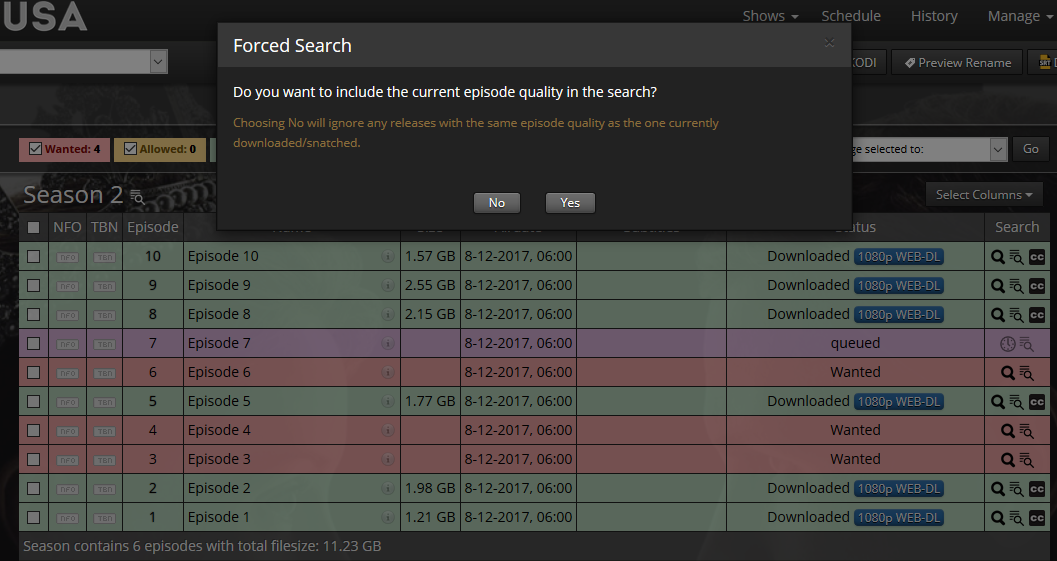
I trying to figure out what the behavior would be if I did not set those directly with the API call. Would Medusa know during the post process what the conditions were when the download was snatched.
Or am I completely missing the point 😄
Rouzax
on 8 Dec 2017
By default an episode is considered priority if it finds the release in its snatch history. Setting is_priority to False allows the post processor to determine the priority.
By default it does not re-process results in your post-processing directory.
Generally I would recommend leaving those at their default false values unless you know you want to reprocess everything or you have a specific release that you want to accept regardless of quality.
labrys
on 8 Dec 2017
@Rouzax
The table you posted actually describes everything pretty accurately. In addition to what @labrys explained, is_priority is also used for manual snatches. Do you have any specific question? I'm not sure what you mean with the screenshot you posted, it has nothing to do with the API.
medariox
on 9 Dec 2017
Force_replace should really be renamed though. It has nothing at all to do with forcing a replacement.
labrys
on 9 Dec 2017
@medariox and @labrys Thanks for the explanation.
The reason for the screenshot is that in the past I had some issues with SickRage.
When I did a Forced Search it would often resnatch the same file, which is what I wanted because there had been an issue with unpacking, moving, ect. If I did not set is_priority and force_replace in the api call it would call the post processor which would say this is the same and ditch the files.
That would result in the episode remaining in a Snatched state indefinitely.
Rouzax
on 9 Dec 2017
@Rouzax for situations like that force_replace should be sufficient to reprocess the file. is_priority is more for situations where you want to accept a result regardless of its quality. For example replacing a preferred quality with an allowed quality, or accepting a result with a quality that isn't in your desired qualities.
labrys
on 9 Dec 2017
Thanks, so always calling 'force_replace' in the API would get me this result.
That clears it up a bit for me.
Again thanks for your help and explanation.
Rouzax
on 9 Dec 2017
Related issues
 GritGub
·
3Comments
GritGub
·
3Comments
 wimpyrbx
·
5Comments
Rouzax
·
4Comments
wimpyrbx
·
5Comments
Rouzax
·
4Comments
 xorinzor
·
4Comments
xorinzor
·
4Comments
 Miicker
·
3Comments
Miicker
·
3Comments