Mediaplugin: Unable to capture video in UWP
<< Issue template needs to be updated, since media plugin is no longer in beta =) >>
Bug Information
Version Number of Plugin: 5.0.1
Device Tested On: Windows 10 (HP ZBook)
Simulator Tested On:
Version of VS: 16.6.3
Version of Xamarin: 4.7.0.1080
Versions of other things you are using:
Essentials: 1.5.3.2
Steps to reproduce the Behavior
File > New project
Add media plugin and update all nugets
Call TakeVideoAsync
Expected Behavior
Camera app starts in video recording mode
Actual Behavior
Camera app starts, but is all black, with an error telling WindowShowFailed 0x80131502
Code snippet
await CrossMedia.Current.TakeVideoAsync(new StoreVideoOptions
         {
            Directory = "Test",
            SaveToAlbum = true,
            Quality = VideoQuality.Medium
         });
Screenshots
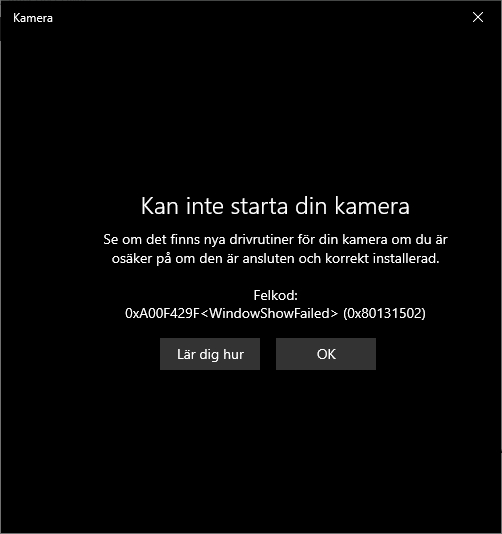
This seems to be a problem in earlier versions of the plugin as well. Probably not introduced in v5.
 Brosten
All 3 comments
I'm pretty sure this is a windows bug. I have the exact same issue. If I launch the camera app separately, go into video, make a quick recording, then go back to my app and launch TakeVideoAsync, it magically works.
 patrickabadi
on 13 Jul 2020
patrickabadi
on 13 Jul 2020
Same issue here. Like @patrickabadi said, if I launch the camera app on its own, and go back to my app and launch TakeVideoAsync, it works.
 SachinCS1992
on 23 Jul 2020
SachinCS1992
on 23 Jul 2020
I'm running into this problem too. Has anyone found a solution or workaround besides manually launching the Camera app and switching to video?
 tpetersheim
on 20 Aug 2020
tpetersheim
on 20 Aug 2020
Related issues
 vinnusaurus
·
6Comments
vinnusaurus
·
6Comments
 MartinRobins
·
8Comments
MartinRobins
·
8Comments
 Glabenwitt
·
4Comments
Glabenwitt
·
4Comments
 fadaEntrepidus
·
6Comments
fadaEntrepidus
·
6Comments
 jimutt
·
8Comments
jimutt
·
8Comments
Most helpful comment
I'm pretty sure this is a windows bug. I have the exact same issue. If I launch the camera app separately, go into video, make a quick recording, then go back to my app and launch TakeVideoAsync, it magically works.