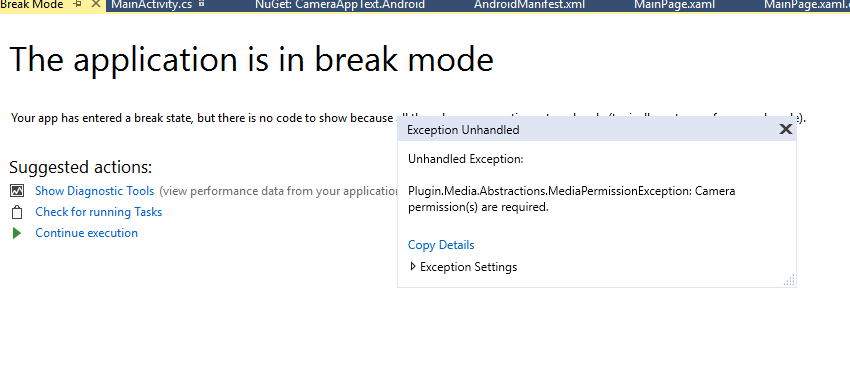
Mediaplugin: Plugin.Media.Abstractions.MediaPermissionException: <Timeout exceeded getting exception details>
Bug Information
Getting the exception, am I missing any plugins? Exception occurs at
var file = await CrossMedia.Current.TakePhotoAsync(new Plugin.Media.Abstractions.StoreCameraMediaOptions
        {
            Directory =  Environment.GetFolderPath(Environment.SpecialFolder.Personal),
            Name = "test.jpg"
        });
Version Number of Plugin: 4.0.1.5
Device Tested On:
Simulator Tested On: Nexus_6_API_28(Android 9.0 - API 28)
Version of VS: 2017
Version of Xamarin: 4.11.0.776
Versions of other things you are using:
Steps to reproduce the Behavior
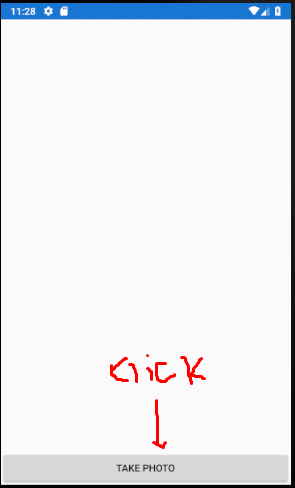
Click on the button
Expected Behavior
Take Picture
Actual Behavior
Public.Media.Abstraction.MediaPermissionException
Code snippet
`
  using Plugin.Media;
  using Plugin.Media.Abstractions;
  using System;
  using System.Collections.Generic;
  using System.Linq;
  using System.Text;
  using System.Threading.Tasks;
  using Xamarin.Forms;

  namespace CameraAppText
  {
       public partial class MainPage : ContentPage
       {
              public MainPage()
              {
                   InitializeComponent();
                   CameraButton.Clicked += CameraButton_Clicked;
               }

    private async void CameraButton_Clicked(object sender, EventArgs e)
    {

        await CrossMedia.Current.Initialize();

        if (!CrossMedia.Current.IsCameraAvailable || !CrossMedia.Current.IsTakePhotoSupported)
        {
            await DisplayAlert("No Camera", ":( No camera available.", "OK");
            return;
        }

        var file = await CrossMedia.Current.TakePhotoAsync(new StoreCameraMediaOptions
        {
            Directory = "Sample",
            Name = "test.jpg"
        });

        if (file == null)
            return;

        await DisplayAlert("File Location", file.Path, "OK");

        PhotoImage.Source = ImageSource.FromStream(() =>
        {
            var stream = file.GetStream();
            return stream;
        });
    }
}
}
`
`
xmlns:local="clr-namespace:CameraAppText"
x:Class="CameraAppText.MainPage">
<Grid>
    <Grid.RowDefinitions>
        <RowDefinition Height="*" />
        <RowDefinition Height="Auto" />
    </Grid.RowDefinitions>

    <Image x:Name="PhotoImage" />
    <Button x:Name="CameraButton" Text="Take Photo" Grid.Row="1" />
</Grid>
`
<?xml version="1.0" encoding="utf-8"?>
<manifest xmlns:android="http://schemas.android.com/apk/res/android" android:versionCode="1" android:versionName="1.0" package="com.companyname" android:installLocation="auto">
    <uses-sdk android:minSdkVersion="21" android:targetSdkVersion="27" />
    <uses-permission android:name="android.permission.CAMERA" />
    <uses-permission android:name="android.permission.READ_EXTERNAL_STORAGE" />
    <uses-permission android:name="android.permission.WRITE_EXTERNAL_STORAGE" />
    <application android:label="CameraAppText.Android"></application>
</manifest>
Screenshots
 vinnusaurus
All 6 comments
In the same situation here when running in an emulator... Works fine on a physical device though
 James-Aidoo
on 1 Nov 2018
James-Aidoo
on 1 Nov 2018
@vinnusaurus @James-Aidoo I to had this issue both on a physical device and in the emulator. I started digging and tried the following code:
var cameraStatus = await Plugin.Permissions.CrossPermissions.Current.CheckPermissionStatusAsync(Permission.Camera);
var storageStatus = await Plugin.Permissions.CrossPermissions.Current.CheckPermissionStatusAsync(Permission.Storage);
The cameraStatus told me that I had granted the app camera permissions but the storageStatus came back as "Denied". I took a look at the code and it turns out that if you don't grant permissions for _both_ camera and storage you will get this exception.
However just adding the permissions in the AndroidManifest.xml file the same exception was still thrown. So i looked at the code for https://github.com/jamesmontemagno/PermissionsPlugin and that code uses the Current Activity Plugin.
So I installed that plugin to the Android project and followed the instructions after that I got a new exception that pointed to this section of the Readme. After following the instructions there it finally worked for me.
Hope this helps!
 ridderholt
on 30 Nov 2018
ridderholt
on 30 Nov 2018
Did you initialize the CurrentActivity Plugin? I assume not... that would fix it such as ^
 jamesmontemagno
on 1 Dec 2018
jamesmontemagno
on 1 Dec 2018
I have the same problem but I can't install Current Activity Plugin

 vickyrusu
on 19 Dec 2018
vickyrusu
on 19 Dec 2018
I have the same problem but I can't install Current Activity Plugin
Try to install only in Android Project for test
 DiegoVenancioVieira
on 26 Apr 2019
DiegoVenancioVieira
on 26 Apr 2019
@DiegoVenancioVieira Try to install only for android project
 babatonha
on 30 May 2019
babatonha
on 30 May 2019
Related issues
 ivmazurenko
·
3Comments
ivmazurenko
·
3Comments
 jimutt
·
8Comments
jimutt
·
8Comments
 CesareSoldani
·
6Comments
CesareSoldani
·
6Comments
 manonaga2188
·
5Comments
manonaga2188
·
5Comments
 Greg-Freeman
·
7Comments
Greg-Freeman
·
7Comments
Most helpful comment
@vinnusaurus @James-Aidoo I to had this issue both on a physical device and in the emulator. I started digging and tried the following code:
The
cameraStatustold me that I had granted the app camera permissions but thestorageStatuscame back as "Denied". I took a look at the code and it turns out that if you don't grant permissions for _both_ camera and storage you will get this exception.However just adding the permissions in the
AndroidManifest.xmlfile the same exception was still thrown. So i looked at the code for https://github.com/jamesmontemagno/PermissionsPlugin and that code uses the Current Activity Plugin.So I installed that plugin to the Android project and followed the instructions after that I got a new exception that pointed to this section of the Readme. After following the instructions there it finally worked for me.
Hope this helps!