Mediaplugin: Select picture returns full black picture
ONLY Post issues against Latest Beta!!!
Make sure you follow all of the setup directions before posting an issue: https://github.com/jamesmontemagno/MediaPlugin#important-permission-information
If you are creating an issue for a BUG please fill out this information. If you are asking a question or requesting a feature you can delete the sections below.
Failure to fill out this information will result in this issue being closed. If you post a full stack trace in a bug it will be closed, please post it to http://gist.github.com and then post the link here.
Bug Information
Version Number of Plugin: 5.0.1
Device Tested On:
Simulator Tested On: IOS Simulator
Version of VS: 8.6 (for Mac)
Version of Xamarin: 4.5.0.617
Versions of other things you are using:
Essentials: 1.5.3
Steps to reproduce the Behavior
Simple select picture - with standard code (see below)
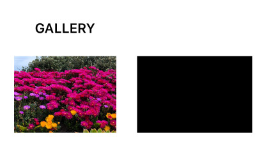
It worked perfectly before and I didn't touch the code. When selecting a picture every picture comes back black (except one for some reason). Tried new pictures as well.
Also tried with a blank project and got same behavior.
Expected Behavior
See the selected picture
Actual Behavior
See black box
Code snippet
await CrossMedia.Current.Initialize();
        if (!CrossMedia.Current.IsPickPhotoSupported)
        {
            //Picking Pics Not Supported
            await Application.Current.MainPage.DisplayAlert("Error", "Picking pics is not supported on your device", "OK");
            return;
        }
        var mediaOptions = new PickMediaOptions()
        {
            PhotoSize = PhotoSize.Full
        };
        var selectedImageFile = await CrossMedia.Current.PickPhotoAsync(mediaOptions);
        //imageTest.Source = ImageSource.FromFile(selectedImageFile.Path);
        imageTest.Source = ImageSource.FromStream(() =>  selectedImageFile.GetStream());
Screenshots

 davynys
All 14 comments
i have the same problem, but i reported in the Xamarin repository, we realized it was a Xam.Plugin.Media issue.. Image returning Black Square
 orlandommb
on 24 Apr 2020
orlandommb
on 24 Apr 2020
I'm seeing the same issue
 diegostamigni
on 24 Apr 2020
diegostamigni
on 24 Apr 2020
Workaround:
I can confirm receiving an black image at version 5.0.1
-> Downgrading the Xam.Plugin.Media to 4.0.1.5 solves the issue.
Technical Information:
Simulator Tested On: IOS Simulator
Version of VS: 16.5.4 (for Windows)
XF: 4.5.0.657
Xamerin Essentials: 1.5.3.1
 Bonnyfication
on 27 Apr 2020
Bonnyfication
on 27 Apr 2020
Problem with SaveMetaData options, with SaveMetaData = false - all ok
 iWeaverMan
on 30 Apr 2020
iWeaverMan
on 30 Apr 2020
@iWeaverMan the workaround works well for me, thanks!
In my case:
Media Plugin Version: 5.0.1
Simulator Tested On: iOS Simulator
Version of VS: 8.5.3 (for Mac)
Version of Xamarin: 4.2.0.709249
Versions of other things you are using:
Essentials: 1.5.3.1
 DarryStonem
on 30 Apr 2020
DarryStonem
on 30 Apr 2020
Seeing this too but only on iOS 13.4. Tested on a iOS 12.2 sim and device and it works fine
 ndastur
on 9 May 2020
ndastur
on 9 May 2020
Confirmation that our team are seeing the same behaviour on ios 13.4/13.5 simulators only when SaveMetaData = true as mentioned above.
Altering the code to use the original behaviour instead of the call to SaveImageWithMetadataiOS13 the image is captured successfully (not black screen).
I have stumbled across https://stackoverflow.com/questions/61552637/cicontext-jpeg-png-output-functions-producing-blank-images which suggests a bug with Apple.
I don't have experience with the calls used by this library to validate / log a bug with Apple.
1) Could someone validate and follow up with a bug report to Apple?
2) Create a workaround for simulators (As with the current working from home a lot of our devs are using simulators for proofing).
Thanks
 MattWard-Ideagen
on 11 Jun 2020
MattWard-Ideagen
on 11 Jun 2020
Seeing the same error here- had to downgrade and it works now
 40417686
on 30 Jun 2020
40417686
on 30 Jun 2020
Confirming the issue is still there.
MediaPlugin Version: 5.0.1
Xamarin.Forms version: 4.6.0.847
What worked without having to downgrade was @iWeaverMan 's suggestion.
Problem with SaveMetaData options, with SaveMetaData = false - all ok
Works fine on Android
 JuanuMusic
on 2 Jul 2020
JuanuMusic
on 2 Jul 2020
Please your help, I'm getting a black screen for both take or pick, I tried using SaveMetaData = false but the same behavior ... any suggestion?
Or the best is to use an old version of the plugin? which one?
Note I downgrade to 4.0.1.5 and unfortunately the same behavior!

 raulandresduque
on 20 Jul 2020
raulandresduque
on 20 Jul 2020
Hi team,
Any clue?
raulandresduque
on 22 Jul 2020
I found my error however I didn't understand why:
I had:
_var t = CrossMedia.Current.TakePhotoAsync(new StoreCameraMediaOptions
{
Directory = HelperConstants.cAppName,
SaveToAlbum = true,
SaveMetaData = false,
Name = fileName,
DefaultCamera = CameraDevice.Rear
});
t.wait();
if (t.result == null)
return;_
I changed to:
var file = await CrossMedia.Current.TakePhotoAsync(new StoreCameraMediaOptions
{
Directory = HelperConstants.cAppName,
SaveToAlbum = true,
SaveMetaData = false,
Name = fileName,
DefaultCamera = CameraDevice.Rear
});
if (file == null)
return;
However, my understanding is both codes are equivalent, any idea why the 1st one fails?
raulandresduque
on 26 Jul 2020
I ran into the same issue. I just added this argument and it got fixed.
await CrossMedia.Current.PickPhotoAsync(new Plugin.Media.Abstractions.PickMediaOptions
                    {
                        PhotoSize = Plugin.Media.Abstractions.PhotoSize.Medium
                    });
 bakhti346
on 6 Aug 2020
bakhti346
on 6 Aug 2020
I'm also facing same issue in iOS only. 1st attempt of picking image is working fine. after that, every attempt gives black image.
Xamarin Forms Ver: 4.6.0.967
Xam.Plugin.Media Ver: 5.0.1
 Fahad-Ali-Qureshi
on 7 Sep 2020
Fahad-Ali-Qureshi
on 7 Sep 2020
Related issues
 irinakush
·
6Comments
irinakush
·
6Comments
 CesareSoldani
·
6Comments
CesareSoldani
·
6Comments
 Glabenwitt
·
4Comments
Glabenwitt
·
4Comments
 Brosten
·
3Comments
Brosten
·
3Comments
 Julien-Mialon
·
7Comments
Julien-Mialon
·
7Comments
Most helpful comment
Problem with SaveMetaData options, with SaveMetaData = false - all ok