Mediapipe: Use Face detection & Multi-Hand tracking in one app
Hello there,
How I can use two graphs/apps such as Face detection and multi hand tracking in single app? IOS/android/desktop
 7AM7
7AM7
All 5 comments
The right solution is to merge multiple graphs into one graph and keep everything in one frame processor/calculator graph.
The quick solution is to run two frame processors/calculator graph instances for face and hand tracking separately in one app.
 jiuqiant
on 3 Apr 2020
jiuqiant
on 3 Apr 2020
How I can use two graphs in one app without merging?
I changed my BUILD file like that but nothing happened
load(
"@build_bazel_rules_apple//apple:ios.bzl",
"ios_application",
)
licenses(["notice"]) # Apache 2.0
MIN_IOS_VERSION = "10.0"
# To use the 3D model instead of the default 2D model, add "--define 3D=true" to the
# bazel build command.
config_setting(
name = "use_3d_model",
define_values = {
"3D": "true",
},
)
genrule(
name = "model",
srcs = select({
"//conditions:default": ["//mediapipe/models:hand_landmark.tflite"],
":use_3d_model": ["//mediapipe/models:hand_landmark_3d.tflite"],
}),
outs = ["hand_landmark.tflite"],
cmd = "cp $< $@",
)
ios_application(
name = "MultiHandTrackingGpuApp",
bundle_id = "com.google.am7.MultiHandTrackingGpu",
families = [
"iphone",
"ipad",
],
infoplists = ["Info.plist"],
minimum_os_version = MIN_IOS_VERSION,
provisioning_profile = "//mediapipe/examples/ios:provisioning_profile",
deps = [
":MultiHandTrackingGpuAppLibrary",
"@ios_opencv//:OpencvFramework",
],
)
objc_library(
name = "MultiHandTrackingGpuAppLibrary",
srcs = [
"AppDelegate.m",
"ViewController.mm",
"main.m",
],
hdrs = [
"AppDelegate.h",
"ViewController.h",
],
data = [
"Base.lproj/LaunchScreen.storyboard",
"Base.lproj/Main.storyboard",
":model",
"//mediapipe/graphs/hand_tracking:multi_hand_tracking_mobile_gpu_binary_graph",
"//mediapipe/graphs/face_detection:mobile_gpu_binary_graph",
"//mediapipe/models:palm_detection.tflite",
"//mediapipe/models:palm_detection_labelmap.txt",
"//mediapipe/models:face_detection_front.tflite",
"//mediapipe/models:face_detection_front_labelmap.txt",
],
sdk_frameworks = [
"AVFoundation",
"CoreGraphics",
"CoreMedia",
"UIKit",
],
deps = [
"//mediapipe/objc:mediapipe_framework_ios",
"//mediapipe/objc:mediapipe_input_sources_ios",
"//mediapipe/objc:mediapipe_layer_renderer",
] + select({
"//mediapipe:ios_i386": [],
"//mediapipe:ios_x86_64": [],
"//conditions:default": [
"//mediapipe/graphs/hand_tracking:multi_hand_mobile_calculators",
"//mediapipe/graphs/face_detection:mobile_calculators",
"//mediapipe/framework/formats:landmark_cc_proto",
"//mediapipe/framework/formats:rect_cc_proto"
],
}),
)
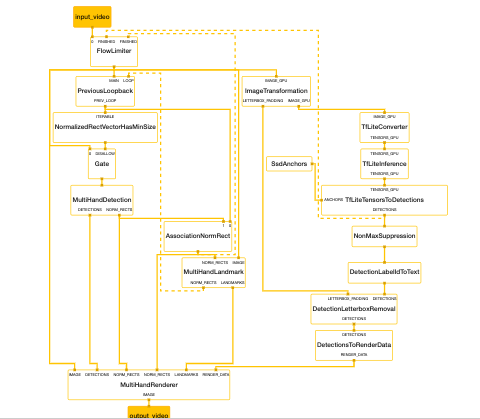
Also, I tried to change the multi_hand_tracking_mobile.pbtxt graph like that but app chrashed
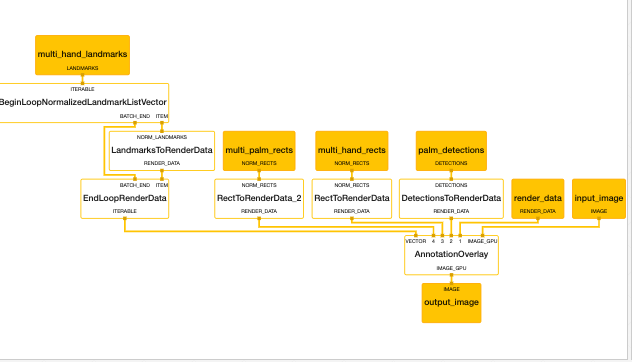
the subgraph multi_hand_renderer_gpu.pbtxt
7AM7
on 3 Apr 2020
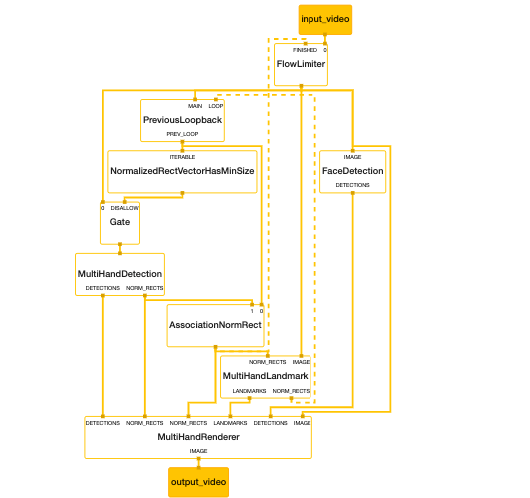
Fixed and work perfectly with a lot of edits but it will help many people.
Let's start
Change multi_hand_tracking_mobile.pbtxt main graph with this:
# MediaPipe graph that performs multi-hand tracking with TensorFlow Lite on GPU.
# Used in the examples in
# mediapipe/examples/android/src/java/com/mediapipe/apps/multihandtrackinggpu.

# Images coming into and out of the graph.
input_stream: "input_video"
output_stream: "output_video"

# Throttles the images flowing downstream for flow control. It passes through
# the very first incoming image unaltered, and waits for downstream nodes
# (calculators and subgraphs) in the graph to finish their tasks before it
# passes through another image. All images that come in while waiting are
# dropped, limiting the number of in-flight images in most part of the graph to
# 1. This prevents the downstream nodes from queuing up incoming images and data
# excessively, which leads to increased latency and memory usage, unwanted in
# real-time mobile applications. It also eliminates unnecessarily computation,
# e.g., the output produced by a node may get dropped downstream if the
# subsequent nodes are still busy processing previous inputs.
node {
  calculator: "FlowLimiterCalculator"
  input_stream: "input_video"
  input_stream: "FINISHED:multi_hand_rects"
  input_stream_info: {
    tag_index: "FINISHED"
    back_edge: true
  }
  output_stream: "throttled_input_video"
}

# Determines if an input vector of NormalizedRect has a size greater than or
# equal to the provided min_size.
node {
  calculator: "NormalizedRectVectorHasMinSizeCalculator"
  input_stream: "ITERABLE:prev_multi_hand_rects_from_landmarks"
  output_stream: "prev_has_enough_hands"
  node_options: {
    [type.googleapis.com/mediapipe.CollectionHasMinSizeCalculatorOptions] {
      # This value can be changed to support tracking arbitrary number of hands.
      # Please also remember to modify max_vec_size in
      # ClipVectorSizeCalculatorOptions in
      # mediapipe/graphs/hand_tracking/subgraphs/multi_hand_detection_gpu.pbtxt
      min_size: 2
    }
  }
}

# Drops the incoming image if the previous frame had at least N hands.
# Otherwise, passes the incoming image through to trigger a new round of hand
# detection in MultiHandDetectionSubgraph.
node {
  calculator: "GateCalculator"
  input_stream: "throttled_input_video"
  input_stream: "DISALLOW:prev_has_enough_hands"
  output_stream: "multi_hand_detection_input_video"
  node_options: {
    [type.googleapis.com/mediapipe.GateCalculatorOptions] {
      empty_packets_as_allow: true
    }
  }
}

# Subgraph that detections hands (see multi_hand_detection_gpu.pbtxt).
node {
  calculator: "MultiHandDetectionSubgraph"
  input_stream: "multi_hand_detection_input_video"
  output_stream: "DETECTIONS:multi_palm_detections"
  output_stream: "NORM_RECTS:multi_palm_rects"
}

# Subgraph that localizes hand landmarks for multiple hands (see
# multi_hand_landmark.pbtxt).
node {
  calculator: "MultiHandLandmarkSubgraph"
  input_stream: "IMAGE:throttled_input_video"
  input_stream: "NORM_RECTS:multi_hand_rects"
  output_stream: "LANDMARKS:multi_hand_landmarks"
  output_stream: "NORM_RECTS:multi_hand_rects_from_landmarks"
}

# Caches a hand rectangle fed back from MultiHandLandmarkSubgraph, and upon the
# arrival of the next input image sends out the cached rectangle with the
# timestamp replaced by that of the input image, essentially generating a packet
# that carries the previous hand rectangle. Note that upon the arrival of the
# very first input image, an empty packet is sent out to jump start the
# feedback loop.
node {
  calculator: "PreviousLoopbackCalculator"
  input_stream: "MAIN:throttled_input_video"
  input_stream: "LOOP:multi_hand_rects_from_landmarks"
  input_stream_info: {
    tag_index: "LOOP"
    back_edge: true
  }
  output_stream: "PREV_LOOP:prev_multi_hand_rects_from_landmarks"
}

# Performs association between NormalizedRect vector elements from previous
# frame and those from the current frame if MultiHandDetectionSubgraph runs.
# This calculator ensures that the output multi_hand_rects vector doesn't
# contain overlapping regions based on the specified min_similarity_threshold.
node {
  calculator: "AssociationNormRectCalculator"
  input_stream: "prev_multi_hand_rects_from_landmarks"
  input_stream: "multi_palm_rects"
  output_stream: "multi_hand_rects"
  node_options: {
    [type.googleapis.com/mediapipe.AssociationCalculatorOptions] {
      min_similarity_threshold: 0.5
    }
  }
}

node {
  calculator: "FaceDetectionSubgraph"
  input_stream: "IMAGE:throttled_input_video"
  output_stream: "DETECTIONS:face_detections"
}

# Subgraph that renders annotations and overlays them on top of the input
# images (see multi_hand_renderer_gpu.pbtxt).
node {
  calculator: "MultiHandRendererSubgraph"
  input_stream: "IMAGE:throttled_input_video"
  input_stream: "DETECTIONS:0:multi_palm_detections"
  input_stream: "DETECTIONS:1:face_detections"
  input_stream: "LANDMARKS:multi_hand_landmarks"
  input_stream: "NORM_RECTS:0:multi_palm_rects"
  input_stream: "NORM_RECTS:1:multi_hand_rects"
  output_stream: "IMAGE:output_video"
}
In mediapipe/mediapipe/graphs/hand_tracking/BUILD file add after:
cc_library(
    name = "multi_hand_mobile_calculators",
    deps = [
this:
"//mediapipe/graphs/hand_tracking/subgraphs:multi_hand_detection_gpu",
Will be like this:
cc_library(
    name = "multi_hand_mobile_calculators",
    deps = [
        "//mediapipe/calculators/core:flow_limiter_calculator",
        "//mediapipe/calculators/core:gate_calculator",
        "//mediapipe/calculators/core:previous_loopback_calculator",
        "//mediapipe/calculators/util:association_norm_rect_calculator",
        "//mediapipe/calculators/util:collection_has_min_size_calculator",
        "//mediapipe/graphs/hand_tracking/subgraphs:multi_hand_detection_gpu",
        "//mediapipe/graphs/hand_tracking/subgraphs:face_detection_mobile_gpu",
        "//mediapipe/graphs/hand_tracking/subgraphs:multi_hand_landmark_gpu",
        "//mediapipe/graphs/hand_tracking/subgraphs:multi_hand_renderer_gpu",
    ],
)
Then, go to mediapipe/mediapipe/graphs/hand_tracking/subgraph/BUILD file add after:
package(default_visibility = ["//visibility:public"])
this
mediapipe_simple_subgraph(
    name = "face_detection_mobile_gpu",
    graph = "face_detection_mobile_gpu.pbtxt",
    register_as = "FaceDetectionSubgraph",
    deps = [
       "//mediapipe/calculators/core:flow_limiter_calculator",
       "//mediapipe/calculators/image:image_transformation_calculator",
        "//mediapipe/calculators/image:image_properties_calculator",
        "//mediapipe/calculators/tflite:ssd_anchors_calculator",
        "//mediapipe/calculators/tflite:tflite_converter_calculator",
        "//mediapipe/calculators/tflite:tflite_inference_calculator",
        "//mediapipe/calculators/tflite:tflite_tensors_to_detections_calculator",
        "//mediapipe/calculators/util:annotation_overlay_calculator",
        "//mediapipe/calculators/tflite:tflite_tensors_to_floats_calculator",
        "//mediapipe/calculators/tflite:tflite_tensors_to_landmarks_calculator",
        "//mediapipe/calculators/util:detection_label_id_to_text_calculator",
        "//mediapipe/calculators/util:detection_letterbox_removal_calculator",
        "//mediapipe/calculators/util:detections_to_render_data_calculator",
        "//mediapipe/calculators/util:detections_to_rects_calculator",
        "//mediapipe/calculators/util:non_max_suppression_calculator",
        "//mediapipe/calculators/util:rect_transformation_calculator",
        "//mediapipe/gpu:gpu_buffer_to_image_frame_calculator",
        "//mediapipe/gpu:image_frame_to_gpu_buffer_calculator",
    ],
)
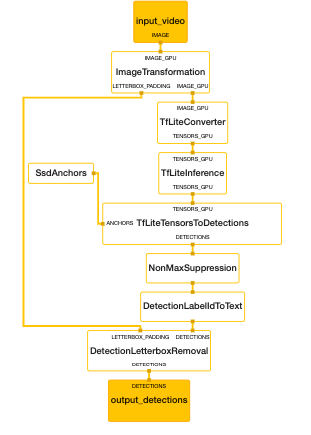
In the same folder, subgprah create a new file with name face_detection_mobile_gpu.pbtxt
Then put this :
type: "FaceDetectionSubgraph"

# Images on GPU coming into and out of the graph.
input_stream: "IMAGE:input_video"

output_stream: "DETECTIONS:output_detections"


# Transforms the input image on GPU to a 128x128 image. To scale the input
# image, the scale_mode option is set to FIT to preserve the aspect ratio,
# resulting in potential letterboxing in the transformed image.


node: {
  calculator: "ImageTransformationCalculator"
  input_stream: "IMAGE_GPU:input_video"
  output_stream: "IMAGE_GPU:transformed_input_video"
  output_stream: "LETTERBOX_PADDING:letterbox_padding"
  node_options: {
    [type.googleapis.com/mediapipe.ImageTransformationCalculatorOptions] {
      output_width: 128
      output_height: 128
      scale_mode: FIT
    }
  }
}

# Converts the transformed input image on GPU into an image tensor stored as a
# TfLiteTensor.
node {
  calculator: "TfLiteConverterCalculator"
  input_stream: "IMAGE_GPU:transformed_input_video"
  output_stream: "TENSORS_GPU:image_tensor"
}

# Runs a TensorFlow Lite model on GPU that takes an image tensor and outputs a
# vector of tensors representing, for instance, detection boxes/keypoints and
# scores.
node {
  calculator: "TfLiteInferenceCalculator"
  input_stream: "TENSORS_GPU:image_tensor"
  output_stream: "TENSORS_GPU:detection_tensors"
  node_options: {
    [type.googleapis.com/mediapipe.TfLiteInferenceCalculatorOptions] {
      model_path: "mediapipe/models/face_detection_front.tflite"
    }
  }
}

# Generates a single side packet containing a vector of SSD anchors based on
# the specification in the options.
node {
  calculator: "SsdAnchorsCalculator"
  output_side_packet: "anchors"
  node_options: {
    [type.googleapis.com/mediapipe.SsdAnchorsCalculatorOptions] {
      num_layers: 4
      min_scale: 0.1484375
      max_scale: 0.75
      input_size_height: 128
      input_size_width: 128
      anchor_offset_x: 0.5
      anchor_offset_y: 0.5
      strides: 8
      strides: 16
      strides: 16
      strides: 16
      aspect_ratios: 1.0
      fixed_anchor_size: true
    }
  }
}

# Decodes the detection tensors generated by the TensorFlow Lite model, based on
# the SSD anchors and the specification in the options, into a vector of
# detections. Each detection describes a detected object.
node {
  calculator: "TfLiteTensorsToDetectionsCalculator"
  input_stream: "TENSORS_GPU:detection_tensors"
  input_side_packet: "ANCHORS:anchors"
  output_stream: "DETECTIONS:detections"
  node_options: {
    [type.googleapis.com/mediapipe.TfLiteTensorsToDetectionsCalculatorOptions] {
      num_classes: 1
      num_boxes: 896
      num_coords: 16
      box_coord_offset: 0
      keypoint_coord_offset: 4
      num_keypoints: 6
      num_values_per_keypoint: 2
      sigmoid_score: true
      score_clipping_thresh: 100.0
      reverse_output_order: true
      x_scale: 128.0
      y_scale: 128.0
      h_scale: 128.0
      w_scale: 128.0
      min_score_thresh: 0.75
    }
  }
}

# Performs non-max suppression to remove excessive detections.
node {
  calculator: "NonMaxSuppressionCalculator"
  input_stream: "detections"
  output_stream: "filtered_detections"
  node_options: {
    [type.googleapis.com/mediapipe.NonMaxSuppressionCalculatorOptions] {
      min_suppression_threshold: 0.3
      overlap_type: INTERSECTION_OVER_UNION
      algorithm: WEIGHTED
      return_empty_detections: true
    }
  }
}

# Maps detection label IDs to the corresponding label text ("Face"). The label
# map is provided in the label_map_path option.
node {
  calculator: "DetectionLabelIdToTextCalculator"
  input_stream: "filtered_detections"
  output_stream: "labeled_detections"
  node_options: {
    [type.googleapis.com/mediapipe.DetectionLabelIdToTextCalculatorOptions] {
      label_map_path: "mediapipe/models/face_detection_front_labelmap.txt"
    }
  }
}


# Adjusts detection locations (already normalized to [0.f, 1.f]) on the
# letterboxed image (after image transformation with the FIT scale mode) to the
# corresponding locations on the same image with the letterbox removed (the
# input image to the graph before image transformation).
node {
  calculator: "DetectionLetterboxRemovalCalculator"
  input_stream: "DETECTIONS:labeled_detections"
  input_stream: "LETTERBOX_PADDING:letterbox_padding"
  output_stream: "DETECTIONS:output_detections"
}
In the same folder, subgprah go to multi_hand_renderer_gpu.pbtxt and replace with this
# MediaPipe multi-hand tracking rendering subgraph.

type: "MultiHandRendererSubgraph"

input_stream: "IMAGE:input_image"
# A vector of NormalizedLandmarks, one for each hand.
input_stream: "LANDMARKS:multi_hand_landmarks"
# A vector of NormalizedRect, one for each hand.
input_stream: "NORM_RECTS:0:multi_palm_rects"
# A vector of NormalizedRect, one for each hand.
input_stream: "NORM_RECTS:1:multi_hand_rects"
# A vector of Detection, one for each hand.
input_stream: "DETECTIONS:0:palm_detections"
# A vector of Face Detection.
input_stream: "DETECTIONS:1:face_detections"
output_stream: "IMAGE:output_image"

# Converts detections to drawing primitives for annotation overlay.
node {
  calculator: "DetectionsToRenderDataCalculator"
  input_stream: "DETECTIONS:palm_detections"
  output_stream: "RENDER_DATA:detection_render_data"
  node_options: {
    [type.googleapis.com/mediapipe.DetectionsToRenderDataCalculatorOptions] {
      thickness: 4.0
      color { r: 0 g: 255 b: 0 }
    }
  }
}

node {
  calculator: "DetectionsToRenderDataCalculator"
  input_stream: "DETECTIONS:face_detections"
  output_stream: "RENDER_DATA:face_detection_render_data"
  node_options: {
    [type.googleapis.com/mediapipe.DetectionsToRenderDataCalculatorOptions] {
      thickness: 9.0
      color { r: 255 g: 0 b: 0 }
    }
  }
}

# Converts normalized rects to drawing primitives for annotation overlay.
node {
  calculator: "RectToRenderDataCalculator"
  input_stream: "NORM_RECTS:multi_hand_rects"
  output_stream: "RENDER_DATA:multi_hand_rects_render_data"
  node_options: {
    [type.googleapis.com/mediapipe.RectToRenderDataCalculatorOptions] {
      filled: false
      color { r: 255 g: 0 b: 0 }
      thickness: 4.0
    }
  }
}

# Converts normalized rects to drawing primitives for annotation overlay.
node {
  calculator: "RectToRenderDataCalculator"
  input_stream: "NORM_RECTS:multi_palm_rects"
  output_stream: "RENDER_DATA:multi_palm_rects_render_data"
  node_options: {
    [type.googleapis.com/mediapipe.RectToRenderDataCalculatorOptions] {
      filled: false
      color { r: 125 g: 0 b: 122 }
      thickness: 4.0
    }
  }
}

# Outputs each element of multi_palm_landmarks at a fake timestamp for the rest
# of the graph to process. At the end of the loop, outputs the BATCH_END
# timestamp for downstream calculators to inform them that all elements in the
# vector have been processed.
node {
  calculator: "BeginLoopNormalizedLandmarkListVectorCalculator"
  input_stream: "ITERABLE:multi_hand_landmarks"
  output_stream: "ITEM:single_hand_landmarks"
  output_stream: "BATCH_END:landmark_timestamp"
}

# Converts landmarks to drawing primitives for annotation overlay.
node {
  calculator: "LandmarksToRenderDataCalculator"
  input_stream: "NORM_LANDMARKS:single_hand_landmarks"
  output_stream: "RENDER_DATA:single_hand_landmark_render_data"
  node_options: {
    [type.googleapis.com/mediapipe.LandmarksToRenderDataCalculatorOptions] {
      landmark_connections: 0
      landmark_connections: 1
      landmark_connections: 1
      landmark_connections: 2
      landmark_connections: 2
      landmark_connections: 3
      landmark_connections: 3
      landmark_connections: 4
      landmark_connections: 0
      landmark_connections: 5
      landmark_connections: 5
      landmark_connections: 6
      landmark_connections: 6
      landmark_connections: 7
      landmark_connections: 7
      landmark_connections: 8
      landmark_connections: 5
      landmark_connections: 9
      landmark_connections: 9
      landmark_connections: 10
      landmark_connections: 10
      landmark_connections: 11
      landmark_connections: 11
      landmark_connections: 12
      landmark_connections: 9
      landmark_connections: 13
      landmark_connections: 13
      landmark_connections: 14
      landmark_connections: 14
      landmark_connections: 15
      landmark_connections: 15
      landmark_connections: 16
      landmark_connections: 13
      landmark_connections: 17
      landmark_connections: 0
      landmark_connections: 17
      landmark_connections: 17
      landmark_connections: 18
      landmark_connections: 18
      landmark_connections: 19
      landmark_connections: 19
      landmark_connections: 20
      landmark_color { r: 255 g: 0 b: 0 }
      connection_color { r: 0 g: 255 b: 0 }
      thickness: 4.0
    }
  }
}

# Collects a RenderData object for each hand into a vector. Upon receiving the
# BATCH_END timestamp, outputs the vector of RenderData at the BATCH_END
# timestamp.
node {
  calculator: "EndLoopRenderDataCalculator"
  input_stream: "ITEM:single_hand_landmark_render_data"
  input_stream: "BATCH_END:landmark_timestamp"
  output_stream: "ITERABLE:multi_hand_landmarks_render_data"
}

# Draws annotations and overlays them on top of the input images. Consumes
# a vector of RenderData objects and draws each of them on the input frame.
node {
  calculator: "AnnotationOverlayCalculator"
  input_stream: "IMAGE_GPU:input_image"
  input_stream: "detection_render_data"
  input_stream: "face_detection_render_data"
  input_stream: "multi_hand_rects_render_data"
  input_stream: "multi_palm_rects_render_data"
  input_stream: "VECTOR:0:multi_hand_landmarks_render_data"
  output_stream: "IMAGE_GPU:output_image"
}
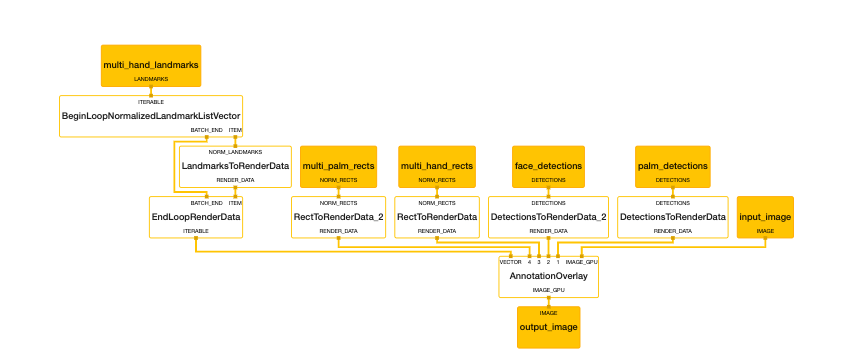
Let's test out work on IOS
let's go to mediapipe/mediapipe/examples/ios/multihandtrackinggpu/BUILD and add after:
"//mediapipe/graphs/hand_tracking:multi_hand_tracking_mobile_gpu_binary_graph",
this:
"//mediapipe/models:face_detection_front.tflite",
"//mediapipe/models:face_detection_front_labelmap.txt",
and after
"//mediapipe/graphs/hand_tracking:multi_hand_mobile_calculators",
add this
"//mediapipe/framework/formats:detection_cc_proto"
Finally, let's get face landmarksponits go to mediapipe/mediapipe/examples/ios/multihandtrackinggpu/ViewController.mm and include detection with this line
#include "mediapipe/framework/formats/detection.pb.h"
and after
static const char* kLandmarksOutputStream = "multi_hand_landmarks";
add
static const char* kFaceOutputStream = "face_detections";
and after
[newGraph addFrameOutputStream:kLandmarksOutputStream outputPacketType:MPPPacketTypeRaw];
add
[newGraph addFrameOutputStream:kFaceOutputStream outputPacketType:MPPPacketTypeRaw];
last thing after
- (void)mediapipeGraph:(MPPGraph*)graph
     didOutputPacket:(const ::mediapipe::Packet&)packet
          fromStream:(const std::string&)streamName
{
add
    //face landmarks poins
    if (streamName == kFaceOutputStream)
    {
          if (packet.IsEmpty())
          {
            NSLog(@"[TS:%lld] No face landmarks", packet.Timestamp().Value());
            return;
          }
            const auto& multi_fac_dect = packet.Get<std::vector<::mediapipe::Detection>>();
            NSLog(@"[TS:%lld] Number of face instances with rects: %lu", packet.Timestamp().Value(),
              multi_fac_dect.size());

            for (int face_index = 0; face_index < multi_fac_dect.size(); ++face_index)
            {
              const auto& location_data = multi_fac_dect[face_index].location_data();

                const auto& keypoints = location_data.relative_keypoints();
                NSLog(@"\tNumber of landmarks for face[%d]: %d", face_index, keypoints.size());

                for (int i = 0; i < keypoints.size(); ++i)
                {
                    const auto& keypoint = keypoints[i];
                    NSLog(@"\t\tFace Landmark[%d]: (%f, %f)", i, keypoint.x(),
                          keypoint.y());
                }

            }
      }
Hope you find this useful and please correct me if I have any mistake.
7AM7
on 6 Apr 2020
Thanks for posting your solution! It will definitely benefit the other developers!
jiuqiant
on 7 Apr 2020
@7AM7 Will the above process work in giving 3D hand landmarks ? If not, can you please guide me how can I do that. I am interested in getting the 3D hand landmarks value.
Thanks in advance.
 Somyarani13
on 9 Jul 2020
Somyarani13
on 9 Jul 2020
Related issues
 shraiwi
·
5Comments
shraiwi
·
5Comments
 Cubbee
·
5Comments
Cubbee
·
5Comments
 RealBBakGosu
·
4Comments
RealBBakGosu
·
4Comments
 Bluebie
·
3Comments
Bluebie
·
3Comments
 suyashjoshi
·
3Comments
suyashjoshi
·
3Comments
Most helpful comment
Fixed and work perfectly with a lot of edits but it will help many people.
Let's start
Change multi_hand_tracking_mobile.pbtxt main graph with this:
In mediapipe/mediapipe/graphs/hand_tracking/BUILD file add after:
this:
"//mediapipe/graphs/hand_tracking/subgraphs:multi_hand_detection_gpu",Will be like this:
Then, go to mediapipe/mediapipe/graphs/hand_tracking/subgraph/BUILD file add after:
package(default_visibility = ["//visibility:public"])this
In the same folder,
subgprahcreate a new file with nameface_detection_mobile_gpu.pbtxtThen put this :
In the same folder,
subgprahgo tomulti_hand_renderer_gpu.pbtxtand replace with thisLet's test out work on IOS
let's go to
mediapipe/mediapipe/examples/ios/multihandtrackinggpu/BUILDand add after:"//mediapipe/graphs/hand_tracking:multi_hand_tracking_mobile_gpu_binary_graph",this:
and after
"//mediapipe/graphs/hand_tracking:multi_hand_mobile_calculators",add this
"//mediapipe/framework/formats:detection_cc_proto"Finally, let's get face landmarksponits go to
mediapipe/mediapipe/examples/ios/multihandtrackinggpu/ViewController.mmand include detection with this line#include "mediapipe/framework/formats/detection.pb.h"and after
static const char* kLandmarksOutputStream = "multi_hand_landmarks";add
static const char* kFaceOutputStream = "face_detections";and after
[newGraph addFrameOutputStream:kLandmarksOutputStream outputPacketType:MPPPacketTypeRaw];add
[newGraph addFrameOutputStream:kFaceOutputStream outputPacketType:MPPPacketTypeRaw];last thing after
add
Hope you find this useful and please correct me if I have any mistake.