Mediapipe: Bad resize quality with ImageTransformationCalculator
After resize with ImageTransformationCalculator images look very jagged:
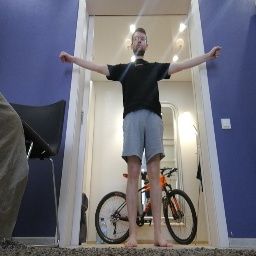
(look at the door frame)
Even nearest neighbour interpolation in opencv doesn't look so jagged:
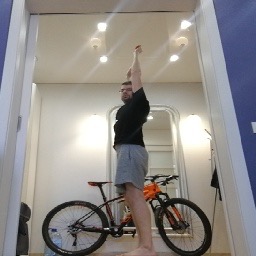
This heavily affects the performance of my model. It works, but results are not as good as on the desktop.
I've tried emulating "good" resize with bilateral filter before ImageTransformationCalculator, but it's very slow.
Another solution that I've tried is decreasing the camera preview size, so ImageTransformationCalculator doesn't need to do 5x resize.
Could you please give advice on how to make resized image after ImageTransformationCalculator look more similar to opencv resizes? Or how to emulate ImageTransformationCalculator resize in opencv?
Could you please explain how are input image colors converted on Android? Do you have debug tips? I plan to use ImageFrameToGpuBufferCalculator to input preconstructed Bitmaps to the model, but don't know how to debug steps before that. Maybe smth is wrong with color space conversions?
 Cubbee
All 5 comments
Tiny update: looks like in my case the problem is not with the resize algo, but somewhere else (probably in the model conversion process or color transformations being slightly different between desktop and mobile).
However, I think it'd be great if resizing algo used by gpu version of ImageTransformationCalculator would be specified in docs.
Cubbee
on 23 Apr 2020
Hi,
The resize algorithm for gpu ImageTransformationCalculator is simply the gpu hardware using GL_LINEAR resampling (configured here)
On the CPU, cv::resize is used with default setting of Linear resampling also.
Due to hardware difference in cpu/gpu and also float vs 8bit precision, those two are not expected to match exactly, but should be close.
It is likely that artifacts will appear when downsampling with such large factors, which is why opencv offers different methods such as inter-area, lanczos, etc. Unfortunately, we don't have a fancy filtering option like that for GPU yet.
A good alternative method using just linear sampling (gpu) is to resize in a pyramid fashion, by stacking a few resize calculators back-to-back that downsample ~2x each time. This is known to reduce artifacts, but maybe also at a bit of performance cost.
 mcclanahoochie
on 23 Apr 2020
mcclanahoochie
on 23 Apr 2020
Thank you for reply!
Could you please point me to the place where color conversion happens for OpenGL calculators on Android? I'm using ImageTransformationCalculator and TfLiteConverterCalculator before image goes into TfLiteInferenceCalculator.
It looks like the colors are converted from YUV to RGB (not BGR). Is this true?
Is there a way to get BGR instead of RGB ordering?
Cubbee
on 23 Apr 2020
There is no explicit[manual] conversion going on I'm aware of, just the creation of RGBA textures.
All camera frames pass through ExternalTextureConverter before entering the graph. Search for "createRgbaTexture" in that file.
mcclanahoochie
on 23 Apr 2020
Thx for your advice.
I've found a bug - it was related with the fact, that (at least on Android) images come in RGB ordering, while my model expects BGR. For now I've solved this with 1x1 conv layer hack.
Cubbee
on 23 Apr 2020
Related issues
 PrinceP
·
5Comments
PrinceP
·
5Comments
 RealBBakGosu
·
4Comments
RealBBakGosu
·
4Comments
 suraj-0387
·
3Comments
suraj-0387
·
3Comments
 Sanerly
·
4Comments
Sanerly
·
4Comments
 dgrnd4
·
4Comments
dgrnd4
·
4Comments
Most helpful comment
Hi,
The resize algorithm for gpu ImageTransformationCalculator is simply the gpu hardware using GL_LINEAR resampling (configured here)
On the CPU, cv::resize is used with default setting of Linear resampling also.
Due to hardware difference in cpu/gpu and also float vs 8bit precision, those two are not expected to match exactly, but should be close.
It is likely that artifacts will appear when downsampling with such large factors, which is why opencv offers different methods such as inter-area, lanczos, etc. Unfortunately, we don't have a fancy filtering option like that for GPU yet.
A good alternative method using just linear sampling (gpu) is to resize in a pyramid fashion, by stacking a few resize calculators back-to-back that downsample ~2x each time. This is known to reduce artifacts, but maybe also at a bit of performance cost.