Mavsdk: How to connect multiple drones correctly?
I've read #931 issue about multiple connecting real drones, but when I type:
drone1 = System(mavsdk_server_address="localhost", port=50040)
await drone1.connect()
mavsdk server doesnt start.
Typing:
drone1 =  System()
    await drone1.connect(system_address="udp://:14540")

    drone2 = System()
    await drone2.connect(system_address="udp://:14541")
It gives me the same UUID of pixhawk controller (I suppose the first - drone1, checked on tcpview app)
Waiting for mavsdk_server to be ready...
Connected to mavsdk_server!
Waiting for mavsdk_server to be ready...
Connected to mavsdk_server!
Waiting for drone1 to connect...
Drone1 discovered with UUID: 3689944625456363321
Waiting for drone2 to connect...
Drone2 discovered with UUID: 3689944625456363321
how can I achieve this to start (based on takeoff_and_land.py example) two or more drones at the same time?
 Owiec94
All 13 comments
This has just been added for Python recently: https://github.com/mavlink/MAVSDK-Python/pull/219
We might have to do a release so you can actually use it.
 julianoes
on 15 Jun 2020
julianoes
on 15 Jun 2020
When mavsdk_server_address=None, which is what happens when you do:
drone1 = System()
then await drone1.connect() starts the embedded mavsdk_server for you. As @julianoes mentions, there is currently no way to set the port on this one, so you cannot run multiple instances of mavsdk_server this way (it's actually undefined behavior, I think).
Your first version is correct:
drone1 = System(mavsdk_server_address="localhost", port=50040)
await drone1.connect()
Here, mavsdk_server_address="localhost", so it's not None, and therefore connect() will not start the embedded mavsdk_server for you. In that case you have to run it manually, with something like:
./mavsdk_server -p 50040
 JonasVautherin
on 15 Jun 2020
JonasVautherin
on 15 Jun 2020
Thank You guys for Your help.
@JonasVautherin typing:
./mavsdk_server -p 50040
is for unix systems, is there any possibility to run server on Windows with python?
Owiec94
on 15 Jun 2020
We do provide a windows executable, too: For v0.27.0 we have mavsdk_server_win32.exe, and v0.28.0 will be packaged soon. You should be able to run that from the command line, right?
JonasVautherin
on 15 Jun 2020
@JonasVautherin Thank You again, first server started properly, during this server running, calling another exe from cmd with port++ giving me binding error
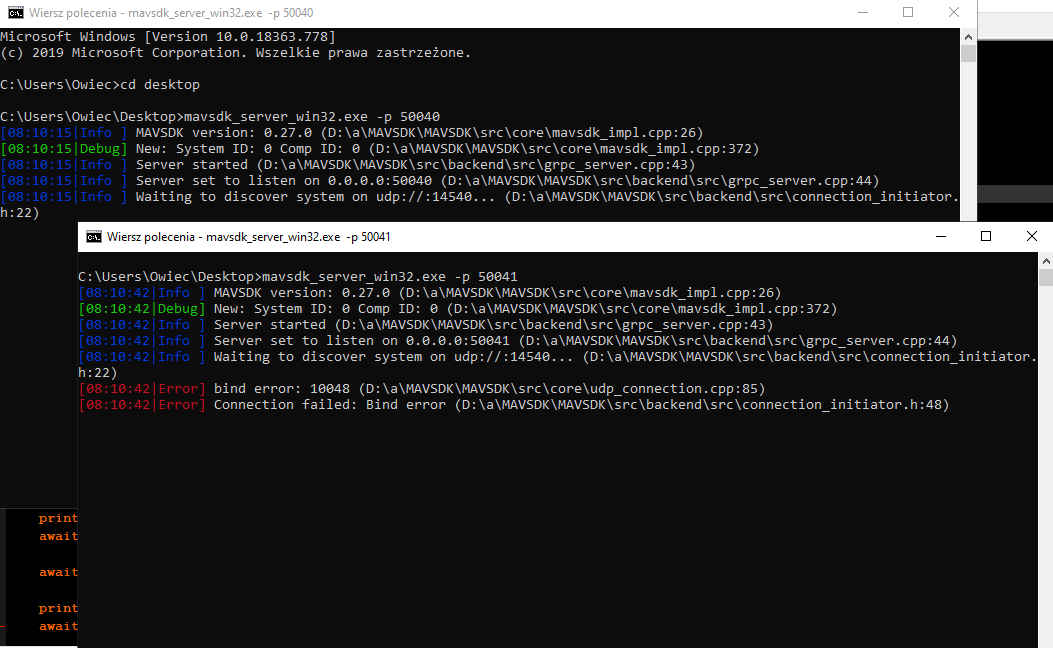
I'm actually trying to run example written in C++ where it is clear example to multi mission drones, but it's hardest way to compile this whole environment (cmake etc.)
Owiec94
on 15 Jun 2020
There are two sides in mavsdk_server. Let's see it like this:
MAVSDK-Python <-----> mavsdk_server <-----> drone
In other words, MAVSDK-Python talks to mavsdk_server (over gRPC), which talks to the drone (over MAVLink). Let's add this information:
MAVSDK-Python <-- gRPC --> mavsdk_server <-- MAVLink --> drone
Now, 50040 and 50041 are the ports exposed to both instances of MAVSDK-Python. On the other side, you are using udp://:14540 twice. Which fails, because two instances of mavsdk_server cannot bind to 14540 at the same time. You need two different MAVLink ports there, too. Something like this:
MAVSDK-Python <-- gRPC (50040) --> mavsdk_server <-- MAVLink (udp://:14540) --> drone
MAVSDK-Python <-- gRPC (50041) --> mavsdk_server <-- MAVLink (udp://:14541) --> drone
Which means that you need to run mavsdk_server twice, like this:
./mavsdk_server udp://:14540 -p 50040 # mavsdk_server1
./mavsdk_server udp://:14541 -p 50041 # mavsdk_server2
In other words:
- drone1 will send MAVLink messages over UDP on port 14540, mavsdk_server1 will receive those MAVLink messages and MAVSDK-Python1 will connect to mavsdk_server1 over gRPC on port 50040
- drone2 will send MAVLink messages over UDP on port 14541, mavsdk_server2 will receive those MAVLink messages and MAVSDK-Python2 will connect to mavsdk_server2 over gRPC on port 50041
Of course, you also need to make sure that drone1 sends to UDP 14540, and drone2 sends to UDP 14541.
Does that help?
JonasVautherin
on 15 Jun 2020
By the way, I realize you mentioned both MAVSDK-Python and MAVSDK-C++.
MAVSDK-C++ is different: it does not use mavsdk_server. All the other languages (python, java, swift, go, c#, js) need mavsdk_server.
JonasVautherin
on 15 Jun 2020
@JonasVautherin
Thats beautiful explanation, now I've connected with 2 drones from one computer. What an awesome idea!
Thank You so so much for Your support! It works like a charm.

for C++ answer, I've just thinking what will be better for me, many servers on python or one app written in C++
Owiec94
on 15 Jun 2020
for C++ answer, I've just thinking what will be better for me, many servers on python or one app written in C++
C++ will be more lightweight, but if it runs on your computer, chances are that you don't need that optimization. So just do what's simpler for you, I would say :slightly_smiling_face:.
JonasVautherin
on 16 Jun 2020
Thank You guys for Your help.
@JonasVautherin typing:
./mavsdk_server -p 50040
is for unix systems, is there any possibility to run server on Windows with python?
When
mavsdk_server_address=None, which is what happens when you do:drone1 = System()then
await drone1.connect()starts the embeddedmavsdk_serverfor you. As @julianoes mentions, there is currently no way to set the port on this one, so you cannot run multiple instances ofmavsdk_serverthis way (it's actually undefined behavior, I think).Your first version is correct:
drone1 = System(mavsdk_server_address="localhost", port=50040)
await drone1.connect()
Here,
mavsdk_server_address="localhost", so it's notNone, and thereforeconnect()will not start the embeddedmavsdk_serverfor you. In that case you have to run it manually, with something like:./mavsdk_server -p 50040
please help.
when and where should i type this: ./mavsdk_server -p 50040
because i try type that in the terminal it returns: -bash: ./mavsdk_server: No such file or directory
 kois86
on 13 Nov 2020
kois86
on 13 Nov 2020
mavsdk_server is an executable, like ls or cd. When you run ls, it tries to find an executable called ls in your PATH and runs it. If it does not find it, it says "No such file or directory".
./ says "don't look in the PATH, just look for it in the current directory. So in order to run ./mavsdk_server, you need to see mavsdk_server appear when you type ls.
I think that a good first step would be to learn the basics of using a terminal. Then your question has nothing to do with running multiple drones, so you should create a new issue instead of answering on an unrelated issue that has been closed months ago :blush:.
JonasVautherin
on 13 Nov 2020
yes, thats the problem, i cant find the mavsdk_server file, or is it a folder? i have my MAVSDK-python folder and try to find the mavsdk_server file, but nowhere to be found. not in the bin folder also. thus i can only spawn one drone, where i want to execute two drones python files.
kois86
on 13 Nov 2020
Please open a new issue, so that we can keep track of them. This one was closed months ago :slightly_smiling_face:.
JonasVautherin
on 13 Nov 2020
Related issues
 bresch
·
5Comments
bresch
·
5Comments
 hamishwillee
·
6Comments
hamishwillee
·
6Comments
 yusufozben
·
4Comments
yusufozben
·
4Comments
 tpennypacker
·
5Comments
tpennypacker
·
5Comments
 dangviethieu
·
7Comments
dangviethieu
·
7Comments
Most helpful comment
There are two sides in
mavsdk_server. Let's see it like this:In other words, MAVSDK-Python talks to
mavsdk_server(over gRPC), which talks to the drone (over MAVLink). Let's add this information:Now, 50040 and 50041 are the ports exposed to both instances of MAVSDK-Python. On the other side, you are using
udp://:14540twice. Which fails, because two instances ofmavsdk_servercannot bind to14540at the same time. You need two different MAVLink ports there, too. Something like this:Which means that you need to run
mavsdk_servertwice, like this:In other words:
Of course, you also need to make sure that drone1 sends to UDP 14540, and drone2 sends to UDP 14541.
Does that help?