Mavsdk: [Help] How to use DroneCore in HITL Gazebo
Hello guys,
I'm using DroneCore to control a Pixhawk with firmware PX4 Flightstack v1.7.3 flashed by QGroundControl.
In SITL, everything works fine with jMAVSim. But when I try to use HITL with my pixhawk hardware board and Gazebo simulator (Because only gazebo supports API), DroneCore can not find the device.
I can use QGroundControl to control Drone without DroneCore but it seems that DroneCore doesn't work in HITL.
I followed the guide here: https://dev.px4.io/en/simulation/hitl.html#using-jmavsim-quadrotor
with QGroundControl: https://s3-us-west-2.amazonaws.com/qgroundcontrol/builds/master/QGroundControl.AppImage
DroneCore tags v0.3.0
Gazebo version 7.0.0
Have you tried HITL with DroneCode and Gazebo ?
Do I have to configure something related to udp ports ?
Can you help me do it.
Thank you very much. Wish you all the best.
 DuongHieuMAI
All 29 comments
Do I have to configure something related to udp ports ?
Default UDP port DroneCore uses is UDP 14540. Can you configure for 14540 ?
As you said it works for QGroundControl, you can try using the same UDP port 14550 in DroneCore as well ? Default UDP port DroneCore uses is UDP 14540. You may override it with 14550. See here: https://github.com/dronecore/DroneCore/blob/develop/core/dronecore.h#L68
Note: Close QGroundControl app before you bind port 14550 in DroneCore.
 shakthi-prashanth-m
on 9 Apr 2018
shakthi-prashanth-m
on 9 Apr 2018
Thank you so much shakthi-prashanth-m ! It works !
Now, DroneCore can detect device.
I will try other functions.
Thank you once again.
In case I want to use both DroneCore and QGroundControl at the same time, what should I do ? Is this problem due to Gazebo version 7.0 ? Upgrading to latest one can solve it ?
Could you give me your opinion?
DuongHieuMAI
on 9 Apr 2018
@DuongHieuMAI do you know who sends the mavlink traffic on 14550? I'm assuming it's Gazebo that plays the repeater?
 julianoes
on 9 Apr 2018
julianoes
on 9 Apr 2018
@julianoes
Currently, I run both Gazebo simulator and DroneCore on the same machine. That's might be a problem. Configuration with port 14550 works in my case while other not.
I'm getting confusing a bit about udp port in this case. I'll try to run DroneCore in another computer/raspberry on the same network to check if it can work.
I appreciate your help very much. Hope you keep going guys.
DuongHieuMAI
on 9 Apr 2018
@DuongHieuMAI
FYI: https://dev.px4.io/en/simulation/#default-px4-mavlink-udp-ports
shakthi-prashanth-m
on 9 Apr 2018
@bkueng in Gazebo HITL who sends UDP?
I know that for jMAVSim it is jMAVSim that bridges between serial (over USB) to UDP.
julianoes
on 9 Apr 2018
It's the same for gazebo: gazebo is the bridge. In addition, gazebo is supposed to support an offboard API on 14540 according to https://dev.px4.io/en/simulation/hitl.html#jmavsimgazebo-hitl-environment. But reading the mesages above, this does not seem to work.
 bkueng
on 9 Apr 2018
bkueng
on 9 Apr 2018
Thank you guys,
Today, when I try to use port 14550. Device is discovered but never ready.
UUID is also strange: 3546110860868007472
[01:19:51|Info ] New device on: 127.0.0.1:14560 (udp_connection.cpp:211)
[01:19:51|Info ] Applying default FollowMe configuration FollowMe to the device... (follow_me_impl.cpp:178)
[01:19:51|Debug] MAVLink: info: data link #0 lost (device_impl.cpp:244)
[01:19:51|Debug] MAVLink: info: data link #0 regained (device_impl.cpp:244)
[01:19:52|Debug] Discovered 3546110860868007472 (dronecore_impl.cpp:234)
It seems that HITL is still unstable to use for me, now.
DuongHieuMAI
on 11 Apr 2018
@DuongHieuMAI It could be waiting for Health check to be successful if you have called Telemetry::health_all_ok() method. Some of the below items are not satisfied:
https://github.com/dronecore/DroneCore/blob/829b9733d08bf4d46fa35de91500c219600ce6ff/plugins/telemetry/telemetry_impl.cpp#L730-L744
I think this could be due to HITL setup, I am not sure.
shakthi-prashanth-m
on 11 Apr 2018
@shakthi-prashanth-m
Thank you for your reply.
In my case gyrometer, magnetometer and magnetometer is not ok.
I have calibrated them all but don't know why. I switch to using DroneCore on my Raspberry
I plan to write an application on raspberry using DroneCore to communicate/control Pixhawh through serial connection on telem 2 port like image below:

I know that DJI products can work in this case but not sure PX4, pixhawk, DroneCore and Gazebo/Jmavsim, GCS work similarly.
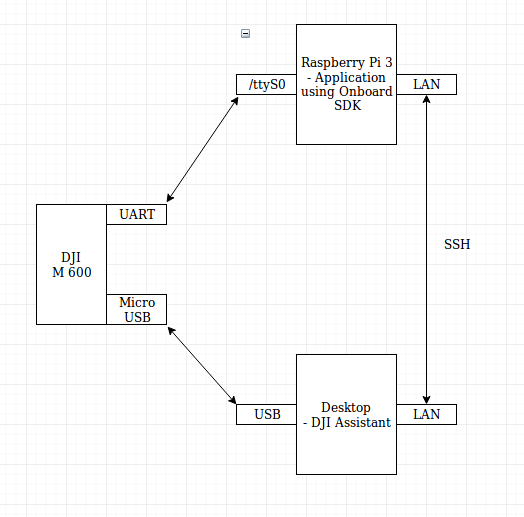
Do you think it works @shakthi-prashanth-m
DuongHieuMAI
on 12 Apr 2018
I never did HITL myself. So I am not qualified to answer. I would request @julianoes / @bkueng to handle it.
However, as DroneCore exposes interface via UART:
https://github.com/dronecore/DroneCore/blob/829b9733d08bf4d46fa35de91500c219600ce6ff/core/dronecore.h#L87-L88
you should be able to use it.
shakthi-prashanth-m
on 12 Apr 2018
@shakthi-prashanth-m
Wonderful! That’s very kind of you. Thank you, guys.
DuongHieuMAI
on 12 Apr 2018
@DuongHieuMAI I've seen before that sensors like the mag are not reported "calibrated" in HITL. I'd have to check in detail but it probably also depends on the hardware used. For now I would suggest to ignore the health check in HITL and see if/how it works.
julianoes
on 12 Apr 2018
@julianoes
I have re-flashed FW and calibrated sensor. As you mentioned, sometime healthy check failed.
Now, device is ready. I can upload mission but can not start (command denied).
So please help me check these things:
- DroneCore can not detect device on HITL
I use wire shark software to capture UDP packet and see that: In SITL there is a packet from port 14557 to port 14540 of DroneCore but not in HITL. I think it is the reason why DroneCore can detect device in SITL but can not in HITL.
- Fly an Autonomous Mission in HITL is possible or not ?
Can I use DronCore on Rasp to communicate with Pixhawk which is currently on HITL mode?
I wanna control (arm, take off, land) and manage mission (upload, start, pause,..) from Raspberry and see the result on GCS like this:
I see that we should not be able to use QGroundControl to run missions and otherwise control the vehicle in HITL. So can we use DroneCore connect directly to Pixhawk to do it and see the result on GCS.
Does it make sense ?
I just want to check my application on Raspberry works well in HITL before real flight.
If my app is ok in SITL, do I have to check in HITL again or can start a real flight without caring about HITL?
Sorry guys for too many questions from a new bie.
DuongHieuMAI
on 14 Apr 2018
@DuongHieuMAI for part of your query, I can suggest you few options.
Have you tried MAVLink Router that handles routing of packets to Flight controller across different applications ?
MAVLink Router opens UART interface to Flight controller and allows applications to get connected via TCP/UDP interface.
So I think, in your case you can run MAVLink Router & DroneCore application on Rasp Pi.
Add an endpoint in MAVLink Router conf file for DroneCore app.

Above is the diagram related to Intel Aero. In your case it is Rasp Pi. Check here for more info:
shakthi-prashanth-m
on 14 Apr 2018
@shakthi-prashanth-m Do you think you might document the mavlink router option in the devguide and/or Dronecore docs (whichever is most appropriate)? I can tidy ....
 hamishwillee
on 16 Apr 2018
hamishwillee
on 16 Apr 2018
@hamishwillee sure I'll.
shakthi-prashanth-m
on 16 Apr 2018
As you mentioned, sometime healthy check failed.
Now, device is ready. I can upload mission but can not start (command denied).
Is there any other message when it is denied? We need to get the other messages that might be sent over mavlink in order to figure out why this happens.
julianoes
on 17 Apr 2018
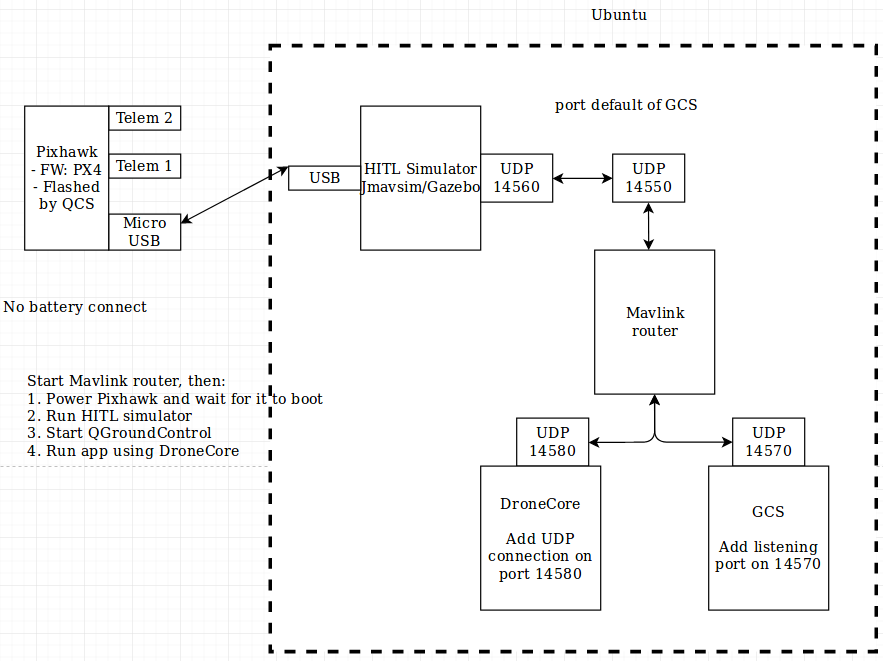
@shakthi-prashanth-m Thank you very much. Now I can use DroneCore and QGroundControl at the same time. I used mavlink-router to route mavlinks packets from 14550 (default port for GCS) to 14570 (new comm link for GCS ) and 14580 (listening port for DroneCore) using:
mavlink-routerd -e 127.0.0.1:14580 -e 127.0.0.1:14570 0.0.0.0:14550
@julianoes Using this way, I can upload mission to Pixhawk but can not start. Command is denied.
These are messages when I used Jmavsim:
[01:21:10|Info ] New device on: 192.168.1.213:44072 (udp_connection.cpp:211)
[01:21:10|Info ] Applying default FollowMe configuration FollowMe to the device... (follow_me_impl.cpp:178)
[01:21:11|Debug] Discovered 3545829398793106486 (dronecore_impl.cpp:234)
[01:21:40|Debug] Send mission item 0 (mission_impl.cpp:772)
[01:21:40|Debug] Send mission item 1 (mission_impl.cpp:772)
[01:21:40|Debug] Send mission item 2 (mission_impl.cpp:772)
[01:21:41|Debug] Send mission item 2 (mission_impl.cpp:772)
[01:21:41|Debug] Send mission item 3 (mission_impl.cpp:772)
[01:21:41|Debug] Send mission item 4 (mission_impl.cpp:772)
[01:21:42|Debug] Send mission item 4 (mission_impl.cpp:772)
[01:21:42|Debug] Send mission item 5 (mission_impl.cpp:772)
[01:21:42|Debug] Send mission item 6 (mission_impl.cpp:772)
[01:21:43|Debug] Send mission item 6 (mission_impl.cpp:772)
[01:21:43|Debug] Send mission item 6 (mission_impl.cpp:772)
[01:21:43|Debug] Send mission item 7 (mission_impl.cpp:772)
[01:21:44|Debug] Send mission item 7 (mission_impl.cpp:772)
[01:21:44|Debug] Send mission item 8 (mission_impl.cpp:772)
[01:21:45|Debug] Send mission item 8 (mission_impl.cpp:772)
[01:21:45|Debug] Send mission item 9 (mission_impl.cpp:772)
[01:21:45|Debug] Send mission item 9 (mission_impl.cpp:772)
[01:21:45|Debug] Send mission item 10 (mission_impl.cpp:772)
[01:21:46|Debug] Send mission item 11 (mission_impl.cpp:772)
[01:21:46|Debug] Send mission item 12 (mission_impl.cpp:772)
[01:21:47|Debug] Send mission item 12 (mission_impl.cpp:772)
[01:21:47|Debug] Send mission item 13 (mission_impl.cpp:772)
[01:21:47|Debug] Send mission item 13 (mission_impl.cpp:772)
[01:21:47|Debug] Send mission item 14 (mission_impl.cpp:772)
[01:21:48|Debug] Send mission item 14 (mission_impl.cpp:772)
[01:21:48|Info ] Mission accepted (mission_impl.cpp:138)
Time taken to upload 5waypoints is 8159ms
Average upload time is 1631ms
[01:21:48|Debug] MAVLink: critical: IGN MISSION_ITEM: No transfer (device_impl.cpp:244)
Arming...
[01:22:05|Info ] sending again, retries to do: 3 (176). (mavlink_commands.cpp:197)
[01:22:05|Warn ] command temporarily rejected (176). (mavlink_commands.cpp:143)
[01:22:05|Debug] MAVLink: critical: Set SYS_HITL to 0 and reboot to disable HITL. (device_impl.cpp:244)
[01:22:06|Debug] MAVLink: critical: Set SYS_HITL to 0 and reboot to disable HITL. (device_impl.cpp:244)
Arming...
[01:22:16|Warn ] command temporarily rejected (176). (mavlink_commands.cpp:143)
[01:22:16|Debug] MAVLink: critical: Set SYS_HITL to 0 and reboot to disable HITL. (device_impl.cpp:244)
In case using Gazebo:
[01:27:01|Info ] New device on: 192.168.1.213:44072 (udp_connection.cpp:211)
[01:27:01|Info ] Applying default FollowMe configuration FollowMe to the device... (follow_me_impl.cpp:178)
[01:27:02|Debug] MAVLink: critical: MANUAL CONTROL LOST (at t=50981ms) (device_impl.cpp:244)
[01:27:02|Debug] MAVLink: info: MANUAL CONTROL REGAINED after 619ms (device_impl.cpp:244)
[01:27:02|Debug] Discovered 3545829398793106486 (dronecore_impl.cpp:234)
_health.home_position_ok not ok
[01:27:04|Debug] MAVLink: critical: MANUAL CONTROL LOST (at t=53745ms) (device_impl.cpp:244)
[01:27:04|Debug] MAVLink: info: MANUAL CONTROL REGAINED after 514ms (device_impl.cpp:244)
...
[01:33:45|Debug] MAVLink: critical: MANUAL CONTROL LOST (at t=453853ms) (device_impl.cpp:244)
[01:33:45|Debug] MAVLink: info: MANUAL CONTROL REGAINED after 571ms (device_impl.cpp:244)
[01:33:51|Debug] Send mission item 0 (mission_impl.cpp:772)
[01:33:51|Debug] Send mission item 1 (mission_impl.cpp:772)
[01:33:51|Debug] Send mission item 2 (mission_impl.cpp:772)
[01:33:51|Debug] Send mission item 3 (mission_impl.cpp:772)
[01:33:51|Debug] Send mission item 4 (mission_impl.cpp:772)
[01:33:51|Debug] Send mission item 5 (mission_impl.cpp:772)
[01:33:51|Debug] Send mission item 6 (mission_impl.cpp:772)
[01:33:51|Debug] Send mission item 7 (mission_impl.cpp:772)
[01:33:51|Debug] Send mission item 8 (mission_impl.cpp:772)
[01:33:51|Debug] Send mission item 9 (mission_impl.cpp:772)
[01:33:51|Debug] Send mission item 10 (mission_impl.cpp:772)
[01:33:51|Debug] Send mission item 11 (mission_impl.cpp:772)
[01:33:51|Debug] Send mission item 12 (mission_impl.cpp:772)
[01:33:51|Debug] Send mission item 13 (mission_impl.cpp:772)
[01:33:51|Debug] Send mission item 14 (mission_impl.cpp:772)
[01:33:51|Info ] Mission accepted (mission_impl.cpp:138)
Time taken to upload 5waypoints is 181ms
Average upload time is 36ms
[01:33:52|Debug] MAVLink: critical: MANUAL CONTROL LOST (at t=460783ms) (device_impl.cpp:244)
[01:33:52|Debug] MAVLink: info: MANUAL CONTROL REGAINED after 526ms (device_impl.cpp:244)
[01:33:52|Debug] MAVLink: critical: MANUAL CONTROL LOST (at t=461642ms) (device_impl.cpp:244)
[01:33:52|Debug] MAVLink: info: MANUAL CONTROL REGAINED after 554ms (device_impl.cpp:244)
[01:33:54|Debug] MAVLink: critical: MANUAL CONTROL LOST (at t=462830ms) (device_impl.cpp:244)
[01:33:54|Debug] MAVLink: info: MANUAL CONTROL REGAINED after 620ms (device_impl.cpp:244)
[01:33:55|Debug] MAVLink: critical: MANUAL CONTROL LOST (at t=463784ms) (device_impl.cpp:244)
[01:33:55|Debug] MAVLink: info: MANUAL CONTROL REGAINED after 589ms (device_impl.cpp:244)
Arming...
[01:33:57|Warn ] command temporarily rejected (176). (mavlink_commands.cpp:143)
[01:33:57|Debug] MAVLink: critical: Set SYS_HITL to 0 and reboot to disable HITL. (device_impl.cpp:244)
[01:33:59|Debug] MAVLink: critical: MANUAL CONTROL LOST (at t=467844ms) (device_impl.cpp:244)
[01:33:59|Debug] MAVLink: info: MANUAL CONTROL REGAINED after 549ms (device_impl.cpp:244)
[01:34:01|Debug] MAVLink: critical: MANUAL CONTROL LOST (at t=469975ms) (device_impl.cpp:244)
[01:34:01|Debug] MAVLink: info: MANUAL CONTROL REGAINED after 519ms (device_impl.cpp:244)
[01:34:01|Debug] MAVLink: critical: MANUAL CONTROL LOST (at t=470732ms) (device_impl.cpp:244)
[01:34:02|Debug] MAVLink: info: MANUAL CONTROL REGAINED after 697ms (device_impl.cpp:244)
Arming...
[01:34:04|Warn ] command temporarily rejected (176). (mavlink_commands.cpp:143)
[01:34:04|Debug] MAVLink: critical: Set SYS_HITL to 0 and reboot to disable HITL. (device_impl.cpp:244)
[01:34:04|Debug] MAVLink: critical: MANUAL CONTROL LOST (at t=473410ms) (device_impl.cpp:244)
[01:34:04|Debug] MAVLink: info: MANUAL CONTROL REGAINED after 521ms (device_impl.cpp:244)
...
This is how I do it:
DuongHieuMAI
on 19 Apr 2018
@DuongHieuMAI thanks for sharing all this, that's helpful.
The cause for the arming failure is in:
MAVLink: critical: Set SYS_HITL to 0 and reboot to disable HITL
Which happens here:
https://github.com/PX4/Firmware/blob/master/src/modules/commander/state_machine_helper.cpp#L385
It looks like that for HITL we need to include this bit: http://mavlink.org/messages/common#MAV_MODE_FLAG_HIL_ENABLED. I thought I had fixed that before but I can't find it so I probably need to do it again.
julianoes
on 19 Apr 2018
I thought I had fixed that before but I can't find it so I probably need to do it again.
No, I had fixed that before:
https://github.com/dronecore/DroneCore/blob/develop/core/mavlink_system.cpp#L560
If DroneCore successfully receives the HEARTBEAT, it should have this flag set:
https://github.com/dronecore/DroneCore/blob/develop/core/mavlink_system.cpp#L164
Could you debug that?
julianoes
on 19 Apr 2018
@julianoes Thank you !
After updating to new source code, the error: " MAVLink: critical: Set SYS_HITL to 0 and reboot to disable HITL " no longer exists. But command is still denied:
[11:10:44|Info ] New device on: 127.0.0.1:37846 (udp_connection.cpp:206)
[11:10:44|Debug] New: System ID: 1 Comp ID: 1 (dronecore_impl.cpp:310)
[11:10:44|Debug] Component Autopilot added. (mavlink_system.cpp:326)
[11:10:44|Debug] MAVLink: info: [cmd] Mission #0 loaded, 15 WPs, curr: 0 (mavlink_system.cpp:263)
[11:10:44|Debug] Found 1 component(s). (mavlink_system.cpp:458)
[11:10:44|Debug] Discovered 3545829398793106486 (mavlink_system.cpp:460)
[11:11:09|Debug] Send mission item 0 (mission_impl.cpp:781)
[11:11:09|Debug] Send mission item 1 (mission_impl.cpp:781)
[11:11:10|Debug] Send mission item 2 (mission_impl.cpp:781)
[11:11:10|Debug] Send mission item 3 (mission_impl.cpp:781)
[11:11:11|Debug] Send mission item 4 (mission_impl.cpp:781)
[11:11:11|Debug] Send mission item 4 (mission_impl.cpp:781)
[11:11:11|Debug] Send mission item 5 (mission_impl.cpp:781)
[11:11:12|Debug] Send mission item 5 (mission_impl.cpp:781)
[11:11:12|Debug] Send mission item 6 (mission_impl.cpp:781)
[11:11:12|Debug] Send mission item 6 (mission_impl.cpp:781)
[11:11:13|Debug] Send mission item 7 (mission_impl.cpp:781)
[11:11:13|Debug] Send mission item 7 (mission_impl.cpp:781)
[11:11:13|Debug] Send mission item 8 (mission_impl.cpp:781)
[11:11:14|Debug] Send mission item 8 (mission_impl.cpp:781)
[11:11:14|Debug] Send mission item 9 (mission_impl.cpp:781)
[11:11:14|Debug] Send mission item 9 (mission_impl.cpp:781)
[11:11:14|Debug] Send mission item 10 (mission_impl.cpp:781)
[11:11:15|Debug] Send mission item 10 (mission_impl.cpp:781)
[11:11:15|Debug] Send mission item 11 (mission_impl.cpp:781)
[11:11:16|Debug] Send mission item 11 (mission_impl.cpp:781)
[11:11:16|Debug] Send mission item 12 (mission_impl.cpp:781)
[11:11:16|Debug] Send mission item 13 (mission_impl.cpp:781)
[11:11:17|Debug] Send mission item 13 (mission_impl.cpp:781)
[11:11:17|Debug] Send mission item 14 (mission_impl.cpp:781)
[11:11:17|Info ] Mission accepted (mission_impl.cpp:146)
Arming...
[11:11:22|Info ] sending again, retries to do: 3 (176). (mavlink_commands.cpp:266)
[11:11:22|Warn ] command temporarily rejected (176). (mavlink_commands.cpp:212)
Arming...
[11:11:30|Warn ] command temporarily rejected (176). (mavlink_commands.cpp:212)
DuongHieuMAI
on 21 Apr 2018
@DuongHieuMAI ok that's good. Now before sending arming, have you checked telemetry.health_all_ok() ?
julianoes
on 23 Apr 2018
@julianoes I have added it this morning. Healthy was ok but command armming still failed
[09:07:36|Info ] Mission accepted (mission_impl.cpp:146)
Arming...
[09:07:50|Warn ] command temporarily rejected (176). (mavlink_commands.cpp:212)
Arming...
[09:07:59|Warn ] command temporarily rejected (176). (mavlink_commands.cpp:212)
Arming...
[09:08:08|Info ] sending again, retries to do: 3 (176). (mavlink_commands.cpp:266)
[09:08:08|Warn ] command temporarily rejected (176). (mavlink_commands.cpp:212)
DuongHieuMAI
on 24 Apr 2018
@julianoes I also restarted whole system and tried several times then I realized that:
- There was some moment, I could start mission and everything went well. But it's rare.
- Another error occurred if drone is armed: (this error also appears if I run fly_mission example)
Mission uploaded.
Arming...
[10:17:01|Info ] Mission accepted (mission_impl.cpp:146)
[10:17:01|Debug] MAVLink: critical: IGN MISSION_ITEM: No transfer (mavlink_system.cpp:263)
[10:17:01|Info ] sending again, retries to do: 3 (176). (mavlink_commands.cpp:266)
[10:17:02|Warn ] Command ack not matching our current command: 400 (mavlink_commands.cpp:182)
[10:17:02|Info ] sending again, retries to do: 3 (400). (mavlink_commands.cpp:266)
Armed.
Starting mission.
[10:17:02|Debug] MAVLink: info: ARMED by arm/disarm component command (mavlink_system.cpp:263)
[10:17:02|Debug] MAVLink: info: [logger] file: /fs/microsd/log/2018-04-24/03_17_0 (mavlink_system.cpp:263)
[10:17:02|Warn ] Command ack not matching our current command: 176 (mavlink_commands.cpp:182)
[10:17:03|Info ] sending again, retries to do: 3 (176). (mavlink_commands.cpp:266)
Started mission.
[10:17:03|Debug] MAVLink: info: Executing mission. (mavlink_system.cpp:263)
[10:17:03|Debug] MAVLink: info: Takeoff to 10.0 meters above home. (mavlink_system.cpp:263)
[10:17:03|Debug] MAVLink: info: Takeoff detected (mavlink_system.cpp:263)
[10:17:03|Debug] MAVLink: emergency: CRITICAL NAVIGATION FAILURE - CHECK SENSOR CALIBR (mavlink_system.cpp:263)
[10:17:03|Debug] MAVLink: critical: Failsafe enabled: no global position (mavlink_system.cpp:263)
[10:17:03|Debug] MAVLink: info: Failsafe mode enabled (mavlink_system.cpp:263)
DuongHieuMAI
on 24 Apr 2018
Hm, hard to say:
[10:17:03|Debug] MAVLink: critical: Failsafe enabled: no global position (mavlink_system.cpp:263)
Why would that happen?
julianoes
on 24 Apr 2018
@julianoes
Because @shakthi-prashanth-m already gave me an option using MAVLink Router that helps me continue to develop my application so this issue is not very important any more.
STIL worked well for me and there are still many things to do before real flight so I think you can close it.
Thank you very much for your support.
I'll keep following you guys.
DuongHieuMAI
on 12 May 2018
Thanks @DuongHieuMAI for the feedback. Let us know when new issues come up :smile:
julianoes
on 14 May 2018
That was helpful. Thanks !
 malik-aliyev-94
on 25 May 2018
malik-aliyev-94
on 25 May 2018
Related issues
 mrpollo
·
5Comments
mrpollo
·
5Comments
 dangviethieu
·
7Comments
shakthi-prashanth-m
·
7Comments
dangviethieu
·
7Comments
shakthi-prashanth-m
·
7Comments
 bozkurthan
·
7Comments
bozkurthan
·
7Comments
 helloE9
·
6Comments
helloE9
·
6Comments