Mattermost-server: Sort DM More.... modal by recent conversations first
If someone drops of the DM section of your sidebar, it can be difficult to find them again. Propose we sort the More... menu by recency.
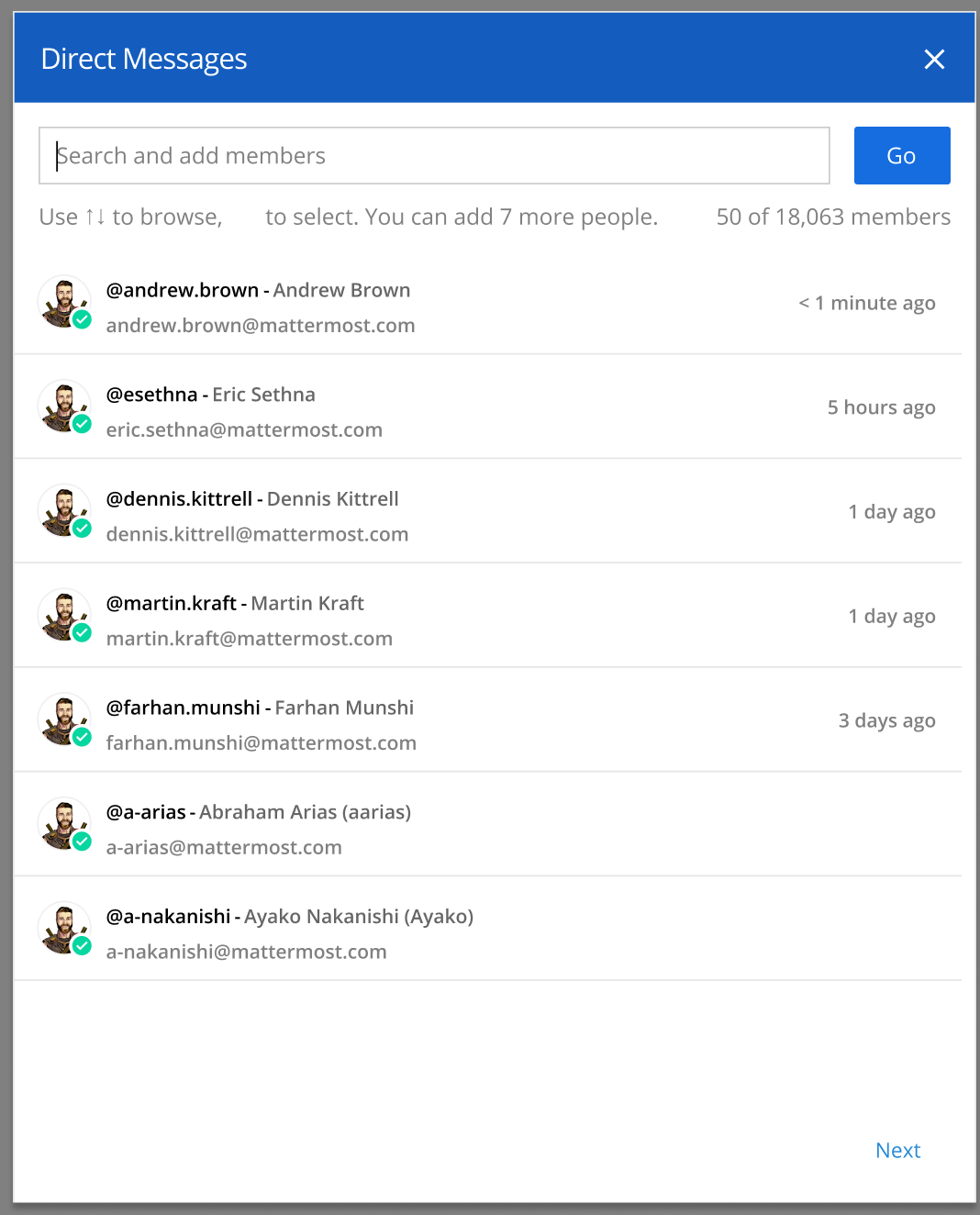
Expected:
- When a user opens the More... menu, show up to 20 DMs that have recent activity (measured by the timestamp of the last message in the DM channel)
- If a user has no recent conversations, then show an alphabetical list as we do now.
- If a user starts to type, filter results that match their typed input. Sort the filtered results by recent activity primarily, then alphabetical after recently matching results.
- In the row on the right side, starte when the last activity was in the channel with the following granularity:
- <60 minutes: X minutes ago (rounding to the nearest minute)
- > 60 minutes but < 24 hours: X hours ago (rounding to the nearest hour)
- > 24 hours < 1 month: X days ago (rounding to the nearest day)
- > 1 month but < 1 year: X months ago (rounding to the nearest month)
- > 1 year: X years ago (rounding to the nearest year)
- No activity in the DM/GM: Do not show anything
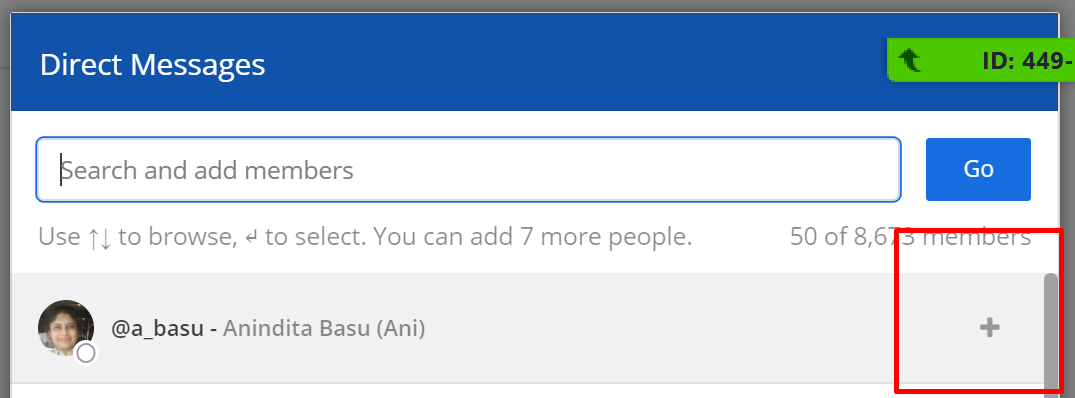
- When hovering over the row, replace the above activity timestamp with the symbol that indicates the DM can be added to the input "+"
If you're interested please comment here and come join our "Contributors" community channel on our daily build server, where you can discuss questions with community members and the Mattermost core team. For technical advice or questions, please join our "Developers" community channel.
New contributors please see our Developer's Guide.
 mattermod
All 7 comments
Hi, I was thinking about a solution for this issue, and came up with something like this:
https://github.com/mattermost/mattermost-webapp/compare/master...Qovaros:MM-22840_sort-dms-by-time?diff=unified
So just adding last_post_at to options in more_direct_channels.tsx
The problem I encountered is that even when you remove memoize from here, this still doesn't update when sending a message, so last_post_at values won't change and the options won't get reordered. Am I doing something wrong here?
 Qovaros
on 6 Apr 2020
Qovaros
on 6 Apr 2020
Hey @Qovaros, thank you for your message on the community server, I just pinged our apps team to provide guidance. Apologize for getting back to you so late.
 jasonblais
on 16 Apr 2020
jasonblais
on 16 Apr 2020
@hmhealey any thoughts on this?
 esethna
on 17 Apr 2020
esethna
on 17 Apr 2020
Hi @Qovaros. Unfortunately, I don't think adding last_post_at will work since the web app may not have all of the users on the server loaded since there might simply be too many to load. The Tech/Go label was unfortunately missing from the ticket, but some of this will likely have to be done on the server so that it can return the users in order of the last DM in the first place. Otherwise, you'll only be displaying the first 50 users alphabetically from the server regardless of how the web app sorts them.
The problem I encountered is that even when you remove memoize from here, this still doesn't update when sending a message, so last_post_at values won't change and the options won't get reordered. Am I doing something wrong here?
Regarding these, I don't think they would need to change here since they aren't sorting the users. I may be missing something here though.
 hmhealey
on 21 Apr 2020
hmhealey
on 21 Apr 2020
I can pick this one if its still open.. 👍
 pradeepmurugesan
on 3 May 2020
pradeepmurugesan
on 3 May 2020
Certainly, thank you @pradeepmurugesan!
jasonblais
on 3 May 2020
Discussed with @hmhealey a couple of approaches to solve this.
Right now, on clicking the + button it opens a modal and the content from the model is served by https://community.mattermost.com/api/v4/users?page=0&per_page=100 endpoint.
The above endpoint cannot filter for the users I have interacted with.
Option 1
In order to achieve the same, we need to use the channels endpoint https://community.mattermost.com/api/v4/users/me/teams/{teamId}/channels. This lists all the channels. In the client,
we can filter for the direct messages.
Sort them by last_posted_at
Lookup for the profiles of the user in the DM ( using the trick here
display the list in the modal
followed by the users sorted alphebetically ( filtering out the one already in the Recents)
Option 2
Add a new users endpoint to list the users I had the recent conversation with.
Then the client
Just needs to call the new endpoint.
We agreed to implement Option 1 and check if it's getting too complex.
pradeepmurugesan
on 10 Jun 2020
Related issues
esethna
·
3Comments
esethna
·
3Comments
 NotSqrt
·
3Comments
esethna
·
3Comments
esethna
·
3Comments
NotSqrt
·
3Comments
esethna
·
3Comments
esethna
·
3Comments