Mattermost-server: Enable users to view archived channels
CURRENT CONDITION:
If the ViewArchivedChannels config setting is enabled, users are able to search for text within the archived channels.
This ticket is to enable users to also view archived channels in the center pane, similar to being able to view a direct message conversation with a deactivated user.
PROPOSED CHANGES:
This requires changes in mattermost-server, mattermost-webapp, and mattermost-mobile
CASE 1 (webapp):
If ExperimentalChannelOrganization is set to true, and Account Settings > Sidebar > Channel Grouping is set to "Combine all channel types", then public channels, private channels and direct messages are combined into a single list.
1.1 - When clicking either CHANNELS heading in the sidebar, or the More.. menu at the bottom of the sidebar, a modal with a list of channels you can join opens.
CHANGE: Add a new dropdown below the "Search for channels" search box with two options:
- Show "Public Channels" [selected by default]
- Show "Archived Channels"
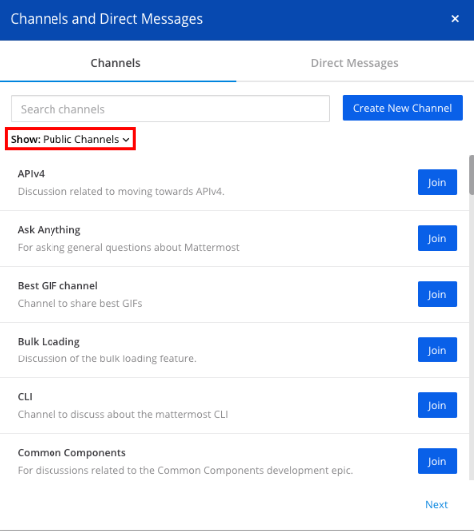
1.2 - When clicking on this new dropdown, the user can select "Archived Channels".
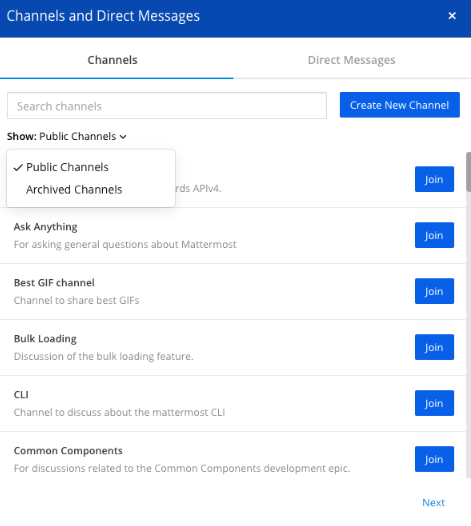
Once selected, a list of archived channels appears. This contains
- any public channels, which have been archived
- any private channels FOR WHICH THE USER WAS A MEMBER OF, and which have been archived.
Note that private channels the user was not a member of should not appear on this list.
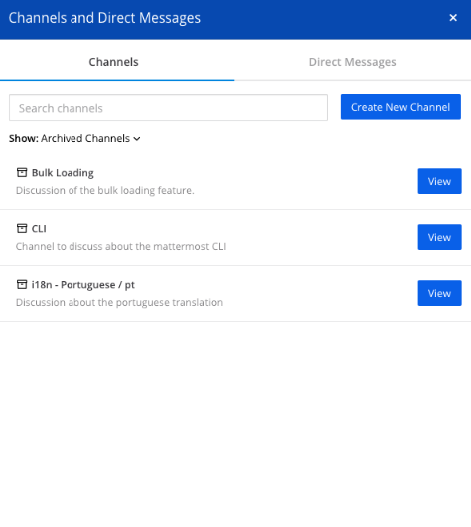
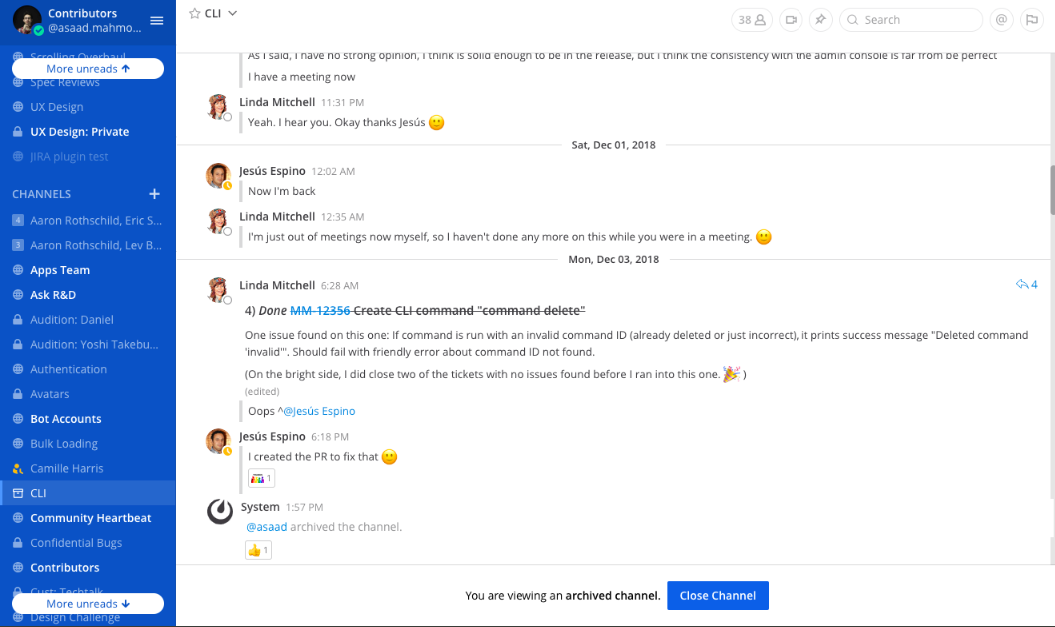
1.3 - A user can then click on the View button of any archived channel to view it. The channel will appear in read-only mode with
- "Archived" channel icon on the left-hand sidebar, next to the channel name (use this Font Awesome icon https://fontawesome.com/v4.7.0/icon/archive)
- "You are viewing an archived channel. [Close Channel]" in place of the message box
- Clicking "Close Channel" button closes the channel, removes the channel from the sidebar and redirects user to "town-square" channel
- Switching to another channel also removes the archived channel from the sidebar
The user is not able to take any actions in the channel like add emoji reactions, post or reply. For an example, you can open a direct message with a deactivated user to test the experience.
CASE 2 (webapp):
If [ExperimentalChannelOrganization |https://docs.mattermost.com/administration/config-settings.html#sidebar-organization-experimental] is set to false, or if Account Settings > Sidebar > Channel Grouping is set to "Channels grouped by type", then public channels, private channels and direct messages are grouped in separate sections on the sidebar.
2.1 When clicking "More.." at the bottom of the PUBLIC channel list, a modal opens.
CHANGE: Add a new dropdown below the "Search for channels" search box with two options:
- Show "Public Channels" [selected by default]
- Show "Archived Channels"
The rest of the changes are the same from CASE 1 above.
2.2 When clicking "More.." at the bottom of the PRIVATE channel list, a modal opens.
CHANGE: Add a new dropdown below the "Search for channels" search box with two options:
- Show "Public Channels"
- Show "Archived Channels" [selected by default] <-- note the difference from other cases above.
The rest of the changes are the same from CASE 1 above.
CASE 3 (mobile):
The same experience from above is reflected on mobile for iOS and Android. There will be a dropdown to show public channels or archived channels.
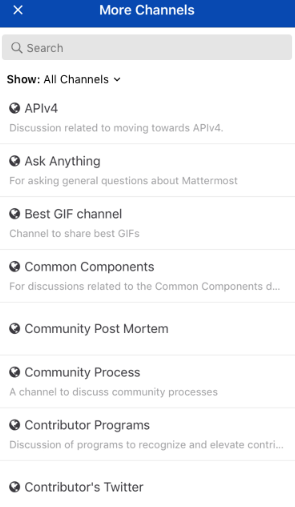
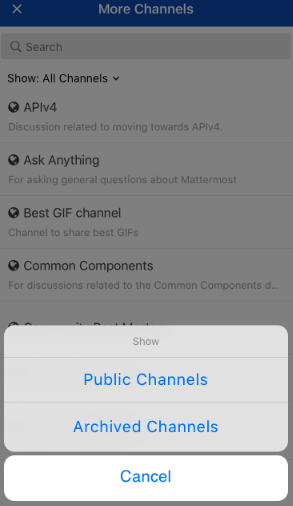
If a user taps on the filter, they can choose either public or archived channels on the list. It will use a standard popup component for filters, an example of this for iOS is attached.
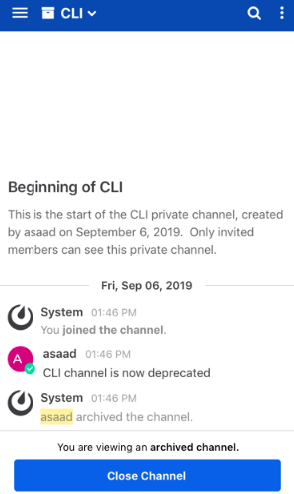
When viewing an archived channel
- "Archived" channel icon is placed left of the channel name in the header (use this Font Awesome icon https://fontawesome.com/v4.7.0/icon/archive)
- "You are viewing an archived channel. [Close Channel]" in place of the message box
- Clicking "Close Channel" button closes the channel, removes the channel from the sidebar and redirects user to "town-square" channel
- Switching to another channel also removes the archived channel from the sidebar
If you're interested please comment here and come join our "Contributors" community channel on our daily build server, where you can discuss questions with community members and the Mattermost core team. For technical advice or questions, please join our "Developers" community channel.
New contributors please see our Developer's Guide.
JIRA: https://mattermost.atlassian.net/browse/MM-19337
For any questions, reach out to @jasonblais on GitHub or @jason.blais on https://community.mattermost.com for any questions.
 jasonblais
All 3 comments
I'd like to work on this!
 valentijnnieman
on 28 Oct 2019
valentijnnieman
on 28 Oct 2019
Great thanks @valentijnnieman! Let me know if you have any questions as you start working on it
jasonblais
on 29 Oct 2019
This has now been resolved
jasonblais
on 20 Nov 2019
Related issues
 harshilsharma2
·
3Comments
harshilsharma2
·
3Comments
 esethna
·
3Comments
esethna
·
3Comments
 tumbl3w33d
·
3Comments
esethna
·
3Comments
tumbl3w33d
·
3Comments
esethna
·
3Comments
 jwilander
·
3Comments
jwilander
·
3Comments
Most helpful comment
I'd like to work on this!