Mattermost-server: Search: Exclude results containing specific words
If you're interested please comment here and come join our "Contributors" community channel on our daily build server, where you can discuss questions with community members and the Mattermost core team. For technical advice or questions, please join our "Developers" community channel.
New contributors please see our Developer's Guide.
Notes: Jira ticket
Context:
Exclude search terms using the "-" symbol. Messages containing any words following the dash are not shown in results
For example:
“jaguar -car”
will only return results with the word “jaguar” that also do not contain the word “car”.
Notes:
- This can also be used in combination with modifiers. For example,
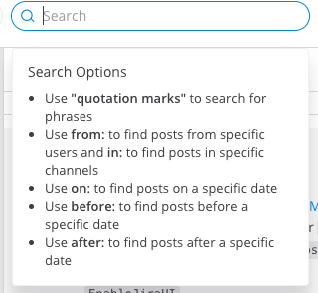
test -from:eric -in:community-heartbeat -releasewill return all results with the word “test”, excluding posts with the word “release”, also excluding posts from @eric, also excluding posts made in the community-heartbeat channel. - Add search help text (located 2nd in list after "use quotation marks"):
Use **dash** "-" to exclude search terms and modifiers.
 esethna
All 8 comments
Plan to work on this.
I did a cursory check of the code, today the search supports ElasticSearch, MySQL and PostgreSQL. The default dev environment is on MySQL. How easy it is to set up Elasticsearch and Postgresql environments to verify changes after it is done, and what are the steps?
 liusy182
on 10 Jun 2019
liusy182
on 10 Jun 2019
@mgdelacroix Can you help with this question?
 hanzei
on 10 Jun 2019
hanzei
on 10 Jun 2019
Thanks for picking up this one @liusy182!
Setting up PostgreSQL as part of the development environment is easy, as it comes already bundled as part of the docker containers. You just have to change the config.json to point it to the postgres instance, changing DriverName to postgres and DataSource to postgres://mmuser:mostest@localhost:5432/mattermost_test?sslmode=disable&connect_timeout=10. For reference, here is the link to the documentation.
As per Elasticsearch, that's part of the enterprise edition, so the best way to proceed would be for you to make these changes for MySQL and Postgres and we will coordinate them with the ones neccessary for Elasticsearch.
 mgdelacroix
on 10 Jun 2019
mgdelacroix
on 10 Jun 2019
awesome thanks @mgdelacroix
liusy182
on 11 Jun 2019
Another question on this. In which use case isOrSearch is true, and how the behavior should look like when there are both included and excluded terms when this value is true?
E.g. search phrase "phrase1 phrase2 -phrase3 -phrase4" and isOrSearch == true. Should it read as "match phrase1 or phrase2 and exclude both phrase3 and phrase4 in the search" ?
liusy182
on 12 Jun 2019
Right now, isOrSearch is set to true when clicking the @ button (that fires a search for mentions). My take is that for queries with -terms, those -terms should always be enforced (always returning results that don't contain them) and then, taking the isOrSearch into account for the rest of the terms.
For your example:
phrase1 phrase2 -phrase3 -phrase4withisOrSearch == true: excludesphrase3andphrase4and matches eitherphrase1orphrase2.phrase1 phrase2 -phrase3 -phrase4withisOrSearch == false: excludesphrase3andphrase4and matches bothphrase1andphrase2.
@wiersgallak could you please confirm that this is the desired approach?
mgdelacroix
on 12 Jun 2019
@liusy182 & @mgdelacroix Yes I agree, that the excludes should always be enforced and the example @mgdelacroix outlined is the way I would expect it to behave.
 wiersgallak
on 13 Jun 2019
wiersgallak
on 13 Jun 2019
Thanks @liusy182 for the contribution!
 jasonblais
on 21 Dec 2019
jasonblais
on 21 Dec 2019
Related issues
esethna
·
3Comments
esethna
·
3Comments
esethna
·
3Comments
esethna
·
3Comments
esethna
·
3Comments