Mattermost-server: Send a DM to bot creator that informs them to add the bot to a team/channel
If you're interested please comment here and come join our "Contributors" community channel on our daily build server, where you can discuss questions with community members and the Mattermost core team. For technical advice or questions, please join our "Developers" community channel.
New contributors please see our Developer's Guide.
Notes: Jira ticket
The purpose of this improvement is to make it more clear that bot accounts need to be added to teams and channels after creation.
It involves the following user flow:
1) When a bot account is created through the REST API or through the UI via Main Menu > Integrations > Bot Accounts, send a DM from the bot to the creator with following text:

Please add me to teams and channels you want me to interact in. See [documentation](https://mattermost.com/pl/default-bot-accounts) to learn more.

[ADD BOT TO TEAMS AND CHANNELS]
2) When the user clicks on the "Add bot to teams and channels" button, the post updates to a webhook message attachment containing
Text: Please select the **team** and **channel** you would like to add the bot to.
Dropdown: Contains a list of teams the user can choose from. This uses the existing message menu component.

3) When the user clicks on the dropdown, they can select a team from the list. As noted above, this uses the existing message menu component.
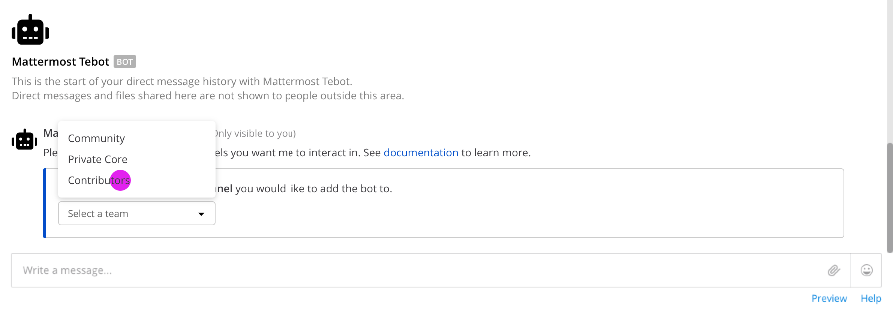
4) When the user selects a team, a second dropdown appears letting them choose the appropriate channel within that team.
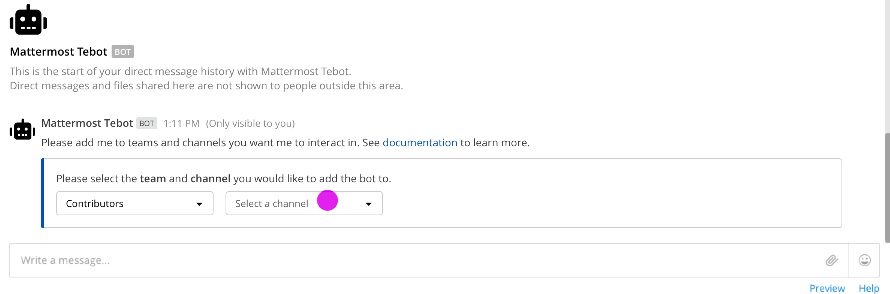
5) When the user clicks on the second dropdown, a list of channels appear
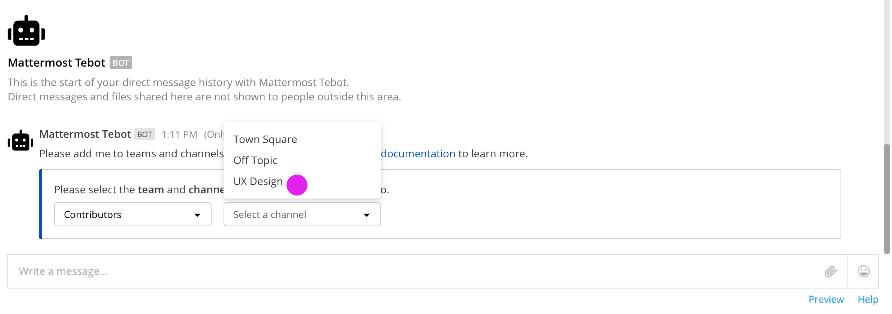
6) When a channel is chosen, a message is posted back to the user with text :tada: I was successfully added to **{Channel Display Name}**.

 esethna
All 22 comments
I'll take this on!
 Wipeout55
on 21 May 2019
Wipeout55
on 21 May 2019
Thank you very much @Wipeout55! :+1: Let us know if you have any questions.
 hanzei
on 21 May 2019
hanzei
on 21 May 2019
Hey all, does anything need to happen when a bot is created through a plugin? It looks like the bot creator would usually be the plugin itself, but the code says it could also specify a user as the bot's owner.
Wipeout55
on 24 May 2019
@jasonblais ^
hanzei
on 24 May 2019
@Wipeout55 good question. If the bot is created through a plugin, let's not send a DM to the user. Only send it when a bot account is created through the REST API or through the UI via Main Menu > Integrations > Bot Accounts.
This is because
- bots created through plugins are usually managed by the plugin itself, as you mentioned
- plugins have the ability to post to any channels via bots
- if the plugin requires users to add the bot to various channels, the plugin can notify the relevant users as needed
 jasonblais
on 24 May 2019
jasonblais
on 24 May 2019
Thanks @jasonblais!
Wipeout55
on 25 May 2019
@jasonblais plugins can specify a user ID as owner ID when creating bots. This makes the specified user as the owner. Correct me if I'm wrong though.
I think as long as bot.OwnerId is one of the active user's ID, we should send the DM to that user, irrespective of where and how did the bot get created.
 harshilsharma2
on 26 May 2019
harshilsharma2
on 26 May 2019
@harshilsharma63 Thank you, I wasn't familiar with that. When someone creates a bot through the rest API or the UI, that person gets automatically assigned as the bot.OwnerId. Is that correct?
If so, your proposal about sending a DM to each user assigned as bot.OwnerId would actually makes sense.
(/cc @Wipeout55)
jasonblais
on 26 May 2019
@jasonblais As far as I understand it, that is correct, which is why I raised the question in the first place. My apologies for not being clearer before.
Wipeout55
on 26 May 2019
@Wipeout55 Ah okay, got it. I missed/forgot about that part. Then it makes sense to send a DM whenever a user is assigned as the bot.OwnerId.
jasonblais
on 26 May 2019
Great, I'll make sure to include that change as well. Thanks again @jasonblais and also thanks to @harshilsharma63 for helping me clarify.
A follow-up but somewhat unrelated question, who should I contact with regards to getting translations for the three(?) new strings I'll be adding to the app?
Wipeout55
on 26 May 2019
Excellent question. You should make sure the user interface (UI) strings are included in en.json localization files. You do not need to worry about the other languages - the strings from en.json will be automatically added to the Mattermost Translation Server once merged, and translated by our localization community.
jasonblais
on 26 May 2019
Oh that's cool! I will make sure to do that!
Wipeout55
on 26 May 2019
Great, thanks @Wipeout55! Here's also a quick 10-step checklist for contributions, which might be helpful https://developers.mattermost.com/contribute/getting-started/contribution-checklist/
(Not each step may apply to your PR of course :) )
jasonblais
on 26 May 2019
Okay, so after lots of investigation I've come up with 2 ways of implementing this workflow. Both will involve creating a custom React component that will be rendered using the system_message_helper, but the amount of logic written on the front-end vs. the back-end will vary (and bear with me as I'm still new to the codebase :-) )
1) On bot creation, a post will be created with a custom type and a message attachment that will include the first dropdown (the team dropdown) and would be populated either using a "GenericTeamChannelProvider" or mapped from the database manually. Once the add button is pushed, the attachment will be un-hidden using "isEmbedVisible" and will allow a team to be selected. Upon selection, the component would hit a new API endpoint that would update the attachment with the channels in the selected team and allow for channel selection. A second API endpoint would then facilitate the adding of the bot to the team and channel.
2) On bot creation, a post will be created with a custom type and no message attachment, and the custom component will be responsible for rendering the MessageAttachment component manually and will fill out the dropdowns as such. It will use the existing API endpoints to perform the workflow.
Upon speaking with @hmhealey, he recommended Option 2, but I wanted to throw this out to the community to see what everyone thought.
A follow-up question: is there anything required for the mobile app? @hmhealey recommended that the message of the post inform the user that they would need to go to the web-app.
Wipeout55
on 27 May 2019
@Wipeout55 I agree with Harrison here. 2 seems like the way to go.
 crspeller
on 27 May 2019
crspeller
on 27 May 2019
Thanks @crspeller for the feedback!
In regards to the mobile app, if I am going to use Harrison's solution, what should the translation string be?
I figured something like:
Please add me to teams and channels you want me to interact in. To do this, use the web app.
Wipeout55
on 31 May 2019
That's a @jasonblais question! (But I think that's good.)
crspeller
on 1 Jun 2019
@Wipeout55 That looks good, just a minor tweak:
Please add me to teams and channels you want me to interact in. To do this, use the browser or Mattermost Desktop App.
and then also hide the Add bot to teams and channels button.
I'm curious if the plan to direct them to the mobile app is due to technical limitations?
jasonblais
on 1 Jun 2019
The only technical limitation is that we need a fallback message like that for older versions of the mobile app and other clients like Matterhorn.
I don't think we need to prioritize adding a proper mobile component for this though since you can't actually create bot users on mobile
 hmhealey
on 3 Jun 2019
hmhealey
on 3 Jun 2019
Okay I've pushed up my PR's. There's a small issue with the workflow:
After the user adds the bot to the channel, we have to update the post with the channel name. I assumed we wanted this to be persistent, so I have updated the post itself, which is kinda weird from an API standpoint as I'm doing it to update another users post.
I have a few thoughts on how to remedy this:
We could probably do nothing, as I understand that bots can only be added by system administrators, so permissions isn't currently a problem.
We could not have the channel name be persistent, such that when you open the DM window with the bot after leaving the screen, the control will reset to its initial position (with just the prompt and button)
We could create a custom API endpoint for updating this particular post type, so that only the owner of the bot (and the system admin) could update it.
Any feedback is appreciated, thanks everyone :)
Wipeout55
on 6 Jun 2019
Great, thank you @Wipeout55! I think the second option (not having it persistent) seems okay from user experience perspective, but I'll tag @asaadmahmood to see if he has any thoughts
jasonblais
on 6 Jun 2019
Related issues
jasonblais
·
3Comments
 tumbl3w33d
·
3Comments
esethna
·
3Comments
esethna
·
3Comments
esethna
·
3Comments
tumbl3w33d
·
3Comments
esethna
·
3Comments
esethna
·
3Comments
esethna
·
3Comments