Mattermost-server: [Help Wanted] [MM-13827] [Desktop] Expose Webview Developer Tools via View Menu
If you're interested please comment here and come join our "Contributors" community channel on our daily build server, where you can discuss questions with community members and the Mattermost core team. For technical advice or questions, please join our "Developers" community channel.
New contributors please see our Developer's Guide.
Notes: Jira ticket
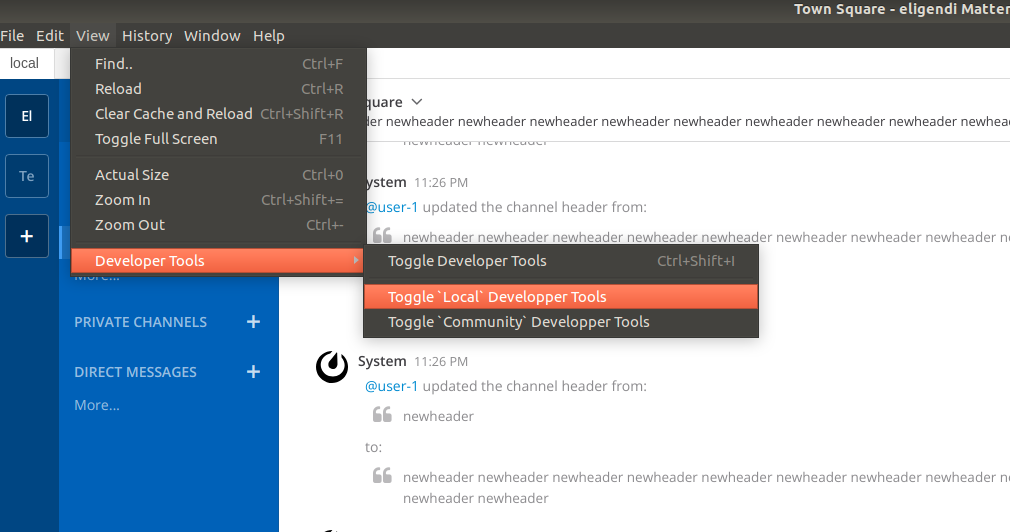
We recently documented the steps necessary to open the developer tools for individual webviews in the desktop app, but this would ideally be accessible from the View menu after "Toggle Developer Tools".
This ticket consists of proposing a design to expose this functionality in the desktop app (vs. the manual steps linked above), sharing in https://community.mattermost.com/core/channels/ux-design and getting buy in, and then implementing the required changes in the Desktop app. Note that this feature will not require changes in the webapp and only affect the Desktop app.
 esethna
All 6 comments
I'm working on this!
 manland
on 6 Feb 2019
manland
on 6 Feb 2019
Thanks @manland!
 hanzei
on 6 Feb 2019
hanzei
on 6 Feb 2019
I propose to implement something like that
manland
on 6 Feb 2019
Discussion on https://community.mattermost.com/core/pl/5jdjfyyq7pdpfc3nyexcgnoiec
Correct implementation will be :
- Developer tools for "current" server (with no shortcut)
- Developer tools for application wrapper (with the Ctrl+Shift+I)
manland
on 6 Feb 2019
@manland @lieut-data did https://github.com/mattermost/desktop/pull/926 complete this, or is there other work still to be done here?
 jwilander
on 4 Mar 2019
jwilander
on 4 Mar 2019
From my perspective, https://github.com/mattermost/desktop/pull/926 suffices to resolve this ticket.
 lieut-data
on 4 Mar 2019
lieut-data
on 4 Mar 2019
Related issues
esethna
·
3Comments
 chengweiv5
·
3Comments
esethna
·
3Comments
chengweiv5
·
3Comments
esethna
·
3Comments
 Pomax
·
3Comments
Pomax
·
3Comments
 clarfonthey
·
3Comments
clarfonthey
·
3Comments