Mattermost-server: [Help Wanted] [MM-12367] Create CLI command "team search"
If you're interested please comment here and come join our "Contributors" community channel on our daily build server, where you can discuss questions with community members and the Mattermost core team. For technical advice or questions, please join our "Developers" community channel.
New contributors please see our Developer's Guide.
Notes: Jira ticket
Mattermost is improving its CLI interface and we're looking for contributors to help with that effort. This Help Wanted issue is to implement team search command in the CLI.
Allow searching teams like in user search command
Example: team search dev
Before you start, make sure you read this short Documentation
If you need other examples you can see the PR mattermost/mattermost-server#9094
 esethna
All 10 comments
@esethna I would like to take up this issue.
Going through the documentation and other CLI commands right now.
 waseem18
on 29 Sep 2018
waseem18
on 29 Sep 2018
Quick update :
I was able to run the API server and the Web app running but I'm facing issues with the CLI.
I ran go install in mattermost-server/cmd/mattermost to generate the executable but mostly all commands seems to throw an error. Here's the error log - https://pastebin.com/t77Mrraj
Could someone please help me with this?
Thanks
waseem18
on 30 Sep 2018
@waseem18 To run the CLI commands, you must be in the directory that contains the Mattermost executable.
On a default install of Mattermost, the directory is /opt/mattermost/bin. The name of the executable is mattermost.
For example, to get the Mattermost version on a default installation of Mattermost:
cd /opt/mattermost/bin
sudo ./mattermost version
Let me know if this helps?
 jasonblais
on 30 Sep 2018
jasonblais
on 30 Sep 2018
Thanks for the response @jasonblais
I didn't install the CLI actually, I'm trying to build it from source.
And yes, I ran the command right from the directory where the executable is - the bin folder inside GOPATH i.e /Users/wasimthabraze/go
Still I get the same issue. And I'm on Mac.
I noticed that I'm getting the error for only some commands like
./mattermost channel (any subcommand)
./mattermost sampledata
./mattermost reset
Is this because of any configuration or database issue?
waseem18
on 30 Sep 2018
I see - what is the output you get from ./mattermost version?
jasonblais
on 30 Sep 2018
The same error - https://pastebin.com/t77Mrraj
To give you a better picture that some command give output while some panic.
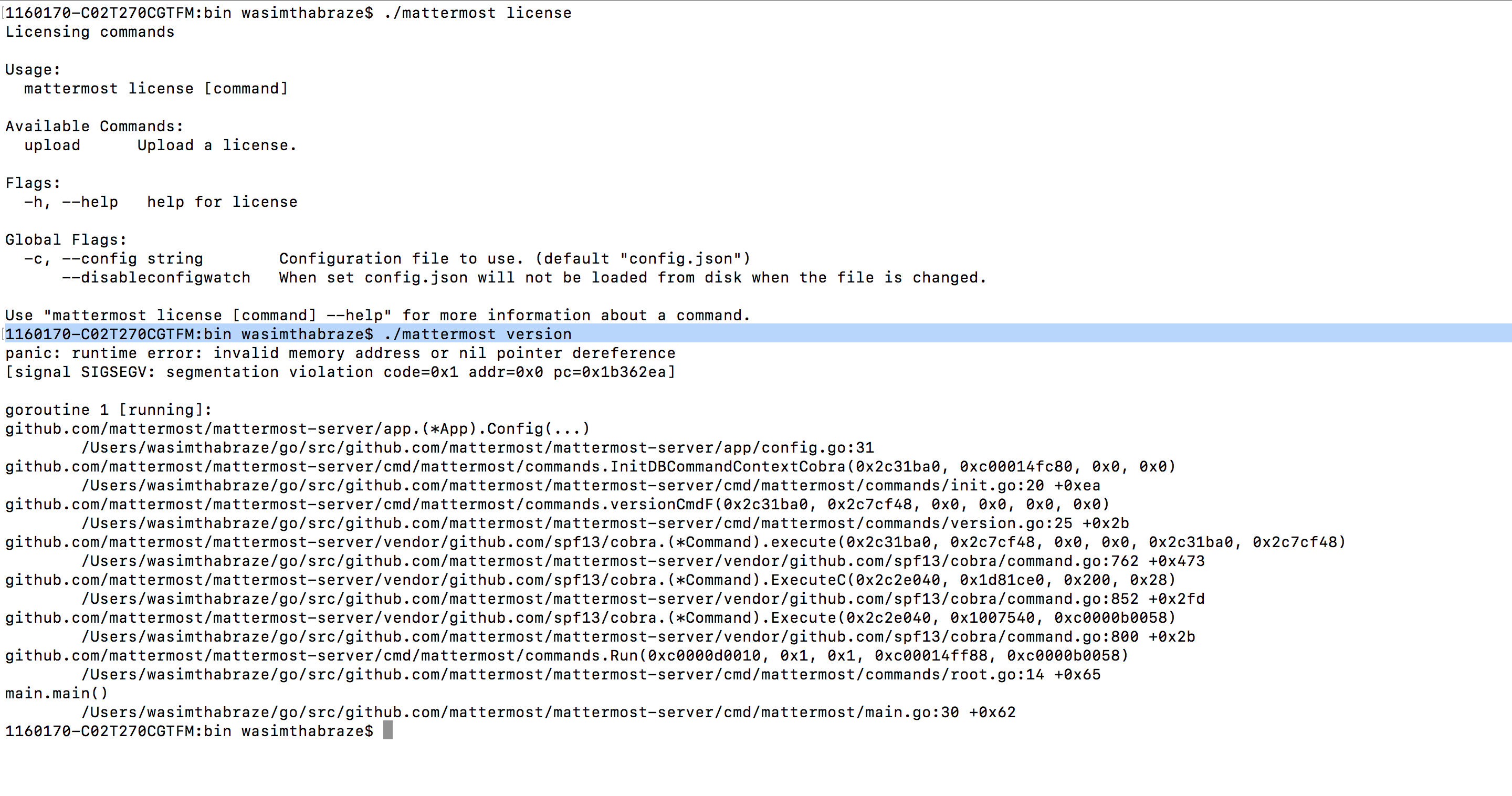
go version : 1.11
Update : I'm trying this on my Ubuntu machine
waseem18
on 30 Sep 2018
Thank you - I'll need to get a developer's help review the errr next. I linked some of the conversation from here to your post in the Developers channel https://pre-release.mattermost.com/core/pl/a5gdbgbzebfeiri6paabf6ca5o
jasonblais
on 30 Sep 2018
Thanks for that @jasonblais
waseem18
on 30 Sep 2018
So I got it running finally by another way.
Instead of generating an executable and running it, I tried running the main.go file present in the cmd directory with the arguments as commands and it seems to work.
Example : go run main.go team create --name mynewteam --display_name "My New Team"
Now that I got the setup running, I've started working on the issue and will put a PR once done. :)
waseem18
on 30 Sep 2018
Glad you got it working :)
jasonblais
on 30 Sep 2018
Related issues
esethna
·
3Comments
 clarfonthey
·
3Comments
clarfonthey
·
3Comments
 Pomax
·
3Comments
esethna
·
3Comments
esethna
·
3Comments
Pomax
·
3Comments
esethna
·
3Comments
esethna
·
3Comments