I am using Phaser3 to make an Angry Birds like game, where I throw a ball. I am not totally sure I need this feature yet in my game, but I was trying to find the prediction of the trajectory of the ball, after I set a velocity to it. I saw that the matterj.s code does first this on the body update:
body.force.x += body.mass * gravity.x * gravityScale;
and then this on the engine:
body.velocity.y = (velocityPrevY * frictionAir * correction) + (body.force.y / body.mass) * deltaTimeSquared;
When the slingshot fires, and the drag ends, I do:
gameObject.setVelocity((gameObject.startPos.x - gameObject.x) * SPEED,
                       (gameObject.startPos.y - gameObject.y) * SPEED)
While dragging occurs, I try to predict the various positions, with my knowledge and memory of school-level physics.
...
gameObject.x = dragX;
gameObject.y = dragY;

const velocityX = (gameObject.startPos.x - dragX) * SPEED;
const velocityY = (gameObject.startPos.y - dragY) * SPEED;

let index = 1;
for (let trajectoryPoint of trajectoryPoints.getChildren()) {
  trajectoryPoint.x = gameObject.x + index * velocityX;
  trajectoryPoint.y = gameObject.y + index * velocityY + GRAVITY * index * (index + 1) / 2;
  index++;
}
...
with GRAVITY being the matter.js gravity, and gameObject being the ball. This gives me a nice trajectory, similar to what matter.js does, but not quite there... Any idea what I am missing?
 strahius
All 7 comments
That doesn't look correct to me, you're missing the airFriction term for one thing?
I'd suggest the easiest way to do this is to take note of the projectile's initial position and angle, then literally call Body.update(...) on it in a loop, taking a clone of its body.position vectors and putting them into an array, then restoring it back to the original position?
 liabru
on 27 Mar 2018
liabru
on 27 Mar 2018
@liabru airFriction is 0 in my setup, so it's out of the equations.
Thanks for the suggestion, that sounds very reasonable! I just didn't want to deal with things like deltaTime, timeScale and correction, but I can look at how Phaser uses matter.js and passes those. I will try this in the next couple of days, and report back here, if you can wait before you close this.
strahius
on 27 Mar 2018
Certainly sounds like one way of doing it, though it would be awesome in the future to use an equation to truly predict the path instead of precomputing it.
 hexus
on 27 Mar 2018
hexus
on 27 Mar 2018
I just didn't want to deal with things like deltaTime, timeScale and correction
Don't worry you only need to pass deltaTime (i.e. time between frames, e.g. usually just 1 / 60 for a fixed 60fps frame rate), the other two are optional and default to 1.
Certainly sounds like one way of doing it, though it would be awesome in the future to use an equation to truly predict the path instead of precomputing it.
There might be a direct equation (think parabolas) but you shouldn't use it, since it won't match with the results of the more generalised (but less accurate) Verlet integration which the engine uses :)
liabru
on 27 Mar 2018
@liabru I am getting closer, but still not quite there... You said all I need to do is run the Body.update but this one (as stated in my initial comment) does not include the gravity calculations, so my projected line is just a straight line. So I thought I needed to add the Engine._bodiesApplyGravity relevant part. I wll post what I have so far. It's Phaser code, but I think it's the matter.js part should be very close to matter.js
ball.setStatic(false);
// Pretend to apply the velocity here, will revert position later
// This is the same velocity that is is being applied to the ball, as when
// we actually release the mouse pointer.
ball.setVelocity((gameObject.startPos.x - gameObject.x) * SPEED,
                 (gameObject.startPos.y - gameObject.y) * SPEED)
const forceY = ball.body.force.y;
// Set y force to y, to start from a clear state
ball.body.force.y = 0;

// Iterate over our predicted trajectory points pool and update their position
for (let trajectoryPoint of trajectoryPoints.getChildren()) {

  // Update gravity first
  ball.body.force.y += ball.body.mass * GRAVITY * 0.001 // gravityScale;

  // Run matterjs engine's update on our body
  Phaser.Physics.Matter.Matter.Body.update(ball.body, 16.19, 1, 1);

  trajectoryPoint.x = ball.body.position.x;
  trajectoryPoint.y = ball.body.position.y;
}

// Revert ball to its original state
ball.setStatic(true);
ball.body.force.y = forceY;
ball.body.position.x = dragX;
ball.body.position.y = dragY;
with ball being the matterjs object, and gameObject the Phaser sprite that uses it.
With this code, I do get a trajectory of a projectile motion, but the curve is too steep, the ball actually goes higher when I release it.
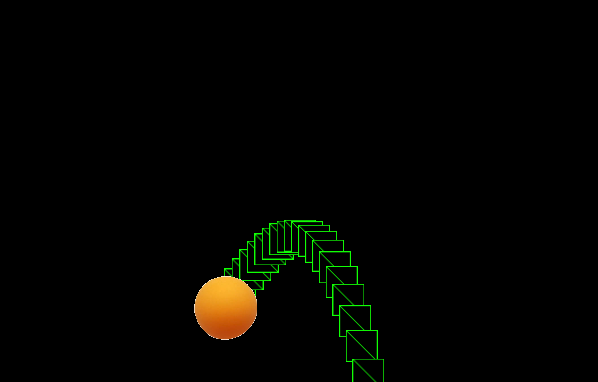
strahius
on 29 Mar 2018
My best guess is that you should ensure phaser is running the physics with fixed delta set to 16.19 and that the force (and your custom gravity) used is exactly the same. Hopefully that sorts it so closing this one, thanks.
liabru
on 11 Jun 2018
@liabru and for whoever else comes across this, I just figured it out! You need to also clear the forces, at the end of the update, as this is what Engine.update does, it calls _bodiesClearForces at the end. So, you need to do 3 main things:
- Update the force
- Run the body's update
- Clear its forces
strahius
on 30 Jul 2018
Related issues
 maximilianberndt
·
4Comments
maximilianberndt
·
4Comments
 christianmalek
·
4Comments
christianmalek
·
4Comments
 koko236
·
3Comments
koko236
·
3Comments
 253153
·
3Comments
253153
·
3Comments
 Zhaopengyang
·
3Comments
Zhaopengyang
·
3Comments
Most helpful comment
@liabru and for whoever else comes across this, I just figured it out! You need to also clear the forces, at the end of the update, as this is what
Engine.updatedoes, it calls_bodiesClearForcesat the end. So, you need to do 3 main things: