Materialdesigninxamltoolkit: Snackbar - "Auto" ActionButton placement doesn't always work
My app defaults it to SeparateLine because Snoop shows 51 on ActualHeight of SnackBar
Forced to Inline to show ActualHeight:
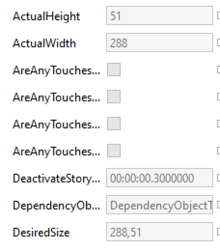
This is when app defaults it to SeparateLine
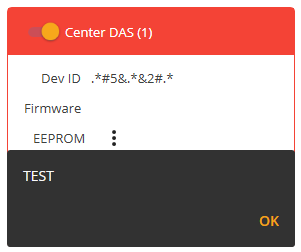
From Kevin:
"I think the issue is our 49 default is just a little too small and we need to bump it up a bit or revisit trying to make it a little more dynamic"
Forcing materialDesign:SnackbarMessage.InlineActionButtonMaxHeight="51" proves this theory
 bebenins
All 5 comments
I took the 49 from https://material.io/components/snackbars#specs as 48 is the minimum height for a single line message and above that the action button is moved on separate line. Seems that was only working for me. It would be no problem to set it to 58 or so.
But I found a potential dangerous loop with the dependency of the placement to the message size:
Take a text that is long enough to break on a second line but short enough for a single line when the action button is on a separate line. In that case it would change infinitely.
Also this image from the specs seems to recommend a separate line for the action button, when the button it self is wider:
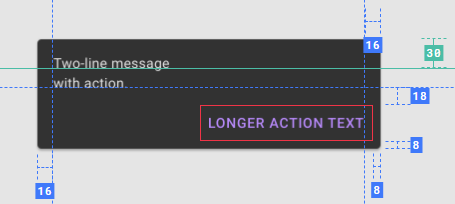
So may be a SnackbarMessage.InlineActionButtonMaxWidth with default 100 (about one third of min-width 288) or so would be better.
Or even better a relative width-share to support wider snackbars like example 5 from Demo-App.
SnackbarMessage.InlineActionButtonMaxRelativeWidth with default 0.33
 greuelpirat
on 9 May 2020
greuelpirat
on 9 May 2020
Hm. Forget ae2d71c. this also can lead to layout loops.
I think only SnackbarMessage.InlineActionButtonMaxWidth with a default 100 or tell me what value you want here is stable.
greuelpirat
on 9 May 2020
If no one has a better idea I stayed with the InlineActionButtonMaxHeight and increased the threshold to 55.
This is better for wider snackbars (like example 5 in demo app) then using a discrete button width.
To avoid layout loops the value must stay below 94 (the height of single line message with button on separate line)
greuelpirat
on 12 May 2020
Thank you very much for making this change. I fully trust your judgement :)
bebenins
on 13 May 2020
I think 55 is a reasonable default.
 Keboo
on 15 May 2020
Keboo
on 15 May 2020
Related issues
 olegsavelos
·
11Comments
greuelpirat
·
12Comments
olegsavelos
·
11Comments
greuelpirat
·
12Comments
 zirius666
·
12Comments
zirius666
·
12Comments
 sagevpremium
·
10Comments
sagevpremium
·
10Comments
 darturdotnetdeveloper
·
11Comments
darturdotnetdeveloper
·
11Comments
Most helpful comment
If no one has a better idea I stayed with the
InlineActionButtonMaxHeightand increased the threshold to55.This is better for wider snackbars (like example 5 in demo app) then using a discrete button width.
To avoid layout loops the value must stay below
94(the height of single line message with button on separate line)