Material: menuBar: failure to remove md-has-open-menu selector
Bug:
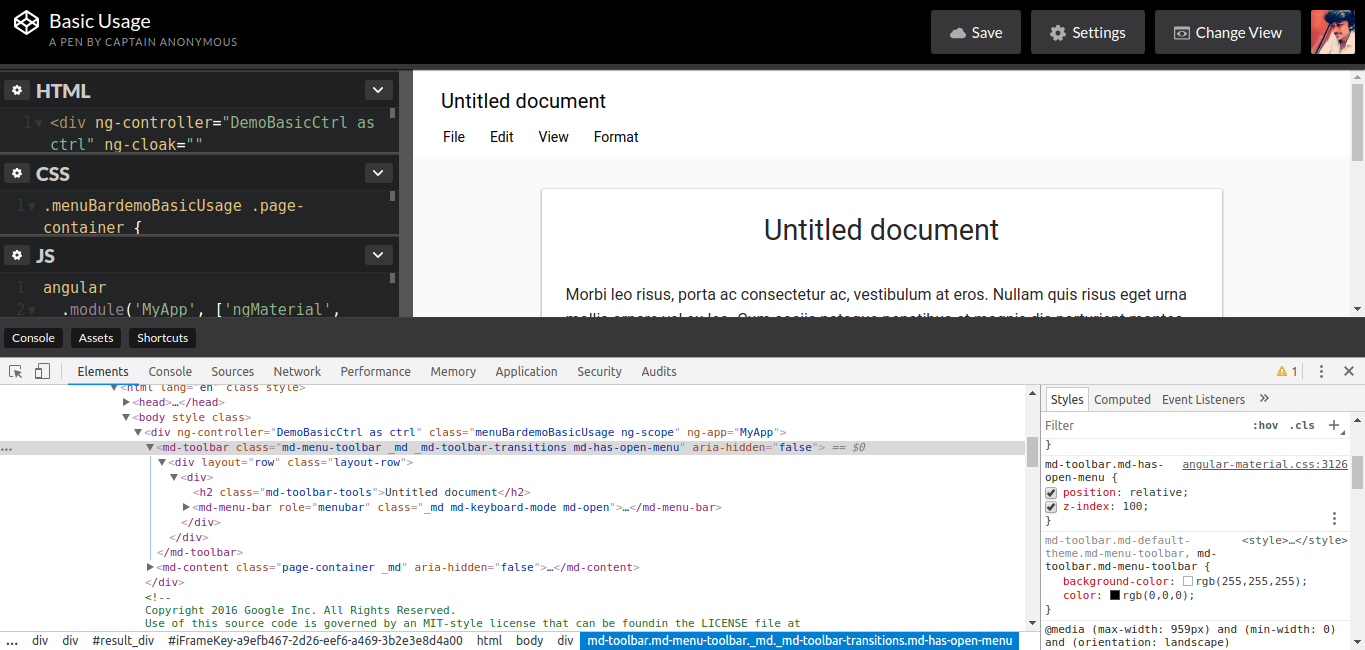
When md-menu is used inside md-toolbar after clicking on some nested menu option, the md-toolbar still contains md-has-open-menu which causes z-index of toolbar to be increased all the time.
What is the expected behavior?
md-toolbar should remove md-has-open-menu after closing the md-menu.
What is the current behavior?
md-toolbar contains md-has-open-menu even after closing the md-menu.
CodePen and steps to reproduce the issue:
CodePen Demo which shows your issue: https://codepen.io/sivakrrish/pen/LdwzoV
Detailed Reproduction Steps:
- Select on _View_ menu.
- Click on _Mode --> Edit_.
- Now look at the md-toolbar, it will still contain .md-has-open-menu.
What is the use-case or motivation for changing an existing behavior?
The z-index caused because of md-has-open-menu breaks UI for some other elements(for ex: md-sidenav ui breaks, since its z-index is only 60 while that has 100)
Which versions of AngularJS, Material, OS, and browsers are affected?
The issue was there from v1.1.1 till now v1.1.8
Is there anything else we should know? Stack Traces, Screenshots, etc.
 sivakrrish1994
All 12 comments
When the user selects any of the menu items, it invokes the open routine in MenuController from where we cannot access the toolbar element as it is two levels above. Menu items like edit, presentation are contained in menu bar and this menu bar is contained in toolbar, therefore this.parentElement would not retrieve the toolbar. So I propose that we remove the class of "md-has-open-menu" from the jQuery object retrieved from $(".md-menu-toolbar") in the open routine in MenuController.
If you agree to the proposed solution, I can submit a PR with the fix.
 simplesethia
on 19 Dec 2018
simplesethia
on 19 Dec 2018
@Splaktar - Please review and suggest.
simplesethia
on 21 Dec 2018
@simplesethia sorry for the delay in responding. Things are busy here with the holidays.
Please take a look at the MenuBarController. It stores a reference in this.parentToolbar:
https://github.com/angular/material/blob/e0463c00083703b4df9186b43363b6132efe3c14/src/components/menuBar/js/menuBarController.js#L35/
The md-has-open-menu class gets removed by self.disableOpenOnHover() on line 62 in
https://github.com/angular/material/blob/e0463c00083703b4df9186b43363b6132efe3c14/src/components/menuBar/js/menuBarController.js#L47-L66
There may be some reason that these checks here are failing for nested menus and not calling self.disableOpenOnHover() when the $mdMenuClose event is fired. Or it might be that the $mdMenuClose event isn't bubbling up from a nested menu.
 Splaktar
on 27 Dec 2018
Splaktar
on 27 Dec 2018
@Splaktar - When we select a menu item, open routine is invoked in menuController. In the open routine, the call to enableHoverListener routine pushes $mdMenuOpen and $mdMenuClose events but these do not have code to remove the class from the toolbar. Also $mdmenuOpen event is emitted in open routine whereas all other events are popped up in disableHoverListener routine call.
simplesethia
on 7 Jan 2019
Based on the above analysis, we would need to remove the class from the menu toolbar in the menu controller open routine (solution as suggested in my first post).
simplesethia
on 7 Jan 2019
Is the issue fixed in 1.1.14? @Splaktar
sivakrrish1994
on 19 Mar 2019
@sivakrrish1994 no, there have been no PRs posted to fix this issue.
Splaktar
on 1 Apr 2019
@Splaktar I'd like to try fixing this, as we're affected by it. Maybe you can help me out get started?
I noticed that there is a difference in behavior, depending on how the menu is closed. We have this behavior with a menu that has 2 levels.
When I open both levels and close the menu by clicking the background, the el will point to the element associated with my mdMenu on the menu bar.
When I open both levels and close the menu by clicking an item in the second level of the menu, then the el will point to the element associated with the first level of the menu, which then causes the handler to work incorrectly.
I'm not sure why this would be happening though :(
 oliversalzburg
on 8 Jan 2020
oliversalzburg
on 8 Jan 2020
It is possibly because closeAll is supplied to $mdMenu.hide()
https://github.com/angular/material/blob/bc7833b45a5de5af3a01ba8445f7e24ca4311faa/src/components/menu/js/menuServiceProvider.js#L239
https://github.com/angular/material/blob/7878d235f8c232e9a685d72f4e10b1a74576e6c4/src/components/menu/js/menuController.js#L186
which then simply removes the elements without triggering an additional $mdMenuClose event for the parent menus?
oliversalzburg
on 8 Jan 2020
@oliversalzburg sorry for the delay.
Are you referring to this el?
https://github.com/angular/material/blob/e0463c00083703b4df9186b43363b6132efe3c14/src/components/menuBar/js/menuBarController.js#L47
Perhaps we should be calling self.disableOpenOnHover(); every time the $rootScope gets a $mdMenuClose event instead of only when parentMenu can be resolved in a satisfactory way. I'd have to do some manual testing and debugging here. Perhaps we should check the opts for closeAll being truthy and then call it in that case? That may be less risky.
https://github.com/angular/material/blob/e0463c00083703b4df9186b43363b6132efe3c14/src/components/menuBar/js/menuBarController.js#L62
The $mdMenuOpen handler clearly has different logic atm which is likely why we have this issue:
https://github.com/angular/material/blob/e0463c00083703b4df9186b43363b6132efe3c14/src/components/menuBar/js/menuBarController.js#L37-L45
Hopefully this helps give you a path to debug?
Splaktar
on 15 Jan 2020
I just wasted all the time I had allocated for this on trying to build the library (Python 2 missing, VS 2005 missing, ...). I hope to get back to it at a later time again.
Lesson learned: I probably wouldn't have wasted any of that time if I had just downgraded to NodeJS <12.
oliversalzburg
on 15 Jan 2020
Alright, I have been working on this for some time now and I feel like it boils down to part of the logic assuming that menus are always part of the DOM structure of their parents, which is not the case.
Menus are often attached directly to the body. So when the problematic code receives the click event on the menu item, it ultimately tries to find the root menu through DOM traversal, but it will only end up at the body and fail.
The other way around doesn't work either. In the $mdMenuOpen case, we have that self.getMenus() call to determine if the child is even part of our own menu structure. That's fine while the menu isn't open yet, because at that time the nodes are still in the child-parent relationship in the DOM where the developer left them. Attempting to do the same in the $mdMenuClose case will not work, because the menu no longer has any children (they have been moved/attached to the body).
Thus, I opted to store the original mdMenuBarController on the menu and use that for reference when handling the event. That seems to work out so far. More testing is likely needed. PR incoming.
oliversalzburg
on 21 Jan 2020
Related issues
 buzybee83
·
3Comments
buzybee83
·
3Comments
 robertmesserle
·
3Comments
robertmesserle
·
3Comments
 sbondor
·
3Comments
sbondor
·
3Comments
 nikhildev
·
3Comments
nikhildev
·
3Comments
 achaussende
·
3Comments
achaussende
·
3Comments