Material: Texts of titleLabel and detailLabel disappear until new controller is pushed
Hi,
I got this weird problem: in my project, when I set the texts of titleLabel and detailLabel, they appear to be empty, like this:

But when I (push) segue to another view controller and come back, titleLable and detailLabel texts appear and they work since then.

I have overwhelmed with this problem for 2 days but got no clues how to fix.
Do you have any ideas?
Regards,
UPDATE: I just upgraded to:
  - Material (2.12.15):
    - Material/Core (= 2.12.15)
  - Material/Core (2.12.15):
    - Motion (~> 1.2.5)
  - Motion (1.2.5):
    - Motion/Core (= 1.2.5)
  - Motion/Core (1.2.5)
But still no luck!
 quanguyen
All 6 comments
Are you setting the initial navigationItem values in the your rootViewController?
 danieldahan
on 9 Nov 2017
danieldahan
on 9 Nov 2017
Below is my storyboard:
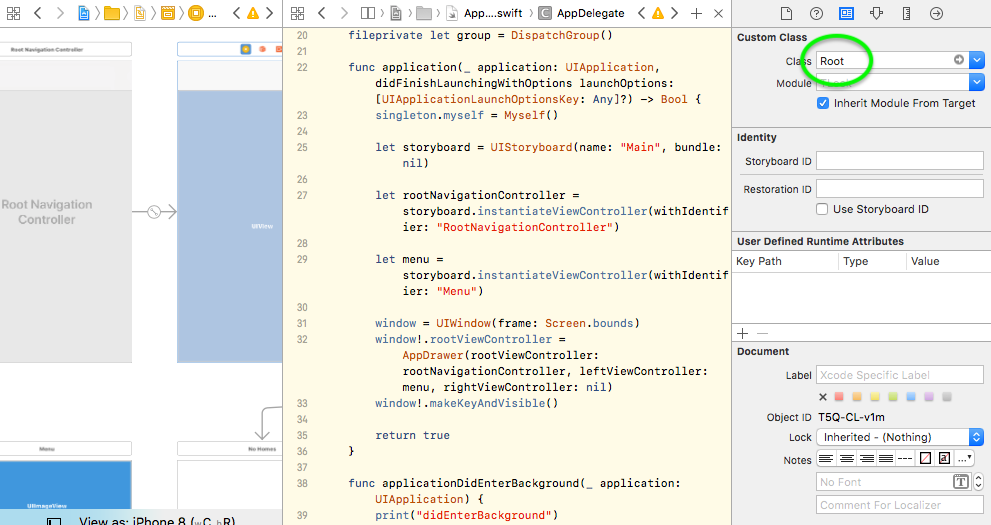
In Root, I "prepare" the toolbar:
private func prepareToolbar() {
        navigationItem.leftViews = [menuButton]
        navigationItem.rightViews = [gatewaysButton, shareButton, settingsButton]

        navigationItem.titleLabel.textAlignment = .left
        navigationItem.detailLabel.textAlignment = .left

// is this what you mean "setting the initial navigationItem values in the rootViewController"??
// If there's a better way, please show me.
    }
and set observers to change the title and detail after some other actions are finished:
titleObserver = NotificationCenter.default.addObserver(forName: Notification.Name(AppNotification.title.rawValue), object: nil, queue: OperationQueue.main, using: { [weak self] (notification) in
            guard let strongSelf = self else { return }
            strongSelf.navigationItem.titleLabel.text = notification.object as? String

            print("title didSet: \(strongSelf.navigationItem.titleLabel.text)")
        })

detailObserver = NotificationCenter.default.addObserver(forName: Notification.Name(AppNotification.detail.rawValue), object: nil, queue: OperationQueue.main, using: { [weak self] (notification) in
            guard let strongSelf = self else { return }
            strongSelf.navigationItem.detailLabel.text = notification.object as? String

            print("detail didSet: \(strongSelf.navigationItem.detailLabel.text)")
        })
I am sure the observers work because:
- The console prints out
title didSet: ...anddetail didSet...the right values when my actions are done - If I (push)segue to another view controller and come back to
Root,titleanddetailare there! (as reported in my question)
Probably not informative, I still upload AppDrawer and RootNavigationController in the zip file below for your reference (if needed).
quanguyen
on 10 Nov 2017
I will take a look at this later today. Thank you!
danieldahan
on 13 Nov 2017
Hi Daniel,
I just looked at this problem seriously and found a work around for this issue:
In viewDidLoad of my Root (which is a UIViewController), if I set a default value for titleLabel and detailLabel texts, then everything is fine, i.e. after I "pre-set" the value in viewDidLoad, I can successfully set the titleLabel and detailLabel texts in my notification observers.
My viewDidLoad:
override func viewDidLoad() {
    super.viewDidLoad()

    navigationItem.titleLabel.text = "My title"
    navigationItem.detailLabel.text = "My detail"

    // other actions
}
Regards,
quanguyen
on 24 Nov 2017
Awesome! :)
danieldahan
on 24 Nov 2017
@danieldahan I believe this is a bug. The workaround from @quanguyen works - where you set the titleLabel in viewDidLoad, and can then set it anytime after - but we shouldn't need to do this. IMO, we should be able to set the titleLabel at any point and it should update it.
Or perhaps another function we can call to layout again so it shows.
 MattKiazyk
on 13 Dec 2017
MattKiazyk
on 13 Dec 2017
Related issues
 karstengresch
·
15Comments
karstengresch
·
15Comments
 VNadygin
·
18Comments
VNadygin
·
18Comments
 ijameelkhan
·
23Comments
ijameelkhan
·
23Comments
 ariedoelman
·
34Comments
ariedoelman
·
34Comments
 timoschwarzer
·
19Comments
timoschwarzer
·
19Comments
Most helpful comment
@danieldahan I believe this is a bug. The workaround from @quanguyen works - where you set the titleLabel in viewDidLoad, and can then set it anytime after - but we shouldn't need to do this. IMO, we should be able to set the titleLabel at any point and it should update it.
Or perhaps another function we can call to layout again so it shows.