Material-ui: [Autocomplete] Input characters are added even when the IME is unsettled with freeSolo and multiple
An IME (Input Method Editor) holds internal state of keys are pressed and it confirms characters when the Enter is pressed. Then the Autocomplete adds into its values because the Enter is detected. It causes input characters is left on the input element but the characters has already added.
Easy to see in GIF: https://gyazo.com/4c1c5607d5500eed6845018540e0d7c6
- [x] The issue is present in the latest release.
- [x] I have searched the issues of this repository and believe that this is not a duplicate.
Current Behavior 😯
When the Enter is pressed, input characters are added into Autocomplete values.
I think there are 2 ways to get that behavior.
- Open popup and highlight something then hit Enter. (difficult to reproduce)
- Make freeSolo and multiple props true. Type something then hit Enter. (easy to reproduce)
Expected Behavior 🤔
DON'T add characters into Autocomplete values while the IME is unsettled.
To detect IME is unsettled, I am recommending to use isComposing flag. It works fine on my environments (chrome, safari and firefox). You can try it on codesandbox.io by link below.
Steps to Reproduce 🕹
Steps:
- See https://codesandbox.io/s/autocomplete-ime-behavior-9qgq2
- Make IME on.
- Type something in the above Autocomplete then hit Enter.
- It added but unsettled characters are left on TextField.
- You can try another behavior which I expect on the next Autocomplete.
macOS/Chrome and Safari cause this problem. Firefox does not. I didn't test other browsers.
Context 🔦
I am using an autocomplete in Japanese. The Autocomplete works almost fine but IME makes it chaos.
I resolved this problem by below code, but I think also it helps community.
<Autocomplete
  multiple
  freeSolo
  options={[]}
  defaultValue={[]}
  renderInput={params => (
    <TextField
      {...params}
      onKeyDownCapture={e =>
        e.key === 'Enter' && e.nativeEvent.isComposing
          ? e.stopPropagation()
          : undefined
      }
    />
  )}
/>
As far as I can see, I may be able to fix the Autocomplete behavior.
I think that inserting && !event.nativeEvent.isComposing into here will be fine.
Your Environment 🌎
| Tech | Version |
| ----------- | ------- |
| material-ui/core | v4.9.0 |
| material-ui/lab | v4.0.0-alpha.40 |
| React | v16.12.0 |
| Browser | macOS, Chrome 79.0.3945.130/Safari 13.0.4/Firefox 72.0.2 |
 teramotodaiki
All 12 comments
Thanks for the issue, IME is an important concern. I don't have any objection with your proposed patch. However, if you could explore the following, we would highly appreciate it:
How does the other implementations solve the problem? We could use this benchmark list: https://trello.com/c/qrI0FOna/2335-autocomplete.
 oliviertassinari
on 28 Jan 2020
oliviertassinari
on 28 Jan 2020
I'm going to research when I have time. :)
teramotodaiki
on 28 Jan 2020
Thank you, it feels odd that we need to dive into the event.nativeEvent, I would hope there is a simpler solution. Ant Design might be a good place to start looking as they have a strong audience that uses IME.
oliviertassinari
on 28 Jan 2020
I'm back. This is the survey of how the Benchmarks resolve this problem.
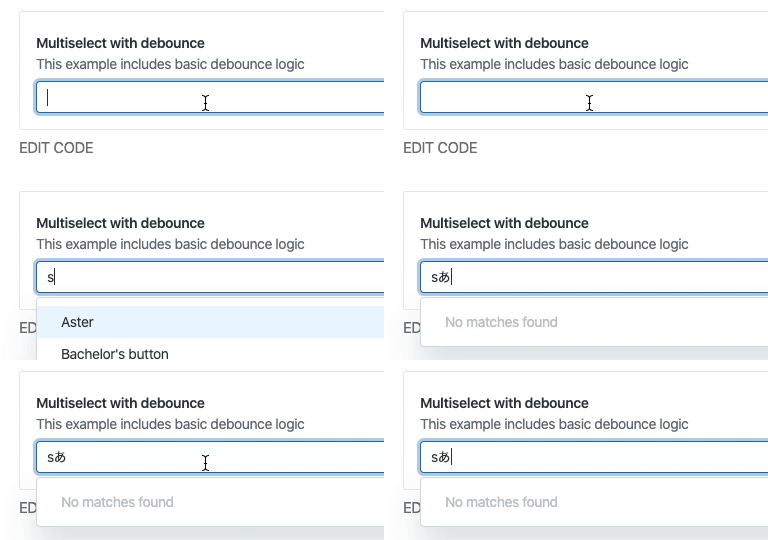
react-components ❌
- https://garden.zendesk.com/react-components/dropdowns/
- IME is canceled 😢
UI Select (AngularUI) ❌
- https://angular-ui.github.io/ui-select/
- Skip update while IME is unsettled.
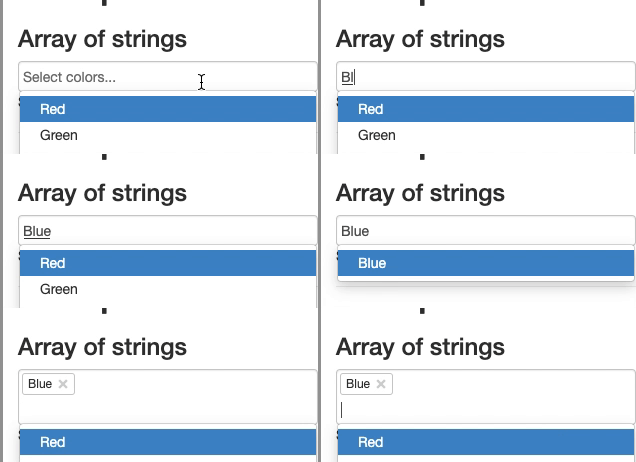
- I can't read the source because not familiar to Angular.
Ant Design ✅
- https://ant.design/components/auto-complete/
- https://ant.design/components/select/
- It depends on rc-select. See below.
🆕 rc-select (react-component/select) ✅
- https://github.com/react-component/select
- It doesn't confirm while IME is unsettled. ✅
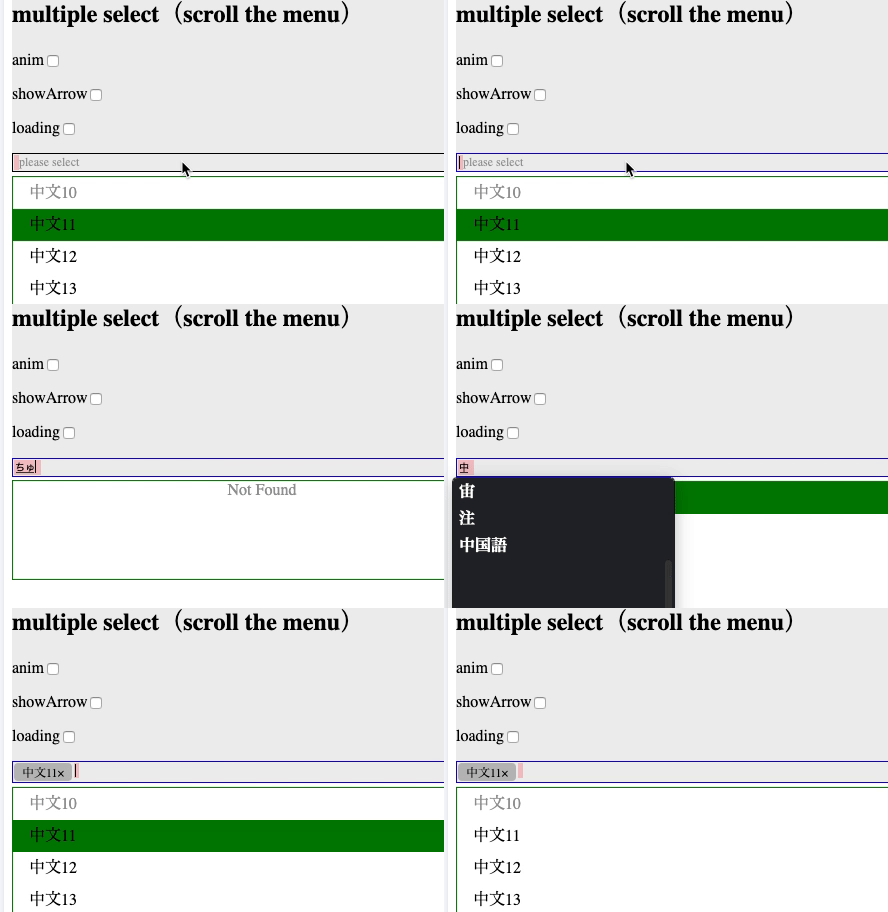
rc-select uses KeyboardEvent.which to handle Enter.
- Source: https://github.com/react-component/select/blob/437b8c99c336a3afc62443c87fafcec456e07341/src/OptionList.tsx#L159
What's
KeyboardEvent.whichof react?whichis an alias for eitherkeyCodeorcharCodedepending on the type of the event.
https://github.com/facebook/react/blob/b87aabdfe1b7461e7331abb3601d9e6bb27544bc/packages/react-dom/src/events/SyntheticKeyboardEvent.js#L52-L62What's
KeyboardEvent.keyCodeof DOM Event?The deprecated KeyboardEvent.keyCode read-only property represents a system and implementation dependent numerical code identifying the unmodified value of the pressed key.
https://developer.mozilla.org/en-US/docs/Web/API/KeyboardEvent/keyCodeWhy can rc-select detect IME is unsettled?
Because keyCode is 229 while using IME. Enter is 13.If an Input Method Editor is processing key input and the event is keydown, return 229.
https://www.w3.org/TR/2014/WD-DOM-Level-3-Events-20140925/#h4_determine-keydown-keyup-keyCodeFYI: KeyboardEvent.which API is also Deprecated, but it is different to React.KeyboardEvent.which.
Blueprint 🤔
- https://blueprintjs.com/docs/#select/select-component
- It confirms when the Enter key is hit even while IME is unsettled.
- But unsettled characters will been cleared. It looks good. ✅
- This way is faster than my approach because user hit Enter key only once. ✅
- Sometimes we need to type something after confirm IME. But it can't. ❌
UI Fablic ❌
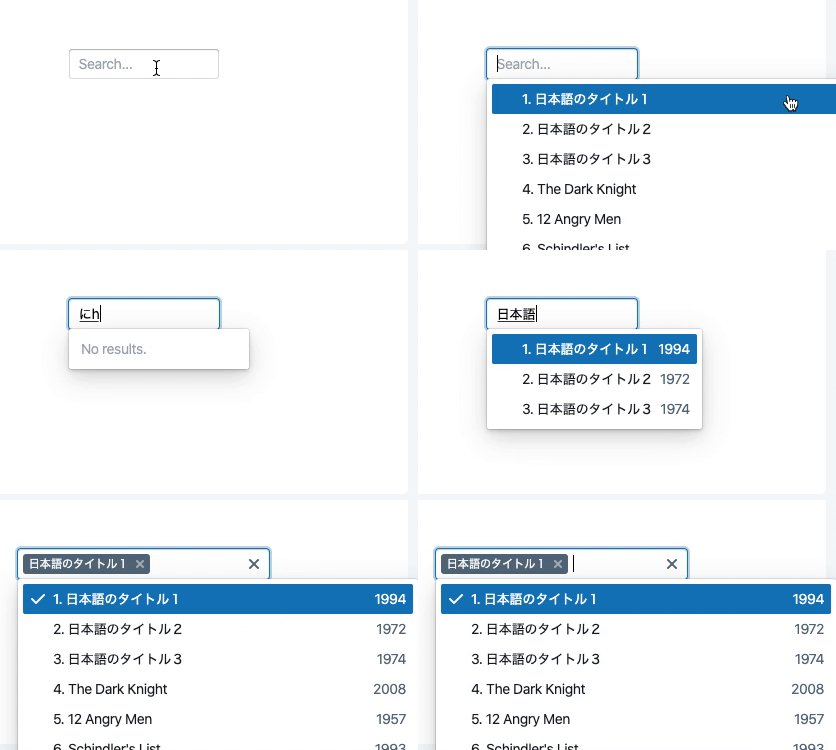
- https://developer.microsoft.com/en-us/fabric/#/controls/web/combobox
- Skip update while IME is unsettled.

NEXT SURVEY if I have time...
https://ej2.syncfusion.com/react/documentation/auto-complete/getting-started/?no-cache=1
https://github.com/downshift-js/downshift
https://github.com/jquense/react-widgets
https://github.com/moroshko/react-autosuggest
https://jqueryui.com/autocomplete/
https://react-select.com/
https://rsuitejs.com/en/components/input-picker
https://select2.org/getting-started/installation
https://ui.reach.tech/combobox/
https://vuetifyjs.com/en/components/combobox
https://sancho-ui.com/components/combobox
https://www.telerik.com/kendo-react-ui/components/dropdowns/
https://www.w3.org/TR/wai-aria-practices/#combobox
https://evergreen.segment.com/components/tag-input/
https://youtube.com/
https://google.com/
https://github.com/
https://semantic-ui.com/modules/dropdown.html
Is there anything you are particularly interested in?
teramotodaiki
on 28 Jan 2020
@teramotodaiki Oh wow, super interesting! What do you think of this fix?
https://github.com/select2/select2/pull/2483/files#diff-1fb8e09d75683cc4dd4a88850714595fR2105
oliviertassinari
on 28 Jan 2020
Hmm... It's better way on real world. event.keyCode is legacy way but still working.
teramotodaiki
on 28 Jan 2020
I think there are 2 ways to fix.
Deprecated, but most browsers have
event.keyCode(DOM)
https://developer.mozilla.org/en-US/docs/Web/API/KeyboardEvent/keyCodeModern, and the best API for this purpose is
event.isComposing(DOM)
https://developer.mozilla.org/en-US/docs/Web/API/KeyboardEvent/isComposing
React wraps event.keyCode (DOM) internally to make event.which (React). So we might use event.which (React) instead of event.isComposing (DOM).
teramotodaiki
on 28 Jan 2020
@teramotodaiki 👍 for going with 2.
oliviertassinari
on 28 Jan 2020
@oliviertassinari Do you mean using event.nativeEvent.isComposing?
I agree to 2. This is confirmation.
teramotodaiki
on 28 Jan 2020
Yes, unless somebody wants to weigh into another approach, it seems to be the more reliable approach.
oliviertassinari
on 28 Jan 2020
I'm sorry but 1 might be better because macOS/Safari returns isComposing==false when the IME is confirmed. This is a cheat sheet of how does browsers do when IME is confirmed.
| browser | fire onKeyDown | event.key | event.which | event.nativeEvent.isComposing |
| --- | --- | --- | --- | --- |
| macOS/Chrome | yes | Enter | 229 | true |
| macOS/Safari | yes | Enter | 229 | false |
| macOS/Firefox | yes | Process | 229 | true |
| Win10/Edge | no | - | - | - |
| Win10/Chrome | yes | Process | 229 | true |
event: React.KeyboardEvent
The event.which may be only solution of this problem. 😅
What do you think about this? @oliviertassinari
teramotodaiki
on 29 Jan 2020
Thanks for not giving up and keep digging. No problem for me, I believe event.which Is how Ant Design and select2 solve this problem, both projects have a strong Chinese community, I would expect that solved the issue relatively well.
oliviertassinari
on 29 Jan 2020
Related issues
 sys13
·
3Comments
sys13
·
3Comments
 newoga
·
3Comments
newoga
·
3Comments
 pola88
·
3Comments
pola88
·
3Comments
 finaiized
·
3Comments
finaiized
·
3Comments
 revskill10
·
3Comments
revskill10
·
3Comments