Material-ui: [ButtonBase] Bug with draggable HTML attribute
- [x] The issue is present in the latest release.
- [x] I have searched the issues of this repository and believe that this is not a duplicate.
A related issue is https://github.com/mui-org/material-ui/issues/16240
Current Behavior 😯
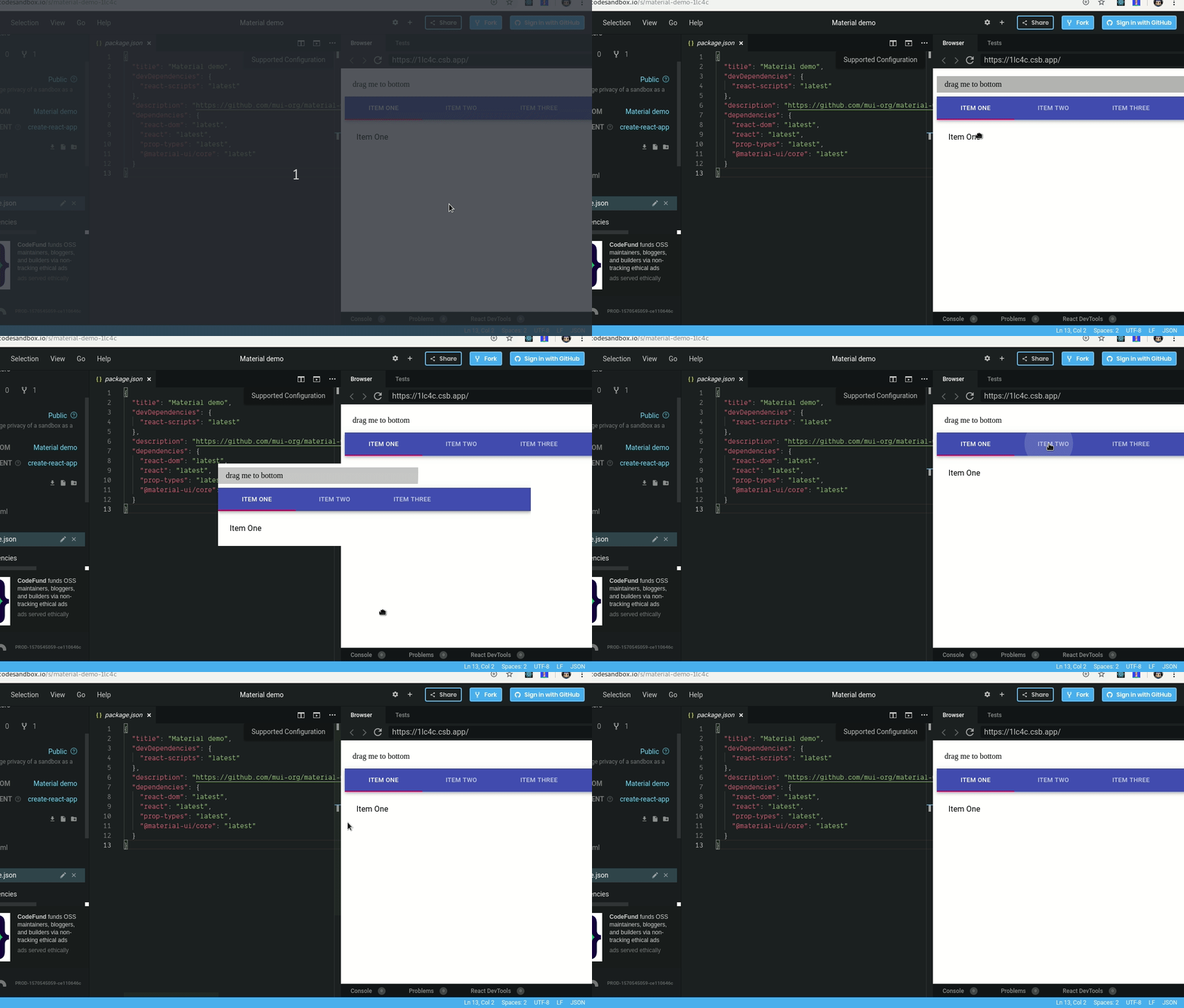
When drag an element that uses "ButtonBase", the draggable element on dragging in Chrome will get all view that overlaps the total area of the expanded ripple.
Expected Behavior 🤔
The draggable element on dragging must not consider the expanded area of ripple.
Steps to Reproduce 🕹
Steps:
Test the bug here -> CodeSandbox
- Click and hold on the "drag me to bottom" and drag it to bottom
- Click and hold on any tab and drag it
Your Environment 🌎
| Tech | Version |
| ----------- | ------- |
| Material-UI | v4.5.0 (latest) |
| React | 16.10 |
| Browser | Google Chrome - Version 77.0.3865.90 (Official Build) (64-bit) |
 jeovazero
All 6 comments
To be honest I would see this as a browser issue. It uses dimensions for the image without considering overflow of the parents.
This means that we would need to fix this for any component using overflow. Considering you can solve this in your app with https://developer.mozilla.org/en-US/docs/Web/API/DataTransfer/setDragImage I don't think we want to fix this in the core.
If somebody has an easy solution then we're listening of course.
 eps1lon
on 10 Oct 2019
eps1lon
on 10 Oct 2019
Hey, I found a possible solution in this issue: https://github.com/react-dnd/react-dnd/issues/832.
Adding 'transform: translate3d(0, 0, 0)' to the draggable element.
The explanation here.
My new codesandbox

jeovazero
on 10 Oct 2019
@jeovazero This is awesome. Thank you for sharing this. I think this is actually something we do want to apply in the core since it also affects repainting:

Notice the big green flash which means the whole area is repainted.
I don't know how to solve this yet. Simply adding the style to the list item didn't result in a smaller paint area.
eps1lon
on 10 Oct 2019
I would observe this for a bit. Might as well be an issue with chrome devtools and I could not find anything about overflow: hidden and repaint issues. I guess this is fine.
eps1lon
on 10 Oct 2019
I have an impression of déjà vu. I'm wondering if we didn't have an open issue in the past where we had too many layer surface because of transfrom translate style on the buttons 🤔.
 oliviertassinari
on 10 Oct 2019
oliviertassinari
on 10 Oct 2019
I don't think that we should create a new layer by default for our ripple elements. I think that we can ignore the problem as not very important.
oliviertassinari
on 30 Nov 2019
Related issues
 newoga
·
3Comments
newoga
·
3Comments
 reflog
·
3Comments
reflog
·
3Comments
 activatedgeek
·
3Comments
activatedgeek
·
3Comments
 FranBran
·
3Comments
FranBran
·
3Comments
 iamzhouyi
·
3Comments
iamzhouyi
·
3Comments
Most helpful comment
Hey, I found a possible solution in this issue: https://github.com/react-dnd/react-dnd/issues/832.
Adding 'transform: translate3d(0, 0, 0)' to the draggable element.
The explanation here.
My new codesandbox
