Material-ui: When dragging slider, if you leave browser window, release, and enter window again, it stays stuck dragging
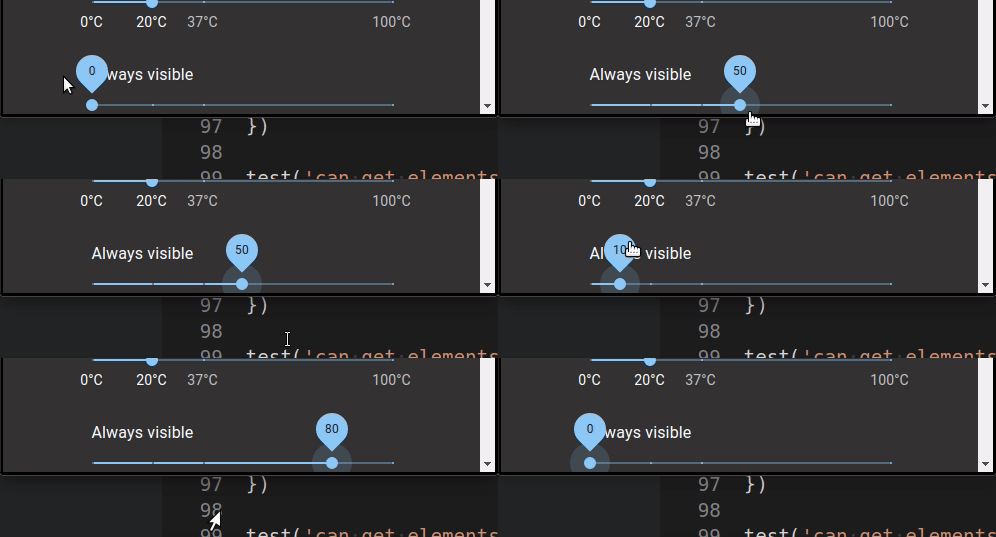
When you are dragging a slider, and you move the mouse pointer outside of the browser window, and release the mouse press outside, when you return to the slider, the slider is still dragging along with the mouse even though you are not pressing the mouse key anymore. This isnt an issue with my code, react version etc, as the same issue occurs on the Material UI "demo" page for the slider. However, the issue DOESNT occur in their sandbox example for some reason.
[x] Checked for similar issues. Found a thread from a year ago saying it had been fixed.
[x] Its not related to React or MUI version since the issue also occurs on the MUI demo page for sliders.
Current Behavior 😯
When you are dragging a slider, and you move the mouse pointer outside of the browser window, and release the mouse press outside, when you return to the slider, the slider is still dragging along with the mouse even though you are not pressing the mouse key anymore. This isnt an issue with my code, react version etc, as the same issue occurs on the Material UI "demo" page for the slider. However, the issue DOESNT occur in their sandbox example for some reason.
Expected Behavior 🤔
When you drag a slide to an edge, leave the browser window, and release the drag outside, the slider should be left on the edge it was last left on, and not stick to the mouse pointer when you hover back into the browser window.
Steps to Reproduce 🕹
https://material-ui.com/components/slider/ (DOESNT WORK)
https://codesandbox.io/s/3gtqd (WORKS FINE)
Steps:
- click on a slider to drag and keep holding mouse press
- move mouse pointer outside of browser (still holding mouse press)
- while outside browser window, release mouse press
- return mouse pointer over slider area
5 (slider will still be dragging following the cursor even though you stopped pressing the key)
Context 🔦
Your Environment 🌎
|Chrome| Latest |
| React | Latest |
|Material-UI| Latest |
|MacOS Mojave | Latest|
 PCMACHero
All 15 comments
@PCMACHero I can't reproduce the issue. What versions are you using?
 oliviertassinari
on 19 Sep 2019
oliviertassinari
on 19 Sep 2019
Reproducible in 4.4.2 with Chrome 75.0.3770.142 on macOS 10.14.6
 mbrookes
on 19 Sep 2019
mbrookes
on 19 Sep 2019
@PCMACHero I can't reproduce the issue. What versions are you using?
I didn't get it at first either. When you mouse back in you actually have to enter the slider again.
 eps1lon
on 19 Sep 2019
eps1lon
on 19 Sep 2019
I don't have to enter the slider again, but perhaps it's different in this slightly older version of Chrome?
mbrookes
on 19 Sep 2019
Yes, I believe that in my case too, I don't have to specifically hover over the slider again. Either way, it's strange that it works in the sandbox example but not on the demo page or my implementation.
PCMACHero
on 19 Sep 2019
@eps1lon Thanks for the video! I can reproduce it too.
The good news is that the bug is not present in https://v3.material-ui.com/lab/slider/. The regression comes from #16986. I would propose that we revert and that we encourage not to create a new component at each render in #16983 (we already have this constraint with the TransitionComponent prop).
oliviertassinari
on 19 Sep 2019
Couldn't reproduce it because I re-entered above the page TOC. At any other point the slider sticks. We're doing something weird with the page TOC I guess.
eps1lon
on 19 Sep 2019
Im new at MUI. Does your response mean it will fix the issue if I merely downgrade to v3?
PCMACHero
on 20 Sep 2019
@PCMACHero Olivier is suggesting that we revert the fix applied in #16986, and encourage the use described in here: https://github.com/mui-org/material-ui/issues/16983#issuecomment-520836867, presumably in the docs.
mbrookes
on 20 Sep 2019
Yes, I propose
- We revert #16986:
diff --git a/packages/material-ui/src/Slider/Slider.js b/packages/material-ui/src/Slider/Slider.js
index cac0edc69..8715ae63c 100644
--- a/packages/material-ui/src/Slider/Slider.js
+++ b/packages/material-ui/src/Slider/Slider.js
@@ -568,11 +568,7 @@ const Slider = React.forwardRef(function Slider(props, ref) {
   const handleMouseEnter = useEventCallback(event => {
     // If the slider was being interacted with but the mouse went off the window
     // and then re-entered while unclicked then end the interaction.
-    //
-    // In Firefox, the event can be triggered when a new DOM node is inserted and hovered.
-    // We need to make sure that the relatedTarget (The EventTarget the pointing device exited from)
-    // is not null (it should be the html element)
-    if (event.buttons === 0 && event.relatedTarget !== null) {
+    if (event.buttons === 0) {
       handleTouchEnd(event);
     }
   });
- We give up on #16983: @Astrantia should move the component outside the render method.
@PCMACHero If you want to work on the issue, you are welcome :).
oliviertassinari
on 20 Sep 2019
@oliviertassinari I want to work on this issue. With which solution are we going?
 neon98
on 1 Oct 2019
neon98
on 1 Oct 2019
@neon98 I have proposed a single solution. Point 1 and 2 are two sides of the same fix. Thanks for the care :).
oliviertassinari
on 1 Oct 2019
@oliviertassinari my bad! I'll submit the PR soon :D
neon98
on 1 Oct 2019
@neon98 Note that "good first issues" are meant to help new contributors get started, after a few, you should be able to move to harder issues :).
oliviertassinari
on 1 Oct 2019
@oliviertassinari definitely :)
neon98
on 1 Oct 2019
Related issues
 chris-hinds
·
3Comments
chris-hinds
·
3Comments
 newoga
·
3Comments
newoga
·
3Comments
 activatedgeek
·
3Comments
activatedgeek
·
3Comments
 mattmiddlesworth
·
3Comments
mattmiddlesworth
·
3Comments
 rbozan
·
3Comments
rbozan
·
3Comments