Material-ui: Customization - CSS in JS section needs an update?
- [x] This is not a v0.x issue.
- [x] I have searched the issues of this repository and believe that this is not a duplicate.
Expected Behavior 🤔
Current Behavior 😯
Examples 🌈
Context 🔦
If you install react-jss via npm, currently it installs with version 10.0.0-alpha.7 which has breaking changes included.
So I guess it should be updated with below? Correct me if I'm wrong, thanks
- import JssProvider from 'react-jss/lib/JssProvider';
- import { createGenerateClassName, jssPreset } from '@material-ui/core/styles';
+ import { JssProvider, createGenerateId } from 'react-jss';
+ import { jssPreset } from '@material-ui/core/styles';
 ifndefdeadmau5
All 23 comments
The new JSS v10 alpha seems to have deprecated the react-jss library, or at least the github repo, and there seem to be breaking API changes as well, the migration path of which is not clear.
 pheuter
on 3 Jan 2019
pheuter
on 3 Jan 2019
Customization - CSS in JS is for @material-ui/core. The equivalent for @material-ui/styles is https://material-ui.com/css-in-js/advanced/
 joshwooding
on 3 Jan 2019
joshwooding
on 3 Jan 2019
@kof It seems that the react-jss npm tags are incorrect.
 oliviertassinari
on 3 Jan 2019
oliviertassinari
on 3 Jan 2019
yeah, npm tags is a mess right now, need to find a way to set them each time with our current setup over lerna publish or drop lerna and do it differently
 kof
on 3 Jan 2019
kof
on 3 Jan 2019
@pheuter what made you think react-jss is deprecated?
kof
on 3 Jan 2019
Last I checked the repo was marked as archived on GitHub, could mean
something totally different I just drew my conclusion from that.
On Thu, Jan 3, 2019 at 5:48 PM Oleg Isonen notifications@github.com wrote:
@pheuter https://github.com/pheuter what made you think react-jss is
deprecated?—
You are receiving this because you were mentioned.Reply to this email directly, view it on GitHub
https://github.com/mui-org/material-ui/issues/14076#issuecomment-451302566,
or mute the thread
https://github.com/notifications/unsubscribe-auth/AAFqGv3szikw74hvXpJz60FVc10vsUACks5u_ojVgaJpZM4ZoC-T
.
pheuter
on 3 Jan 2019
I guess writing it once in the project title is never enough...
kof
on 3 Jan 2019
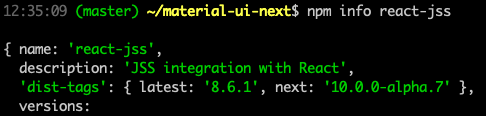
@ifndefdeadmau5 react-jss's npm tags have been fixed. We can close the issue. You should be able to use react-jss as before.
oliviertassinari
on 4 Jan 2019
@kof I'm sure it's enough, I was just rushing and happened to miss it. Thanks for the clarification.
pheuter
on 4 Jan 2019
@oliviertassinari Thank you for quick fix 🙏
ifndefdeadmau5
on 4 Jan 2019
Hello @oliviertassinari
So, react-jss is no longer included in the material-ui package?
I am in process of upgrading from v1 beta to newest version. I didn't any information about it.
 darkowic
on 10 Jan 2019
darkowic
on 10 Jan 2019
@darkowic react-jss has never been included. It's a third dependency. @material-ui/styles has a StylesProvider component that serves the same role as JssProvider.
oliviertassinari
on 10 Jan 2019
It has been included
$ npm show material-ui@next dependencies
{ '@babel/runtime': '^7.0.0-beta.42',
'@types/jss': '^9.3.0',
'@types/react-transition-group': '^2.0.8',
brcast: '^3.0.1',
classnames: '^2.2.5',
deepmerge: '^2.0.1',
'dom-helpers': '^3.2.1',
'hoist-non-react-statics': '^2.5.0',
jss: '^9.3.3',
'jss-camel-case': '^6.0.0',
'jss-default-unit': '^8.0.2',
'jss-global': '^3.0.0',
'jss-nested': '^6.0.1',
'jss-props-sort': '^6.0.0',
'jss-vendor-prefixer': '^7.0.0',
keycode: '^2.1.9',
lodash: '^4.2.0',
'normalize-scroll-left': '^0.1.2',
'prop-types': '^15.6.0',
'react-event-listener': '^0.5.1',
'react-jss': '^8.1.0',
'react-lifecycles-compat': '^3.0.0',
'react-popper': '^0.10.0',
'react-scrollbar-size': '^2.0.2',
'react-transition-group': '^2.2.1',
recompose: '^0.26.0 || ^0.27.0',
scroll: '^2.0.3',
warning: '^3.0.0' }
$ npm show @material-ui/[email protected] dependencies
{ '@babel/runtime': '7.0.0-rc.1',
'@types/jss': '^9.5.3',
'@types/react-transition-group': '^2.0.8',
brcast: '^3.0.1',
classnames: '^2.2.5',
csstype: '^2.5.2',
debounce: '^1.1.0',
deepmerge: '^2.0.1',
'dom-helpers': '^3.2.1',
'hoist-non-react-statics': '^2.5.0',
'is-plain-object': '^2.0.4',
jss: '^9.3.3',
'jss-camel-case': '^6.0.0',
'jss-default-unit': '^8.0.2',
'jss-global': '^3.0.0',
'jss-nested': '^6.0.1',
'jss-props-sort': '^6.0.0',
'jss-vendor-prefixer': '^7.0.0',
keycode: '^2.1.9',
'normalize-scroll-left': '^0.1.2',
'popper.js': '^1.14.1',
'prop-types': '^15.6.0',
'react-event-listener': '^0.6.2',
'react-jss': '^8.1.0',
'react-transition-group': '^2.2.1',
recompose: '^0.28.0',
warning: '^4.0.1' }
Problem is that it disappeared in version 3...
darkowic
on 10 Jan 2019
You are right. You can install it if you need the JssProvider component.
oliviertassinari
on 10 Jan 2019
Yes, I can install. But which version... I see in the source that you are using jss 10 alpha and current react-jss is using jss 8. Or it is only in the styles package...
Anyway, I need it for https://material-ui.com/customization/css-in-js/#css-injection-order and there is not clear explanation about it :confused:
darkowic
on 10 Jan 2019
But as you mention above - I can probably use the StylesProvider instead of using the JssProvider - https://github.com/mui-org/material-ui/blob/master/packages/material-ui-styles/src/StylesProvider.js
darkowic
on 10 Jan 2019
Check the codesandbox.io demos of the documentation. They all work. Alternativelty check our examples projects.
oliviertassinari
on 10 Jan 2019
FYI: I manage to run it without any problems after following examples. Thanks
darkowic
on 10 Jan 2019
@darkowic do you have code you can share? I'm struggling to get css working properly (here's what I have so far)
 mbrevda
on 23 Jan 2019
mbrevda
on 23 Jan 2019
@mbrevda briefly
import MuiThemeProvider from '@material-ui/core/styles/MuiThemeProvider';
import JssProvider from 'react-jss/lib/JssProvider';

const context = createContext();

const ThemeProvider = ({ ...props }) => (
  <JssProvider generateClassName={context.generateClassName} jss={context.jss}>
    <MuiThemeProvider theme={context.theme} {...props}/>
  </JssProvider>
);

export default ThemeProvider;
import { create } from 'jss'; // provided by material-ui
import jssPreset from '@material-ui/core/styles/jssPreset';
import createPalette from '@material-ui/core/styles/createPalette';
import createMuiTheme from '@material-ui/core/styles/createMuiTheme';
import createTypography from '@material-ui/core/styles/createTypography';
import createBreakpoints from '@material-ui/core/styles/createBreakpoints';
import createGenerateClassName from '@material-ui/core/styles/createGenerateClassName';

...
const generateClassName = createGenerateClassName();

...
const jss = create({
  ...jssPreset(),
  insertionPoint: INSERTION_POINT // optional
});

export default function createContext() {
  return {
    jss,
    theme,
    generateClassName
  };
}


md5-50a875b417a16b5e00dea04a4b2e0848


    "@material-ui/core": "^3.9.0",
    "react-jss": "^8.6.1",
@darkowic: I tried your code example to set an insertionPoint for the generated mui styles. Sadly it does not effect the output. Did I miss something?
Actually working now.
import MuiThemeProvider from '@material-ui/core/styles/MuiThemeProvider';
import JssProvider from 'react-jss/lib/JssProvider';
import { create } from "jss";
import jssPreset from '@material-ui/core/styles/jssPreset';
import createGenerateClassName from '@material-ui/core/styles/createGenerateClassName';
import createMuiTheme from '@material-ui/core/styles/createMuiTheme';

const theme =  createMuiTheme({ ... }});


const jss = create({
  ...jssPreset(),
  insertionPoint: 'jss-insertion-point',
}

const createContext = () => {
  return {
    jss,
    theme,
    generateClassName
  };
}

const context = createContext();

const ThemeProvider = ({ ...props }) => (
  <JssProvider generateClassName={context.generateClassName} jss={context.jss}>
    <MuiThemeProvider theme={context.theme} {...props}>
      {props.children}
    </MuiThemeProvider>
  </JssProvider>
);

const styleNode = document.createComment('jss-insertion-point');
document.head.insertBefore(styleNode, document.head.firstChild);

  render() {
    // const { user } = this.props;
    return (
      <ThemeProvider>
          ...
      </ThemeProvider>
)}
Dependencies:
    "@material-ui/core": "^3.9.1",
    "react-jss": "^8.6.1",
 o-faro
on 28 Jan 2019
o-faro
on 28 Jan 2019
Did you pass the jss with the insertion point to the provider?
kof
on 28 Jan 2019
No, I didn't :)
It's working now, thanks a lot! Updated the example as well.
o-faro
on 28 Jan 2019
Related issues
 newoga
·
3Comments
newoga
·
3Comments
 finaiized
·
3Comments
finaiized
·
3Comments
 mb-copart
·
3Comments
mb-copart
·
3Comments
 activatedgeek
·
3Comments
activatedgeek
·
3Comments
 revskill10
·
3Comments
revskill10
·
3Comments
Most helpful comment
@mbrevda briefly