I'm trying to use Tooltip, IconButton, and Icon from material-ui 3.5.1. I'm still using other components from material-ui 0.20.1.
It seems to work pretty well, until I have the IconButton in another component, like a Popover. When I hover over my button, the tooltip appears behind the popover. It looks like this:
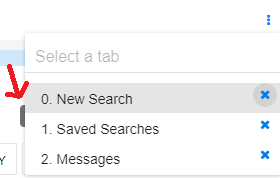
For the button, I'm simply doing:
    <Tooltip
        title={this.props.tooltip}
        placement={placement}
        style={this.props.tooltipStyles}
     >
              <span}>
                    <IconButton
                        className={this.props.className}
                        onClick={this.props.onClick}
                        id={this.props.id}
                        disabled={this.props.disabled}
                        style={this.props.style}
                   >
                       <Icon
                            className={classNames(this.props.iconClassName, this.props.disabled ? 'disabled' : '')}
                            style={this.props.iconStyle}
                        />
                   </IconButton>
              </span>
     </Tooltip>
 kimwykoff
All 8 comments
The v0.x popover z-index:
https://github.com/mui-org/material-ui/blob/1b1c1fce216b5b2f5ecd52d21f8ec6a326c00cd5/src/styles/zIndex.js#L9
The v1 tooltip z-index:
https://github.com/mui-org/material-ui/blob/43f93a50b48feaf0ae8798613e06c514630ad224/packages/material-ui/src/styles/zIndex.js#L9
You can change the z index like this:
const theme = createMuiTheme({
  zIndex: {
    mobileStepper: 3000,
    appBar: 3100,
    drawer: 3200,
    modal: 3300,
    snackbar: 3400,
    tooltip: 3500,
  },
});
 oliviertassinari
on 20 Dec 2018
oliviertassinari
on 20 Dec 2018
I'm still using v0.x for most things, so the theme creation is the old way:
export const theme = getMuiTheme({
    zIndex: {
        menu: 1000,
        appBar: 1100,
        drawerOverlay: 1200,
        drawer: 1300,
        dialogOverlay: 1400,
        dialog: 1500,
        layer: 2000,
        popover: 2100,
        snackbar: 2900,
        tooltip: 3000
    },
But when I run my app, the tooltip stil has a z-index of 1500:

I also tried to pass in the z-index in-line, but of course it didn't work (I know there's some particularities with loading order of z-indexes).
Is it really feasible for me to try to adopt the newer version of material-ui little by little? Because it seems like a great effort to try to move everything at once. But then we have problems like this.
kimwykoff
on 21 Dec 2018
@kimwykoff Yes, the migration can be done one step at the time. You need to use two theme providers, one for v0.x and one for +v1. The example I have given you is for the new theme provider, not the old one.
oliviertassinari
on 21 Dec 2018
@oliviertassinari Thanks for that. Could you point me in the right direction for doing this? According to this response , I can have multiple theme providers since v1.0, but how do I do that with the v0.x?
thanks
kimwykoff
on 21 Dec 2018
oliviertassinari
on 21 Dec 2018
ok, great. Thanks!
kimwykoff
on 21 Dec 2018
@oliviertassinari, now that that works, I just had one small problem left. I'm using an IconButton with a tooltip in a List v0.x, and no matter which position I specify, the tooltip is always placed far away from the button. I think it's getting positioned with respect to the List item, but I'm not sure. With a position of 'right', I get:
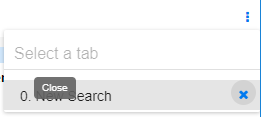
Is there anything I can do for that?
kimwykoff
on 21 Dec 2018
@kimwykoff it's strange, the positioning is performed by Popper.js. If you have some overflow hidden style, it will definitely struggle.
oliviertassinari
on 24 Dec 2018
Related issues
 revskill10
·
3Comments
revskill10
·
3Comments
 ryanflorence
·
3Comments
ryanflorence
·
3Comments
 chris-hinds
·
3Comments
chris-hinds
·
3Comments
 zabojad
·
3Comments
zabojad
·
3Comments
 newoga
·
3Comments
newoga
·
3Comments
Most helpful comment
The v0.x popover z-index:
https://github.com/mui-org/material-ui/blob/1b1c1fce216b5b2f5ecd52d21f8ec6a326c00cd5/src/styles/zIndex.js#L9
The v1 tooltip z-index:
https://github.com/mui-org/material-ui/blob/43f93a50b48feaf0ae8798613e06c514630ad224/packages/material-ui/src/styles/zIndex.js#L9
You can change the z index like this: