Material-ui: bad alignment when add default value in TextField by safari only
Safari

Firefox
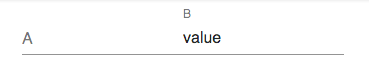
Chrome

| Tech | Version |
|--------------|---------|
| Material-UI | v3.0.3 |
| React | 16.4.2 |
| Browser | Safari 11.1.2 (OS X) |
 shin0602
👍1
All 2 comments
Even stranger - if you type a character in A, delete it, then type again, B will fall into alignment.
 mbrookes
on 11 Sep 2018
mbrookes
on 11 Sep 2018
Same issue with this demo: https://codesandbox.io/s/rr7zjr7v1m. Here is a simple workaround in https://github.com/mui-org/material-ui/blob/814b7fa70eba15bb708ddc2f6d6f1a7ffabe6527/packages/material-ui/src/FormControl/FormControl.js#L11-L20:
  root: {
    display: 'inline-flex',
    flexDirection: 'column',
    position: 'relative',
    // Reset fieldset default style
    minWidth: 0,
    padding: 0,
    margin: 0,
    border: 0,
+   verticalAlign: 'middle', // Fix an aligment issue on Safari
  },
@shin0602 Do you want to work on it?
 oliviertassinari
on 16 Sep 2018
oliviertassinari
on 16 Sep 2018
👍2
🎉1
Was this page helpful?
0 / 5 - 0 ratings
Related issues
 ghost
·
3Comments
ghost
·
3Comments
ghost
·
3Comments
ghost
·
3Comments
 ericraffin
·
3Comments
ericraffin
·
3Comments
 zabojad
·
3Comments
zabojad
·
3Comments
 newoga
·
3Comments
newoga
·
3Comments
Most helpful comment
Same issue with this demo: https://codesandbox.io/s/rr7zjr7v1m. Here is a simple workaround in https://github.com/mui-org/material-ui/blob/814b7fa70eba15bb708ddc2f6d6f1a7ffabe6527/packages/material-ui/src/FormControl/FormControl.js#L11-L20:
@shin0602 Do you want to work on it?