Material-ui: Forced scrollable Tabs nested in Toolbar causes 'Maximum update depth exceeded.' error
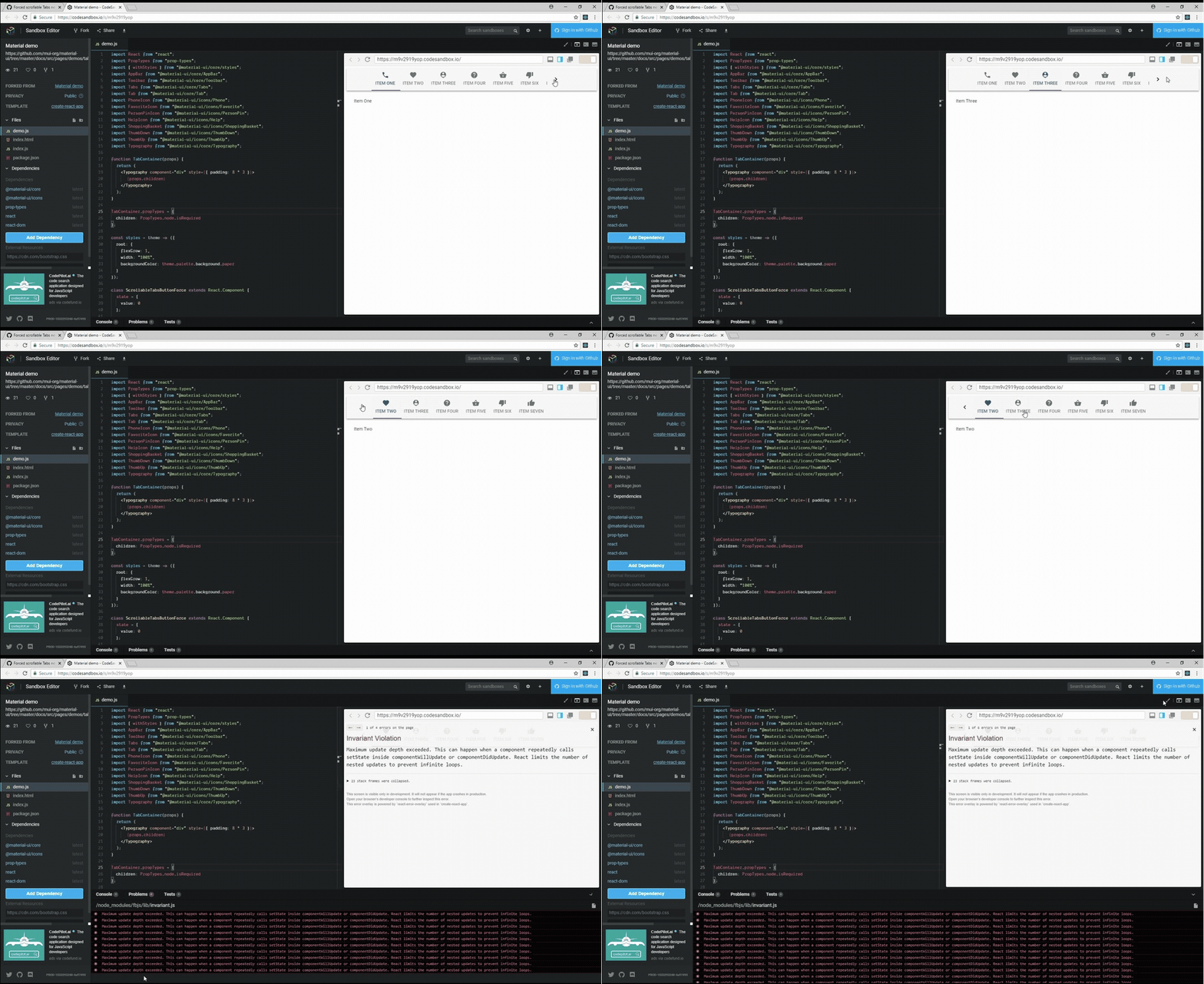
When adding forced scrollable Tabs as children of the Toolbar component an Invariant Violation occurs.
The following error output is from the Link: codesandbox example:
https://m9v2919yop.codesandbox.io/node_modules/fbjs/lib/invariant.js:42:15
scheduleWork$1
https://m9v2919yop.codesandbox.io/node_modules/react-dom/cjs/react-dom.development.js:16222:11
Object.enqueueSetState
https://m9v2919yop.codesandbox.io/node_modules/react-dom/cjs/react-dom.development.js:11300:5
Tabs.Component.setState
https://m9v2919yop.codesandbox.io/node_modules/react/cjs/react.development.js:270:16
    at Tabs._this.updateScrollButtonState (https://m9v2919yop.codesandbox.io/node_modules/
material-ui/core/Tabs/Tabs.js:257:17
    at Tabs.componentDidUpdate (https://m9v2919yop.codesandbox.io/node_modules/
material-ui/core/Tabs/Tabs.js:288:12
commitLifeCycles
https://m9v2919yop.codesandbox.io/node_modules/react-dom/cjs/react-dom.development.js:14370:22
commitAllLifeCycles
https://m9v2919yop.codesandbox.io/node_modules/react-dom/cjs/react-dom.development.js:15463:7
HTMLUnknownElement.callCallback
https://m9v2919yop.codesandbox.io/node_modules/react-dom/cjs/react-dom.development.js:100:14
Object.invokeGuardedCallbackDev
https://m9v2919yop.codesandbox.io/node_modules/react-dom/cjs/react-dom.development.js:138:16
invokeGuardedCallback
https://m9v2919yop.codesandbox.io/node_modules/react-dom/cjs/react-dom.development.js:187:29
commitRoot
https://m9v2919yop.codesandbox.io/node_modules/react-dom/cjs/react-dom.development.js:15604:7
completeRoot
https://m9v2919yop.codesandbox.io/node_modules/react-dom/cjs/react-dom.development.js:16619:34
performWorkOnRoot
https://m9v2919yop.codesandbox.io/node_modules/react-dom/cjs/react-dom.development.js:16564:9
performWork
https://m9v2919yop.codesandbox.io/node_modules/react-dom/cjs/react-dom.development.js:16483:7
performSyncWork
https://m9v2919yop.codesandbox.io/node_modules/react-dom/cjs/react-dom.development.js:16455:3
requestWork
https://m9v2919yop.codesandbox.io/node_modules/react-dom/cjs/react-dom.development.js:16355:5
scheduleWork$1
https://m9v2919yop.codesandbox.io/node_modules/react-dom/cjs/react-dom.development.js:16219:11
Object.enqueueSetState
https://m9v2919yop.codesandbox.io/node_modules/react-dom/cjs/react-dom.development.js:11300:5
Tabs.Component.setState
https://m9v2919yop.codesandbox.io/node_modules/react/cjs/react.development.js:270:16
    at Tabs._this.updateScrollButtonState (https://m9v2919yop.codesandbox.io/node_modules/
material-ui/core/Tabs/Tabs.js:257:17
    at eval (https://m9v2919yop.codesandbox.io/node_modules/
material-ui/core/Tabs/Tabs.js:127:13
later
https://m9v2919yop.codesandbox.io/node_modules/debounce/index.js:28:23
- [x] This is a v1.x issue.
- [x] I have searched the issues of this repository and believe that this is not a duplicate.
Expected Behavior
Able to add forced scrollable Tabs as a child of the Toolbar component without Invariant error.
Current Behavior
When clicking through the scroll buttons and tabs the browser becomes unresponsive and throws the following error:
Invariant Violation
Maximum update depth exceeded. This can happen when a component repeatedly calls setState inside
componentWillUpdate or componentDidUpdate. React limits the number of nested updates to prevent
infinite loops.
Steps to Reproduce
Link: codesandbox example
This bug is consistently reproducible but the exact number of steps is unpredictable.
Within the codesandbox.io example using Chrome
- Click a scroll button
- Click a few tabs
- Click the other scroll button
- Click a few tabs
- Repeat until the error is thrown. It usually only takes a few cycles.
Context
I am trying to add forced scrollable Tabs to my applications Toolbar component.
Your Environment
| Tech | Version |
|--------------|---------|
| Material-UI | v1.5.0 |
| React | v16.3.2 |
| browser | Chrome Version 68.0.3440.106 (Official Build) (64-bit) |
 thomasmi
All 14 comments
@thomasmi I'm sorry, I can't reproduce. Did you have a chance to dig into the internal to find a fix?
 oliviertassinari
on 14 Aug 2018
oliviertassinari
on 14 Aug 2018
@oliviertassinari No worries! I wish I could trigger the error more consistently. I am digging in right now to see if I can narrow it down some more. Thanks for the quick response!
thomasmi
on 14 Aug 2018
@oliviertassinari It looks like the issue might be with how the showRightScroll variable is determined in the updateScrollButtonState function. I have logged the variables that trigger the set state and uploaded a pic of the log when it gets stuck in the loop.

thomasmi
on 16 Aug 2018
I've also seen this issue on a scrollable tab. Once I started playing with the Tab width and flex attributes of the Tabs component, it went away.
 rooch84
on 16 Aug 2018
rooch84
on 16 Aug 2018
@oliviertassinari It looks like removing the updateScrollButtonState call from componentDidUpdate fixes the issue. Do you see any reason not to remove it?
Edit: Adding more info
The updateScrollButtonState function does calculations to determine which scroll buttons to show, then sets the state with booleans for the left and right scroll buttons. Setting the state causes componentDidUpdate to trigger and within componentDidUpdate, updateScrollButtonState function is called to do the calculations and set the state again. This is where the infinite loop can happen. Therefore removing the updateScrollButtonState function call from the componentDidUpdate fixes the bug and doesn't appear to be break anything else.
thomasmi
on 16 Aug 2018
It appears the clientWidth or _this$tabsRef.clientWidth is alternating by 24px each iteration. I am assuming this is because when showRightScroll is true it brings in the right scroll button which has font-size: 24px;. The calculations are preformed in updateScrollButtonState which is called from componentDidUpdate to take DOM changes into consideration.

thomasmi
on 16 Aug 2018
I have an idea for a fix. Does it makes sense to only update the state when the scrollLeft variable changes?
For example:
_this.updateScrollButtonState = function () {
      var _this$props3 = _this.props,
          scrollable = _this$props3.scrollable,
          scrollButtons = _this$props3.scrollButtons,
          theme = _this$props3.theme;

      if (scrollable && scrollButtons !== 'off') {
        var _this$tabsRef = _this.tabsRef,
            scrollWidth = _this$tabsRef.scrollWidth,
            clientWidth = _this$tabsRef.clientWidth;

        var scrollLeft = (0, _normalizeScrollLeft.getNormalizedScrollLeft)(_this.tabsRef, theme.direction);
        var showLeftScroll = theme.direction === 'rtl' ? scrollWidth > clientWidth + scrollLeft : scrollLeft > 0;
        var showRightScroll = theme.direction === 'rtl' ? scrollLeft > 0 : scrollWidth > clientWidth + scrollLeft;

        if (scrollLeft !== _this.state.scrollLeft && (showLeftScroll !== _this.state.showLeftScroll || showRightScroll !== _this.state.showRightScroll)) {
          _this.setState({
            scrollLeft: scrollLeft,
            showLeftScroll: showLeftScroll,
            showRightScroll: showRightScroll
          });
        }
      }
    }, _temp));
  }
@oliviertassinari Here's a video of the above linked codesandbox. Is there any additional info I can add to help?
thomasmi
on 20 Aug 2018
i'm currently facing the same issues too, @thomasmi did you manage to resolve it?
 murugaratham
on 26 Sep 2018
murugaratham
on 26 Sep 2018
@murugaratham Unfortunately, I haven't had much time to look into it. Adding the scrollLeft value to the state and checking against it fixed the infinite loop. However, if I recall it creates an issue with displaying the tab button(s) in certain situations.
thomasmi
on 27 Sep 2018
@thomasmi I fixed it on my end, it was a bad push which caused the tab items to be "wider"
murugaratham
on 5 Oct 2018
@murugaratham can you explain a bit more about your fix? We're also seeing this issue, and I'm wondering if your solution will work for us.
 Quantumplation
on 15 Oct 2018
Quantumplation
on 15 Oct 2018
@Quantumplation in short, i had a bad push which caused the "tab contents" to exceed the "tab container", which caused updateScrollButtonState to keep attempting to recalculate whether or not to show the left and right buttons.
murugaratham
on 17 Oct 2018
I’m closing this as a duplicate of #13699. This should now be fixed.
 joshwooding
on 25 Jan 2019
joshwooding
on 25 Jan 2019
Related issues
 sys13
·
3Comments
sys13
·
3Comments
 newoga
·
3Comments
newoga
·
3Comments
 iamzhouyi
·
3Comments
iamzhouyi
·
3Comments
 revskill10
·
3Comments
revskill10
·
3Comments
 ghost
·
3Comments
ghost
·
3Comments