Material-ui: [Dialog] fullWidth is capped by default 'sm' theme
- [x] I have searched the issues of this repository and believe that this is not a duplicate.
Expected Behavior
When calling Dialog component with fullWidth=true and no other props I would expect the Dialog to take up the full width of the screen
Current Behavior
What's happening is because the of the defaultProps value for maxWidth is 'sm' the true width ends up being capped at 600px like so:
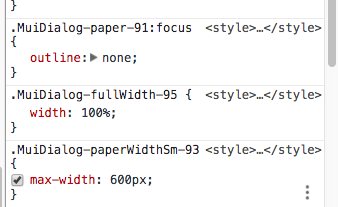
I only noticed the issue when I accidentally put 'lg' a value which is not supported and noticed that it worked like I wanted it to
Steps to Reproduce (for bugs)
- Open Dialog component with props fullScreen=true
Context
I would like to submit a PR if approved to check if there is fullScreen applied and no maxWidth prop provided to ignore the defaultProps of 'sm'
Your Environment
| Tech | Version |
|--------------|---------|
| Material-UI | 1.0.0-beta.26 |
| React | 16 |
| browser | Chrome 63 |
| etc | |
 gregnb
All 14 comments
@gregnb What about allowing the maxWidth property to be false?
I would like to submit a PR if approved to check if there is fullScreen applied and no maxWidth prop provided to ignore the defaultProps of 'sm'
You won't be able to know if the maxWidth property is coming from the default property or from the users. We need the default property for the documentation generation. Also, this behavior might not be the one expected by the users.
 oliviertassinari
on 3 Jan 2018
oliviertassinari
on 3 Jan 2018
@oliviertassinari Ok thanks for that background information. What about something like this to make it clear to users:
 /**
   * Determine the max width of the dialog.
   * The dialog width grows with the size of the screen, this property is useful
   * on the desktop where you might need some coherent different width size across your
   * application. Set 'false' to turn off
   */
  maxWidth: PropTypes.oneOf(['xs', 'sm', 'md', false]),
Im getting an error if I put maxWidth as "lg", wich is working, but showing an error at the console
 FernandoGOT
on 13 Jul 2018
FernandoGOT
on 13 Jul 2018
@FernandoGOT lg isn't supported:
maxWidth: PropTypes.oneOf(['xs', 'sm', 'md', false]),
 mbrookes
on 13 Jul 2018
mbrookes
on 13 Jul 2018
Is there a reason for excluding 'lg'? There's a pretty big jump between 'md' and just disabling maxWidth altogether.
I'm curious if it was a conscious design decision or it just wasn't needed at the time.
 TheMoonDawg
on 22 Aug 2018
TheMoonDawg
on 22 Aug 2018
@MoonDawg92 No good reason. Do you want to add this support?
oliviertassinari
on 22 Aug 2018
Sure, I'll give it a shot!
TheMoonDawg
on 22 Aug 2018
@oliviertassinari I see that the maxWidth settings are using the theme's breakpoints. Should I also add support for xl while I'm at it, or is that probably overkill?
TheMoonDawg
on 22 Aug 2018
@MoonDawg92 Awesome!
1920px, I doubt there is a valid use case for that value 😬.
oliviertassinari
on 22 Aug 2018
That's what I figured too, so I'll leave it out for now. 😄
TheMoonDawg
on 22 Aug 2018
@oliviertassinari
TheMoonDawg
on 22 Aug 2018
All this is nonsense, let's start from the beginning:
On the official Material UI documentation it says we can use all the values from 'xs' to 'xl' . [ link: [https://material-ui.com/demos/dialogs/](https://material-ui.com/demos/dialogs/) ]
but when I pass the prop 'xl' I get this error in my console:

There's a guy in this chat that says it added support for 'lg' back in August 2018 ... what the hell is goin on?
Do I need to update the material-ui dependency? Do I need to manually put a pixel width to the modal to get rid of that annoying error and make it large like the examples you have on the docs?
Also why would you not support bigger screen sizes for modal maxWidth? Why are we forced to use small modals and we cannot use bigger ones? Computers and laptops are still around in this world no?
thank you so much for clearing my mind, I'm pretty confused by this whole maxWidth issue...
 bitfede
on 15 Jan 2019
bitfede
on 15 Jan 2019
ah damn I cannot reopen the issue, I will make a new one....
bitfede
on 15 Jan 2019
@bitfede
You're almost definitely running on an older version. Here's the prop types for the Dialog component: https://github.com/mui-org/material-ui/blob/master/packages/material-ui/src/Dialog/Dialog.js#L260
Did you install material-ui or @material-ui/core?
The material-ui package is the older Beta version. @material-ui/core is the release version that actually contains all of these changes.
TheMoonDawg
on 15 Jan 2019
Related issues
 ghost
·
3Comments
ghost
·
3Comments
 mb-copart
·
3Comments
mb-copart
·
3Comments
 reflog
·
3Comments
reflog
·
3Comments
 ryanflorence
·
3Comments
ryanflorence
·
3Comments
 ericraffin
·
3Comments
ericraffin
·
3Comments