Material-ui: [Bug] Modal/Dialog Uncaught RangeError: Maximum call stack size exceeded.
When using a Select inside a Dialog i get the error "Uncaught RangeError: Maximum call stack size exceeded." after clicking into the select box.
The error came from here.
Note: I'm using redux-form with redux-form-material-ui, but I don't think that they are related, expected for the fact that redux-form-material-ui is using beta 16 of material-ui for the Select component
- [X ] I have searched the issues of this repository and believe that this is not a duplicate.
Expected Behavior
To not throw errors
Current Behavior
Errors in console
Steps to Reproduce (for bugs)
Your Environment
| Tech | Version |
|--------------|-------------------|
| Material-UI | 1.0.0-beta.17 |
| React | 15.6.1 |
| redux-form-material-ui | 5.0.0-beta1 |
| browser | Chrome 61 |
 marcoturi
All 17 comments
Your issue has been closed because it does not conform to our issue requirements.
Please provide a reproduction test case. This would help a lot 👷 .
A live example would be perfect. This codesandbox.io template _may_ be a good starting point. Thank you!
 oliviertassinari
on 18 Oct 2017
oliviertassinari
on 18 Oct 2017
@oliviertassinari sorry for not providing a live example early. I got only now the time to reproduce it. I found how to reproduce the problem, but I could not use codesandbox. The error "Uncaught RangeError: Maximum call stack size exceeded." happens when you use the Select component inside an Dialog component in an external library (i.e. in node modules).
This is the code that I use, It does nothing special just add same small functionality to the Dialog:
/* eslint-disable jsx-a11y/no-noninteractive-element-interactions */
// @flow
import React from 'react';
import classNames from 'classnames';
import { compose, defaultProps } from 'recompose';
import { withStyles } from 'material-ui/styles';
import Dialog, { DialogActions, DialogContent, DialogTitle } from 'material-ui/Dialog';

export type Props = {
  /**
   * Useful to extend the style applied to components.
   */
  classes: Object,
  /**
   * @ignore
   */
  className?: Object,
  /**
   * State of the Dialog
   */
  open: boolean,
  /**
   * Title of the Dialog
   */
  title: string,
  /**
   * Content of the modal
   */
  children: any,
  /**
   * Close icon url
   */
  closeIcon: string,
  /**
   * Actions elements
   */
  actions?: any,
  /**
   * Handle closing modal
   */
  onRequestClose: Function
}

export const styles = (theme: Object) => ({
  closeIcon: {
    position: 'absolute',
    top: 10,
    right: 10,
    cursor: 'pointer',
  },
  title: {
    fontSize: 18,
    fontWeight: theme.typography.fontWeightLight,
    fontFamily: theme.typography.fontFamily,
    padding: '20px 0px 0px 20px',
  },
  modalContent: {
    fontSize: theme.typography.fontSize,
    fontFamily: theme.typography.fontFamily,
    color: theme.palette.common.black,
    padding: '25px 25px 0 20px',
    minHeight: '60px',
    minWidth: '500px',
  },
});

/**
 *
 * @param {*} props
 *
 * Handler open and close modal by open prop
 *
 * Callback on... for all behavior
 */

const Modal = (props: Props) => {
  const {
    classes,
    open,
    title,
    children,
    closeIcon,
    actions,
    onRequestClose,
    ...other
  } = props;

  const actionsEl = actions ? (<DialogActions>{actions}</DialogActions>) : (<div />);

  const className = props.className || {};
  const cpClassName = classNames([
    classes.modalContent,
    className.modalContent,
  ]);

  return (
    <Dialog
      open={open}
      onRequestClose={onRequestClose}
      {...other}
    >
      <img
        onClick={props.onRequestClose || null}
        src={closeIcon}
        className={classes.closeIcon}
        alt="Close"
      />
      <DialogTitle disableTypography className={classes.title}>
        {title}
      </DialogTitle>
      {children &&
      <DialogContent className={cpClassName}>
        {children}
      </DialogContent>
      }
      {actionsEl}
    </Dialog>);
};

export default compose(
  withStyles(styles),
  defaultProps({
    open: true,
    children: '',
    closeIcon: '',
    title: '',
    onRequestClose: () => null,
  })
)(Modal);
Copying the same file directly to the project fix the error (i.e. import Modal from '@topconagriculture/react-components/Modal'; -> import Modal from '../../common/Modal';). Honestly I don't have any clue on where I could look to prevent this error. Do you have any idea? I would like to provide a PR if I found a solution.
marcoturi
on 6 Nov 2017
happens when you use the Select component inside an Dialog component in an external library (i.e. in node modules).
It could be linked to a focus loop issue.
oliviertassinari
on 6 Nov 2017
If this code can help, I am experiencing a similar issue trying to create a custom input control. The first change event throws the error (not blur or focus), then every actions causes it too (blur, focus, change).
It doesn't seem to happen when I initialize with numbers (x: 0, y: 0) instead of (x: undefined, y: undefined).
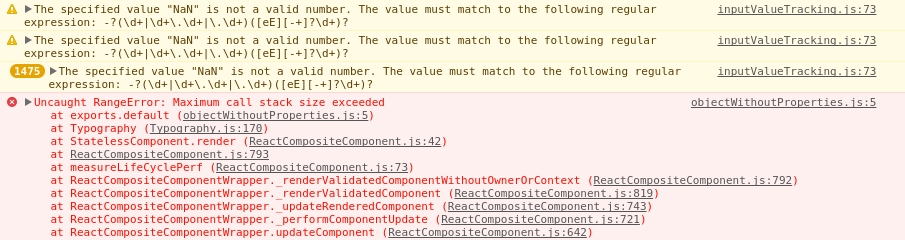
I happened to see more warnings when I added parseInt in handleChange and pressed backspace to remove the content of the input (this doesn't happen with (x: 0, y: 0):
Redux-Form field
    ...
    <Field
      name="myPosition"
      component={PointField}
      label={intl.formatMessage(messages.anchor_position)}
      required
    />
    ...
Redux-Form wrapper
const PointField = ({
  input,
  meta: { touched, error },
  ...custom
}) => (
  <MuiPointField
    error={touched && error}
    {...input}
    {...custom}
  />
);

PointField.propTypes = {
  ...FieldProps
};
MUI component
import React, { Component } from 'react';
import PropTypes from 'prop-types';
import classNames from 'classnames';
import { withStyles } from 'material-ui/styles';

import { FormControl, FormHelperText } from 'material-ui/Form';
import Input, { InputLabel, InputAdornment } from 'material-ui/Input';

const styles = {
  root: {},
  inputControl: {
    marginTop: '16px'
  },
  inputX: {
    width: '50%'
  },
  inputY: {
    width: '50%'
  },
};

class MuiPointField extends Component {

  constructor(props) {
    super(props);

    this.state = {
      value: {
        x: undefined,
        y: undefined
      }
    };

    this.handleFocus = this.handleFocus.bind(this);
    this.handleBlur = this.handleBlur.bind(this);
    this.handleChange = this.handleChange.bind(this);
  }

  handleFocus(event) {
    event.preventDefault();
    event.stopPropagation();
    if (this.props.onFocus) {
      this.props.onFocus(this.state.value);
    }
  }

  handleBlur(event) {
    event.preventDefault();
    event.stopPropagation();
    if (this.props.onBlur) {
      this.props.onBlur(this.state.value);
    }
  }

  handleChange(event, propName) {
    event.preventDefault();
    event.stopPropagation();
    this.setState({
      value: {
        ...this.state.value,
        [propName]: parseInt(event.target.value, 10)
      }
    }, () => {
      if (this.props.onChange) {
        this.props.onChange(this.state.value);
      }
    });
  }

  render() {
    const {
      classes,
      className,
      disabled,
      error,
      FormHelperTextProps,
      fullWidth,
      helperText,
      id,
      InputLabelProps,
      label,
      name,
      placeholder,
      required,
      rootRef,
      ...other
    } = this.props;

    const {
      value
    } = this.state;

    const renderInputComponent = propName => (
      <Input
        type="number"
        disabled={disabled}
        id={`${id}.${propName}`}
        name={`${name}.${propName}`}
        className={classes[`input${propName.toUpperCase()}`]}
        placeholder={placeholder !== undefined ? placeholder[propName] : ''}
        value={value[propName] !== undefined ? value[propName] : ''}
        startAdornment={<InputAdornment position="start">{propName.toUpperCase()}</InputAdornment>}
        onFocus={event => this.handleFocus(event, propName)}
        onBlur={event => this.handleBlur(event, propName)}
        onChange={event => this.handleChange(event, propName)}
      />
    );

    return (
      <FormControl
        className={classNames(classes.root, className)}
        error={error}
        fullWidth={fullWidth}
        required={required}
        {...other}
        ref={rootRef}
      >
        {label && (
          <InputLabel shrink {...InputLabelProps}>{label}</InputLabel>
        )}
        <div className={classes.inputControl}>
          {renderInputComponent('x')}
          {renderInputComponent('y')}
        </div>
        {helperText && (
          <FormHelperText {...FormHelperTextProps}>{helperText}</FormHelperText>
        )}
      </FormControl>
    );
  }

}

MuiPointField.propTypes = {
  classes: PropTypes.object.isRequired,
  className: PropTypes.string,
  disabled: PropTypes.bool,
  error: PropTypes.bool,
  fullWidth: PropTypes.bool,
  FormHelperTextProps: PropTypes.object,
  helperText: PropTypes.node,
  id: PropTypes.string,
  InputLabelProps: PropTypes.object,
  label: PropTypes.node,
  name: PropTypes.string,
  placeholder: PropTypes.string,
  onFocus: PropTypes.func,
  onBlur: PropTypes.func,
  onChange: PropTypes.func,
  required: PropTypes.bool,
  rootRef: PropTypes.func,
  value: PropTypes.shape({
    x: PropTypes.number,
    y: PropTypes.number
  }).isRequired
};
 jpmn
on 7 Nov 2017
jpmn
on 7 Nov 2017
Guys, please provide a reproduction on codesandbox.io. We have too many issues to handle to spend time, trying to reproduce issues. Thank you :).
oliviertassinari
on 7 Nov 2017
We investigated the problem and it was a conflict between the multiple inputs sharing the same FormControl context. When one of them would become dirty, the other one would also trigger a change in the state and this created an infinite loop. We had to override the behavior of the muiFormControl context (similar to Input) in order to fix this problem (checkDirty, componentWillUpdate, isControlled, getChildContext).
jpmn
on 9 Nov 2017
Is it possible to reopen this issue?
I have created a sandbox illustrating it: https://codesandbox.io/s/r4xnw0p31m
 alphaeadevelopment
on 27 Feb 2018
alphaeadevelopment
on 27 Feb 2018
@oliviertassinari I agree with @alphaeadevelopment this issue should be opened.
marcoturi
on 27 Feb 2018
Thanks @DarkKnight1992.
Sandbox updated here: https://codesandbox.io/s/2x00kvkopy
alphaeadevelopment
on 20 Apr 2018
@alphaeadevelopment Do I need to use a specific browser? I can't reproduce the problem. Also, the codesandbox is using a third party library and an old version of Material-UI (2-3-month-old). I'm closing for now.
oliviertassinari
on 28 Apr 2018
I assume you weren't looking at https://codesandbox.io/s/2x00kvkopy, where I'd implemented the workaround suggested by @DarkKnight1992?
Looking at https://codesandbox.io/s/r4xnw0p31m, I get the issue in both chrome and safari.
I've updated the version of material ui to the latest (1.0.0-beta.43) and the issue is still there.
The third party library is there precisely because the bug only manifests when including a component from node_modules. It doesn't happen with the component is inline. See https://codesandbox.io/s/y05yk3k3pv and try switching in ModalForm.jsx between the local file InlineForm.jsx and the library component test-materialui-modal-form-bug - the source is just copy/pasted from that library into the InlineForm component.
You have to open the sandbox in a separate tab, it doesn't happen in the embedded sandbox viewer.
The bug appears when you open up the dropdown:
Chrome:

Safari:

alphaeadevelopment
on 28 Apr 2018
the bug only manifests when including a component from node_modules.
@alphaeadevelopment It's the tips of the iceberg. It happens when you are trying two nest two Modal with a different ModalManager instance. Both modals think they are the top level one, and try to restore the focus position on the right DOM node.
https://github.com/mui-org/material-ui/blob/b74a67516881bf75b18befb57d75070603c12712/packages/material-ui/src/Modal/Modal.js#L406
(your third party package is bundling the components twice)
where I'd implemented the workaround
Using disableEnforceFocus is an option to address the problem. But I would rather encourage you not to bundle Material-UI in your third party component or to inject a custom instance of the ModalManager.
oliviertassinari
on 28 Apr 2018
@oliviertassinari I'm running into this problem as well, the problem is we have a "component library" that includes components that connect redux-form Field to material-ui input components. One of the components we're using is material-ui-picker's DatePicker, which causes the issue above.
How would you inject a custom instance of ModalManager? I actually injected it into Modal.Naked.defaultProps.manager but then I found out that Naked (in withStyles) is only available in non-production environments. My last resort is to add disableEnforceFocus for every modal that contains the datepicker, but my concern is that I would rather have a solution that will "fix" the issue so that future developers working with my code / library won't run into this issue again.
Any tips? Would it be too much to ask to allow Naked to be exposed for development environments as well? :)
 foodforarabbit
on 4 Jul 2018
foodforarabbit
on 4 Jul 2018
@foodforarabbit The problem you are describing is hiding something else. It would be good to get to the bottom of it. Still, if you are looking for a quick workaround, you might be able to inject the modal manager in the theme.props.MuiModal.manager key.
Would it be too much to ask to allow Naked to be exposed for development environments as well?
No way! We are exposing Naked as a hack for testing purposes.
oliviertassinari
on 5 Jul 2018
@oliviertassinari ok thanks for the reply! I didn't realize you could override defaults with the theme, really appreciate the tip!
foodforarabbit
on 5 Jul 2018
Hmm ok I tried the theme thing out... got the error:
Modal.js:130 Uncaught TypeError: _this.props.manager.add is not a function
I checked the object in the debugger, it has the same properties as a ModalManager instance e.g.
containers : []
data : []
handleContainerOverflow : true
hideSiblingNodes : true
modals : []
but all the functions are missing and it is just a plain object. Anyway I'm going to go back to the previous solution with the disableEnforceFocus it seems to be the easiest way forward at the moment. Thanks!
foodforarabbit
on 5 Jul 2018
Hmm ok I tried the theme thing out... got the error:
@foodforarabbit Yeah, we need to fix #12031.
oliviertassinari
on 5 Jul 2018
Related issues
 anthony-dandrea
·
3Comments
anthony-dandrea
·
3Comments
 iamzhouyi
·
3Comments
iamzhouyi
·
3Comments
 ghost
·
3Comments
ghost
·
3Comments
 sys13
·
3Comments
sys13
·
3Comments
 mb-copart
·
3Comments
mb-copart
·
3Comments
Most helpful comment
@alphaeadevelopment It's the tips of the iceberg. It happens when you are trying two nest two Modal with a different
ModalManagerinstance. Both modals think they are the top level one, and try to restore the focus position on the right DOM node.https://github.com/mui-org/material-ui/blob/b74a67516881bf75b18befb57d75070603c12712/packages/material-ui/src/Modal/Modal.js#L406
(your third party package is bundling the components twice)
Using
disableEnforceFocusis an option to address the problem. But I would rather encourage you not to bundle Material-UI in your third party component or to inject a custom instance of theModalManager.