Material-ui: [v1] Font family issue on server side rendering
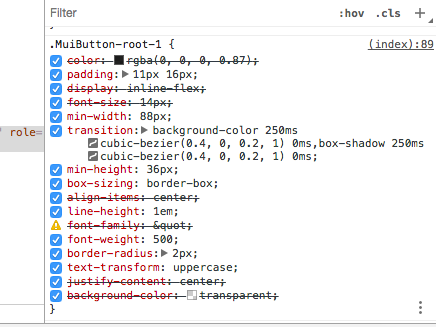
I am using the v1 with server side rendering and followed the instructions describe here: https://material-ui-1dab0.firebaseapp.com/guides/server-rendering/ but am having a litlle issue with the font on the MuiButton... Before the browser loads the client side, the generated css for the button have this:
font-family: "
Only after the client is loaded it gets fixed for the robot font.
Here is a screenshot
Steps to reproduce
Do some server side rendering with a button on the page.
Versions
- Material-UI: 1.0.0-beta5
- React: 15.5.4
- Browser: Chrome
 githubdoramon
All 8 comments
@githubdoramon How are you inlining the generated CSS? This looks like a escaping issue.
 oliviertassinari
on 23 Aug 2017
oliviertassinari
on 23 Aug 2017
That is exactly the problem... Here is my code... I am not sure what I must do different:
import React from 'react';
import ReactDOMServer from 'react-dom/server';
import PropTypes from 'prop-types'
import  {outputFiles} from '../../../webpack/output-files'
const assetsJson = require('../../../webpack-assets.json')

const ServerHtml = ({ htmlAttrs, bodyAttrs, appHtml, css, dehydratedState, helmet}) => (
  <html {...htmlAttrs}>
    <head>
      <meta charset="utf-8" />
      <meta name="viewport" content="width=device-width, initial-scale=1.0, user-scalable=no, minimum-scale=1.0, maximum-scale=1.0" />
      <link rel="stylesheet" href="https://maxcdn.bootstrapcdn.com/bootstrap/3.3.7/css/bootstrap.min.css" />
      <link rel="stylesheet" href="https://fonts.googleapis.com/css?family=Roboto:300,400,500" />

      <link rel='stylesheet' href={ assetsJson.main ? `/${ "." + assetsJson.main.css }` : `/${ outputFiles.staticPath + outputFiles.css }` } />

      {helmet.title.toComponent()}
      {helmet.meta.toComponent()}
      {helmet.link.toComponent()}
    </head>
    <body {...bodyAttrs}>
      <div
        id='root'
        dangerouslySetInnerHTML={ { __html: appHtml } } // eslint-disable-line
      />
      <style id="jss-server-side">{css}</style>

      <script
        dangerouslySetInnerHTML={ { __html: `var _DEHYDRATED_STATE = ${ dehydratedState };` } } // eslint-disable-line
      />
      <script type='text/javascript' src={ assetsJson.main ? `/${ "." + assetsJson.vendor.js }` : `/${ outputFiles.staticPath + outputFiles.vendor }`  } />
      <script type='text/javascript' src={ assetsJson.main ? `/${ "." + assetsJson.main.js }` : `/${ outputFiles.staticPath + outputFiles.client }`  } />

      <script src="https://code.jquery.com/jquery-3.2.1.min.js"></script>
      <script src="https://maxcdn.bootstrapcdn.com/bootstrap/3.3.7/js/bootstrap.min.js"></script>
    </body>
  </html>
);

ServerHtml.propTypes = {
  appHtml: PropTypes.string,
  dehydratedState: PropTypes.string,
};

const getServerHtml = (appHtml, css, dehydratedState = null, helmet) => {
  const htmlAttrs = helmet.htmlAttributes.toComponent();
  const bodyAttrs = helmet.bodyAttributes.toComponent();
  const result = `<!doctype html>${ ReactDOMServer.renderToString(<ServerHtml htmlAttrs={htmlAttrs} bodyAttrs={bodyAttrs} appHtml={ appHtml } css={css} helmet={helmet} dehydratedState={ dehydratedState } />) }`;
  console.log(result);
  return result
};

export default getServerHtml;
Ok... solved... not sure it was the best solution but:
<style id="jss-server-side" dangerouslySetInnerHTML={ { __html: css } }></style>
@githubdoramon Yes, it's 👍 .
oliviertassinari
on 23 Aug 2017
We do the same on the next.js example.
oliviertassinari
on 23 Aug 2017
I fell less bad then hehehehe!!!
Thanks everyone for the help
githubdoramon
on 23 Aug 2017
I am having the same problem using material-ui-next and an ejs template. Everything loads fine except the fonts.
In my template I have
Any recommendations?
server.js
server.get('*', (req, res) => {
  const initialState = req.cookies && req.cookies.token ?
    {auth: {...omit(jwt.decode(req.cookies.token), ['exp', 'iat']), token: req.cookies.token}} :
    {};
  const store = storeFactory(initialState);
  const serverRender = () => {
    const promises = [];
    Routes.some((route) => {
      const match = matchPath(req.path, route);
      if (match && route.loadData)
        promises.push(route.loadData(store.dispatch, match.params));
      return match;
    });
    return Promise.all(promises);
  };
  serverRender()
    .then(() => {
      let context = {};
      const sheetsRegistry = new SheetsRegistry();
      const theme = createMuiTheme(th);
      const generateClassName = createGenerateClassName();
      const content = renderToString(
        <Provider store={store}>
          <JssProvider registry={sheetsRegistry} generateClassName={generateClassName}>
            <MuiThemeProvider theme={theme} sheetsManager={new Map()}>
              <Reboot />
              <Router location={req.url} context={context}>
                <App />
              </Router>
            </MuiThemeProvider>
          </JssProvider>
        </Provider>
      );
      const finalState = store.getState();
      const css = sheetsRegistry.toString();
      const helmet = Helmet.renderStatic();
      const status = context.status || 200;
      res.status(status).render('index', {
        initialMarkup: content,
        initialData: finalState,
        css,
        helmet
      });
    });
});
 webbygregg
on 29 Jan 2018
webbygregg
on 29 Jan 2018
@webbygregg You need to make ejs not escaping the css variable.
oliviertassinari
on 29 Jan 2018
Related issues
 newoga
·
3Comments
newoga
·
3Comments
 ghost
·
3Comments
ghost
·
3Comments
 FranBran
·
3Comments
FranBran
·
3Comments
 pola88
·
3Comments
pola88
·
3Comments
 mattmiddlesworth
·
3Comments
mattmiddlesworth
·
3Comments
Most helpful comment
Ok... solved... not sure it was the best solution but: