Material-theme-jetbrains: Tab shadow is not consistent
Summary
Tab shadow feature is not consistent.
Expected behavior
Tab shadow should always be enabled and be consistent regardless of the editor's content.
Actual behavior
The shadow under the tabs occasionally flashes. Sometimes it's there but not always. After a while it will completely disappear only to appear a few seconds later.
Steps to reproduce (if needed)
- Use Material Oceanic and enable contrast mode
- Open a couple of editor tabs.
- Start typing or do whatever and keep an eye on the shadow. You'll notice that it's not consistent and appears to "flash" from time to time.
Environment
- macOS High Sierra
- RubyMine 2018.2
- Material Theme v2.7.2 (also noticed it in v2.7.1)
 kstratis
All 12 comments
Yeah i know about it. I tried to investigate but I decided it's not worth the trouble. This is simply a quick tweak to look more "material-designish" so it doesn't matter :)
 mallowigi
on 6 Aug 2018
mallowigi
on 6 Aug 2018
how to disable this feature?
 s-trooper
on 23 Aug 2018
s-trooper
on 23 Aug 2018
not possible atm
mallowigi
on 23 Aug 2018
This was closed awfully fast. Can this be looked at again, or at least can an option to disable the shadow be added? It's annoying enough when using a split editor layout to make me switch back to the default theme :/
 Kosyne
on 8 Sep 2018
Kosyne
on 8 Sep 2018
I'll add a registry option for that.
mallowigi
on 8 Sep 2018
Ok I've decided to not do that. I don't want to introduce an option for every little tweak as it would overload the settings which are already way overloaded.
It's not that big of a deal IMO but if that really pisses you off, you can still fork the project and remove this tweak.
mallowigi
on 3 Oct 2018
To clarify, the tweak in question was requested as a workaround for the original issue.
The original issue at hand is a bug, not an enhancement request. The shadow itself bugs out and flickers with each character typed.
Kosyne
on 3 Oct 2018
What is your environment? In Windows and Mac i don't see that flicker.
mallowigi
on 4 Oct 2018
Two different windows 10 machines, one up to date, and one not up to date. It happens across PyCharm, Rider, DataGrip, and WebStorm. I use the OneDark theme and the only other plugin I have installed is Code Glance.
Sorry for the lack of detail on the previous responses, I was submitting via phone.
I think it may have something to do with code linting perhaps. But as you type in an actual project file (not necessarily a dummy text file), while you're typing the shadow disappears, and when you stop, it reappears. It seems to treat spaces differently.
Here's a clip of it happening:

Kosyne
on 5 Oct 2018
Alright will add a new setting for the next version
mallowigi
on 5 Oct 2018
thanks for the excellent work. I saw the changelog 2.9.2 that wrote "Add setting for enabling/disabling Tab Shadow", can you show the the path to enabling and disabling under jetbrain's preference? actually I didn't find that after checking the "Material Design" tab.
 MengJueM
on 8 Oct 2018
MengJueM
on 8 Oct 2018
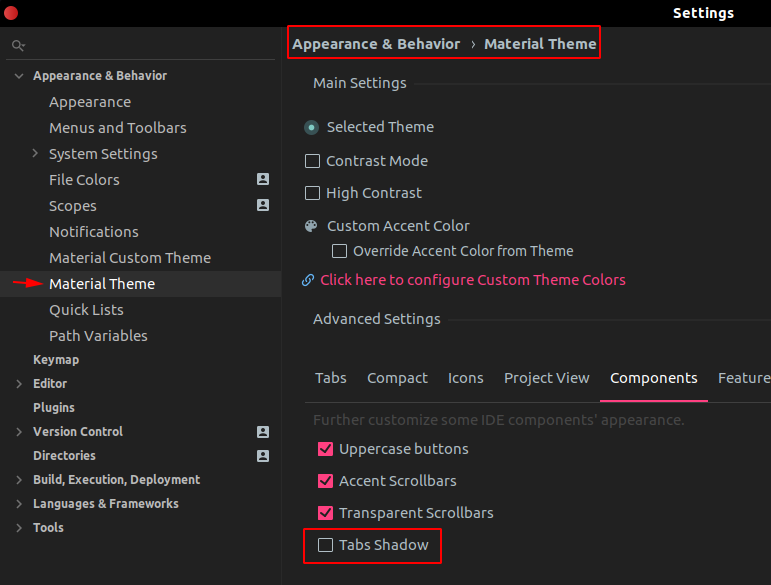
Might be late, but for those who are having troubles finding the option:
Go to Settings > Appearance and Behaviour > Material Theme.
Then in the Advanced Setting section, there is a Components tab under it. Click that.
After clicking the Components tab, the Tabs Shadow checkbox will be revealed.
 tanhernandez
on 28 Mar 2019
tanhernandez
on 28 Mar 2019
Related issues
 timrspratt
·
3Comments
timrspratt
·
3Comments
 NikoGrano
·
4Comments
NikoGrano
·
4Comments
 jpap
·
3Comments
jpap
·
3Comments
 nammaianh
·
3Comments
nammaianh
·
3Comments
 sanderboom
·
4Comments
sanderboom
·
4Comments