Material-design-icons: Problem with two tone font on Chrome Windows
There is a problem with Two Tone font on Chrome on Windows.
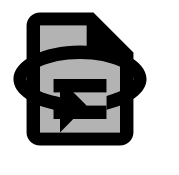
It is as if the 360 icon was displayed over all other icons.
The strangest part is that it displays correctly on Firefox and Edge and also Chrome on Linux.
Sample code (https://codepen.io/jfaissolle/pen/dLMQxy):
<html>
  <head>
    <link href="//fonts.googleapis.com/icon?family=Material+Icons+Two+Tone" rel="stylesheet" type="text/css">
  </head>
  <body>
    <i class="material-icons-two-tone" style="font-size: 128px;">description</i>
  </body>

</html>
 jfaissolle
All 10 comments
That font doesn't work on in Chrome Android at all, it shows monotone icon in Samsung browser.
Try this instead:
<html>
  <head>
    <script src="https://code.iconify.design/1/1.0.0/iconify.min.js"></script>
  </head>
  <body>
    <i class="iconify" data-icon="ic-twotone-description" style="font-size: 128px;"></i>
  </body>

</html>
 cyberalien
on 5 Apr 2019
cyberalien
on 5 Apr 2019
I got the same issue on my win10 chrome but it seems fine on win7. Its really weird as they were all fine a while ago then suddenly something is messed up.
 timc986
on 18 Apr 2019
timc986
on 18 Apr 2019
Are there any updates for this?
 Coding-Kiwi
on 16 Jul 2019
Coding-Kiwi
on 16 Jul 2019
any update on this?
 gaganbal
on 7 Aug 2019
gaganbal
on 7 Aug 2019
Please fix this 🙏🏻
 FlopRe
on 22 Sep 2019
FlopRe
on 22 Sep 2019
There is a problem with Two Tone font on Chrome on Windows.
It is as if the 360 icon was displayed over all other icons.
The strangest part is that it displays correctly on Firefox and Edge and also Chrome on Linux.
Sample code (https://codepen.io/jfaissolle/pen/dLMQxy):
<html>
  <head>
    <link href="//fonts.googleapis.com/icon?family=Material+Icons+Two+Tone" rel="stylesheet" type="text/css">
  </head>
  <body>
    <i class="material-icons-two-tone" style="font-size: 128px;">description</i>
  </body>

</html>
It is working fine using UTF-8 encoding in Notepad while saving html file. Chrome and Edge on Win 10 are displaying the font correctly. Online code editors still not showing properly.
 santoshdvc
on 22 Sep 2019
santoshdvc
on 22 Sep 2019
It is working fine using UTF-8 encoding in Notepad while saving html file. Chrome and Edge on Win 10 are displaying the font correctly. Online code editors still not showing properly.
It is not working for me on Win 10. Maybe it is not a good solution.
 ssk7833
on 22 Oct 2019
ssk7833
on 22 Oct 2019
Still a problem. Anyone come up with their own hacky solution? Our design team has to design around it which sucks.
 JakeFDev
on 27 Jan 2020
JakeFDev
on 27 Jan 2020
Still a problem. Anyone come up with their own hacky solution? Our design team has to design around it which sucks.
In addition to using SVG, I've been experimenting with fonts a bit few months ago and came up with this: https://github.com/material-icons/material-icons-font
Its the same icon font as latest official font, including two tone icons, but built without ligatures. It splits two tone icons into 2 separate shapes, then overlaps them on top of each other using :before and :after pseudo selectors with opacity for transparent layer.
Its a browser proof solution because it uses old technology. All stuff is in stylesheet.
cyberalien
on 27 Jan 2020
@JakeFDev you can download the icons as svg from the material website, then generate the webfont yourself with icomoon, but ligatures will be disabled:
Font glyphs cannot have more than one color by default. Using CSS, IcoMoon stacks multiple glyphs on top of each other to implement multicolor glyphs. As a result, these glyphs take more than one character code and cannot have ligatures.
To avoid multicolor glyphs, re-import your SVG after changing all its colors to a single color.
Coding-Kiwi
on 27 Jan 2020
Related issues
 VeeK727
·
4Comments
VeeK727
·
4Comments
 anlexN
·
3Comments
anlexN
·
3Comments
 cdeutsch
·
4Comments
cdeutsch
·
4Comments
 andrey-helldar
·
4Comments
andrey-helldar
·
4Comments
 maxmedina05
·
4Comments
maxmedina05
·
4Comments
Most helpful comment
@JakeFDev you can download the icons as svg from the material website, then generate the webfont yourself with icomoon, but ligatures will be disabled: