Material-components-web: [MDCSlider] "data-step" value is adding to many decimal places
Bug report
When setting the data-step value to .1 we're getting to many decimal places. We expect the aria-valuenow to increment in .1's but it's adding 16 decimal places .0000000000000000 behind the .
This is causing a visual problem in our UI.
Steps to reproduce
- Go to my codepen example https://codepen.io/oneezy/pen/PoZGKYK
- Notice the step value is set to
.1 - Move the slider up/down with mouse/ thumb/ or arrow keys and notice the long decimal value produced in
inputvalue andaria-valuenow
Actual behavior
16 decimal places are shown after the decimal point i.e. 1.2000000000000002
Expected behavior
The expected result value would be i.e. 1.2
Screenshots
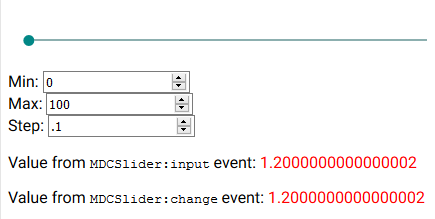
Your Environment:
| Software | Version(s) |
| ---------------- | ---------- |
| MDC Web | latest
| Browser | All
| Operating System | Windows 10
 oneezy
All 2 comments
JavaScript produces extra decimal points because it loses precision when calculating with float numbers. See Imprecision calculations for more explanation.
You should not rely on JavaScript equality operator when comparing two float numbers. There are few workarounds depending on application use case.
Most common way to compare float numbers: parseFloat(a.toFixed(2)) === 1.2
When possible avoid using float numbers in Step value.
 abhiomkar
on 22 Jun 2020
abhiomkar
on 22 Jun 2020
While one can create their own tie in to the mdc eventListener wouldn't it be a value add to just have the default listener apply the correct parse float percision based on step?
`
slider.addEventListener('MDCSlider:input', () => {
value.textContent = parseFloat((slider.getValue()).toFixed(1));
});
slider.addEventListener('MDCSlider:change', () => {
committedValue.textContent = parseFloat((slider.getValue()).toFixed(1));
});
`
 bigcountry-scav
on 23 Jun 2020
bigcountry-scav
on 23 Jun 2020
Related issues
 trimox
·
4Comments
trimox
·
4Comments
 yapryntsev
·
3Comments
yapryntsev
·
3Comments
 CyborgSemon
·
3Comments
CyborgSemon
·
3Comments
 patrickrodee
·
3Comments
abhiomkar
·
3Comments
patrickrodee
·
3Comments
abhiomkar
·
3Comments
Most helpful comment
While one can create their own tie in to the mdc eventListener wouldn't it be a value add to just have the default listener apply the correct parse float percision based on step?
`
slider.addEventListener('MDCSlider:input', () => {
value.textContent = parseFloat((slider.getValue()).toFixed(1));
});
slider.addEventListener('MDCSlider:change', () => {
committedValue.textContent = parseFloat((slider.getValue()).toFixed(1));
});
`