Material-components-web: [MDCTextField] Outlined label position incorrect with `mdc-text-field--fullwidth`
Bug report
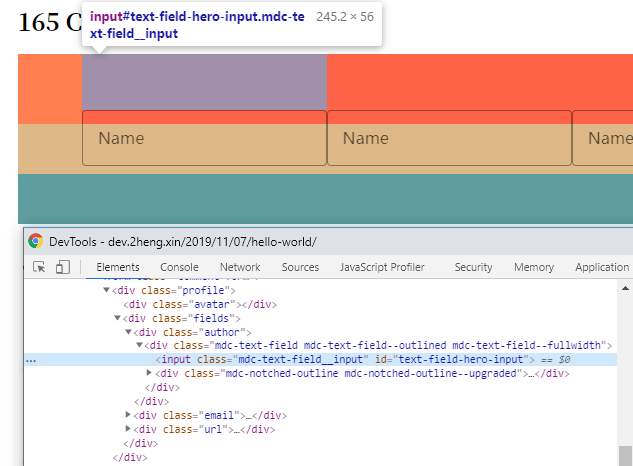
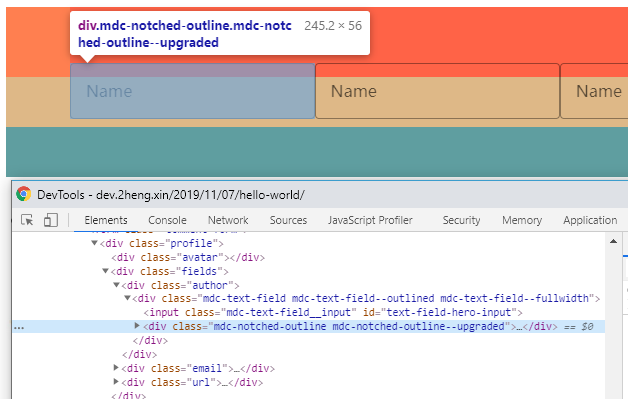
Outlined label position incorrect with mdc-text-field--fullwidth:

Steps to reproduce
   <div class="fields">
      <div class="author">
        <div class="mdc-text-field mdc-text-field--outlined mdc-text-field--fullwidth">
          <input class="mdc-text-field__input" id="text-field-hero-input">
          <div class="mdc-notched-outline">
            <div class="mdc-notched-outline__leading"></div>
            <div class="mdc-notched-outline__notch">
              <label for="text-field-hero-input" class="mdc-floating-label">Name</label>
            </div>
            <div class="mdc-notched-outline__trailing"></div>
          </div>
        </div>
      </div>
      <div>...The same div loop here</div>
   </div>
    .fields {
      width: 100%; /*parent is flex row layout*/
      height: 100%; /*100% of parent with a px fixed height*/
      background: tomato;
      display: -webkit-flex;
      display: flex;

      >* {
        width: 100%;
        height: 100%;
      }
    }
Actual behavior
Expected behavior
Label display in correct height/top/margin (whatever), whild mdc-text-field has a 100% width of parent.
Picture below, just remove the mdc-text-field--fullwidth class from the first field.

Screenshots
Your Environment:
| Software | Version(s) |
| ---------------- | ---------- |
| MDC Web |4.0.0|
| Browser |Chrome 78.0.3904.108|
| Operating System |Windows 10|
Additional context
Possible solution
 mashirozx
All 4 comments
More information:
mashirozx
on 13 Dec 2019
Solution:
add top:0 to .mdc-notched-outline

mashirozx
on 13 Dec 2019
Hello,
Thanks for the issue. Reproduced in codepen here. However, after a preliminary investigation it seems like the notes in the docs for this indicate that the full-width textfield should not be used with the outlined variant nor with a floating label.
 allan-chen
on 13 Dec 2019
allan-chen
on 13 Dec 2019
Thanks. I didn't notice the notes on docs. Maybe this can be a feature requests in the future.🐕
mashirozx
on 13 Dec 2019
Related issues
 CyborgSemon
·
3Comments
CyborgSemon
·
3Comments
 devshekhawat
·
3Comments
devshekhawat
·
3Comments
 AbuMareBear
·
3Comments
AbuMareBear
·
3Comments
 traviskaufman
·
3Comments
traviskaufman
·
3Comments
 ghost
·
3Comments
ghost
·
3Comments
Most helpful comment
Thanks. I didn't notice the notes on docs. Maybe this can be a feature requests in the future.🐕