Material-components-web: [Select] Space to underlying form element is reduces when select option is selected
Bug report
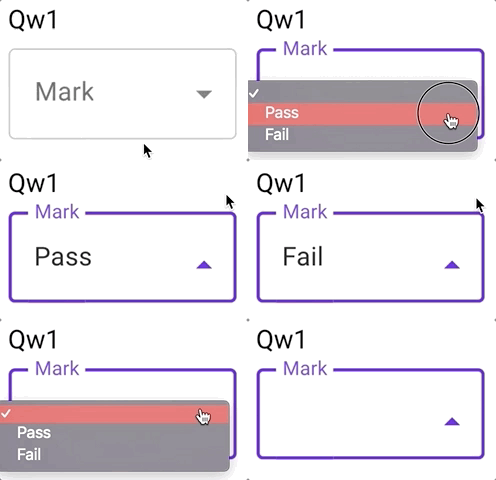
When a select option is selected the spacing to the underlying element is automatically changed. This bug is visible on the demo site on the outlined enhanced select element.
https://material-components.github.io/material-components-web-catalog/#/component/select
Steps to reproduce
- Go to https://material-components.github.io/material-components-web-catalog/#/component/select
- Click on outlined enhanced select element
- Choose option
- Spacing to the underlying elements gets reduced
Actual behavior
Spacing to the underlying element gets reduced.
Expected behavior
The spacing should not be changed.
 FabianKoestring
All 5 comments
This is happening to me as well
Gif of issue: (look closely)
Images of inspect view of parent div:
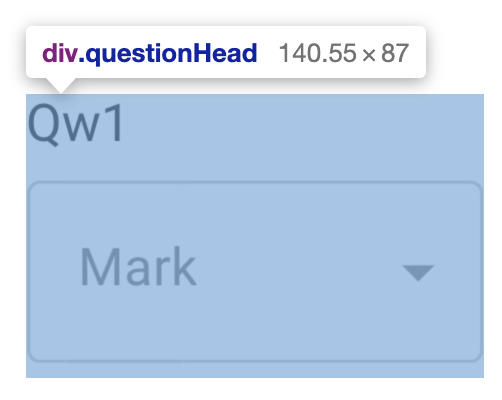
You can see the 4px under the select when the value is empty
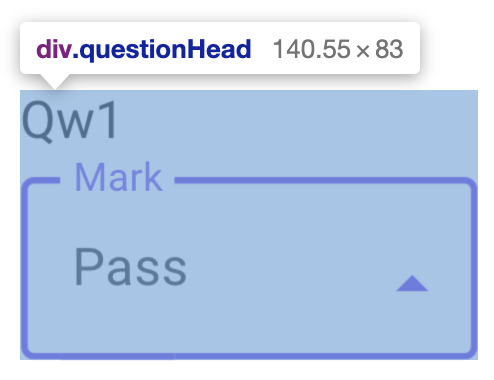
Now that 4px is gone
The div I'm using is set up like this
<div>
  <div>Some text</div>
  <div class="mdc-select">...</div>
</div>
 CyborgSemon
on 17 Jul 2019
CyborgSemon
on 17 Jul 2019
This happens because .mdc-select__selected-text not have child nodes and browsers add those extra 4px (I not have idea why).
To solve it, .mdc-select__selected-text needs at least one child node (it can be a pseudo element)
This rules solve the problem, also I made a demo
.mdc-select__selected-text{
    display: flex; /*For filled select*/
}
.mdc-select__selected-text::before{
    content: "";
}
 Darhakexge
on 31 Jul 2019
Darhakexge
on 31 Jul 2019
This happens because
.mdc-select__selected-textnot have child nodes and browsers add those extra 4px (I not have idea why).
To solve it,.mdc-select__selected-textneeds at least one child node (it can be a pseudo element)This rules solve the problem, also I made a demo
.mdc-select__selected-text{
  display: flex; /*For filled select*/
}
.mdc-select__selected-text::before{
  content: "";
}
Works perfectly. Will this be part of next release?
FabianKoestring
on 1 Aug 2019
I found a more optimal way to remove that extra space using the vertical-align property
.mdc-select{
  vertical-align: middle;
}
This should be fixed after layout overhaul in 28d10a9, which includes changing .mdc-select__anchor from display: inline-flex to display: flex so that the root mdc-select element dictates width.
 allan-chen
on 24 Apr 2020
allan-chen
on 24 Apr 2020
Related issues
 traviskaufman
·
4Comments
traviskaufman
·
4Comments
 kimurakenshi
·
3Comments
kimurakenshi
·
3Comments
 16rajumane
·
3Comments
traviskaufman
·
3Comments
traviskaufman
·
3Comments
16rajumane
·
3Comments
traviskaufman
·
3Comments
traviskaufman
·
3Comments