Material-components-web: Textarea border is partially cut by the floating label
Bugs
What MDC-Web Version are you using?
0.25.0 (except for base that is 0.24.0
What browser(s) is this bug affecting?
Chrome 62.0.3202.94 (64 bits)
What OS are you using?
MacOS 10.13.1
What are the steps to reproduce the bug?
Please write the steps which need to be taken in order to reproduce the bug. These steps should be
as detailed as possible, e.g.
- Go to this url.
- Start typing on the textarea
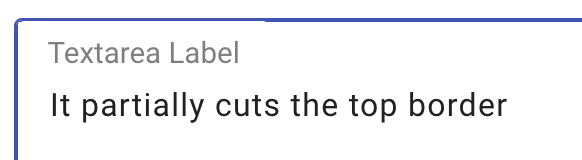
- Observe the component's behavior: the top border is partially overlapped by the label.
What is the expected behavior?
The top border should stay the same
What is the actual behavior?
The top border is partially cut near the label
Any other information you believe would be useful?
 ricardobrandao
All 7 comments
Looks like a bug. Putting in tracker.
 amsheehan
on 20 Nov 2017
amsheehan
on 20 Nov 2017
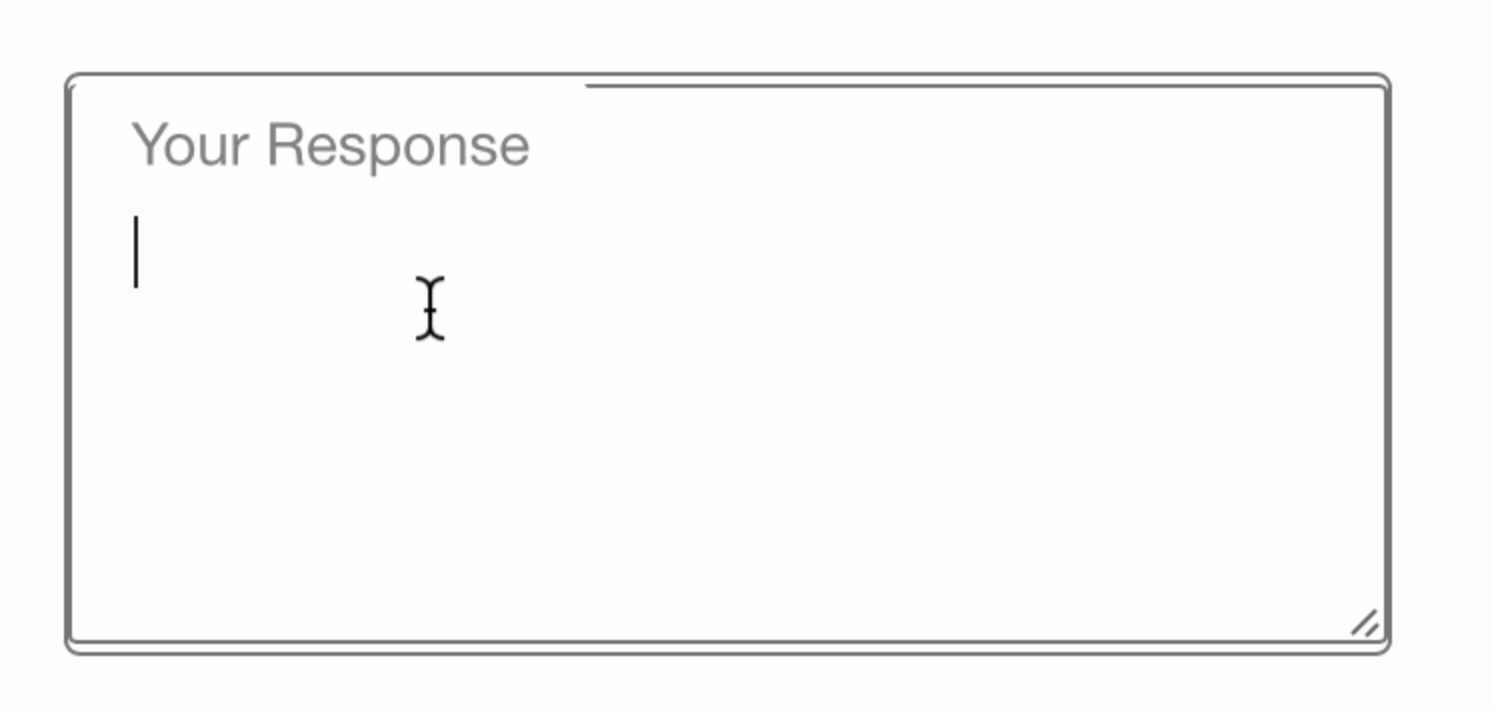
Textarea for Safari (Mobile & Desktop) is even worse ☹️
 mellogarrett
on 4 Dec 2017
mellogarrett
on 4 Dec 2017
We have found that zoom levels and pixel densities of monitors have had a detrimental effect on these types of features. @mellogarrett Thank you for the screen shot, could you also provide the specs for the machine(s) you're using?
amsheehan
on 4 Dec 2017
Seen on both 2017 MacBook Pro & iPhone 8+
mellogarrett
on 4 Dec 2017
While looking at the dev tools, it seems like the and the mdc-text-field wrapper both have a border. The element does not have border-radius, and since the label is position: absolute, it overlaps the border. I also notice that the line-height for the label is slightly larger on the codepen compared to that of the demo site since the demo site uses normalize.
Proposed solution is to remove the textarea input border, and add line-height of label to same as normalize.css (line-height: 1.15).
 moog16
on 7 Dec 2017
moog16
on 7 Dec 2017
@ricardobrandao In the MDC demo normalize.css is being used, but is turned off in your codepen. I noticed that margin is added by default on both Chrome and Safari. Safari (v11.0.1) however adds by default to the textfield.
margin-top: 0em;
margin-bottom: 0em;
margin-left: 0em;
margin-right: 0em;
I noticed that this doesn't remove all margin (as seen in @mellogarrett screenshot), but by overriding this with margin: 0 Safari actually removes the margin as expected. So seems like we stumbled upon a Safari bug. I'll be opening a PR with that change.
moog16
on 12 Dec 2017
@moog16 thanks for the update 😄 Glad you've found the problem.
ricardobrandao
on 13 Dec 2017
Related issues
 traviskaufman
·
3Comments
traviskaufman
·
3Comments
 trimox
·
4Comments
trimox
·
4Comments
 ghost
·
3Comments
ghost
·
3Comments
 CyborgSemon
·
3Comments
CyborgSemon
·
3Comments
 devshekhawat
·
3Comments
devshekhawat
·
3Comments
Most helpful comment
Seen on both 2017 MacBook Pro & iPhone 8+