Material-components-ios: {CocoaPods} dyld: Symbol not found: _OBJC_CLASS_$_MDCChipView
### It is work to my iPhone 7 iOS 13.3.2, but crash on iPhone 11 iOS 13.2.2
Version 11.2.1 (11B500)
After I include into Podfile pod:
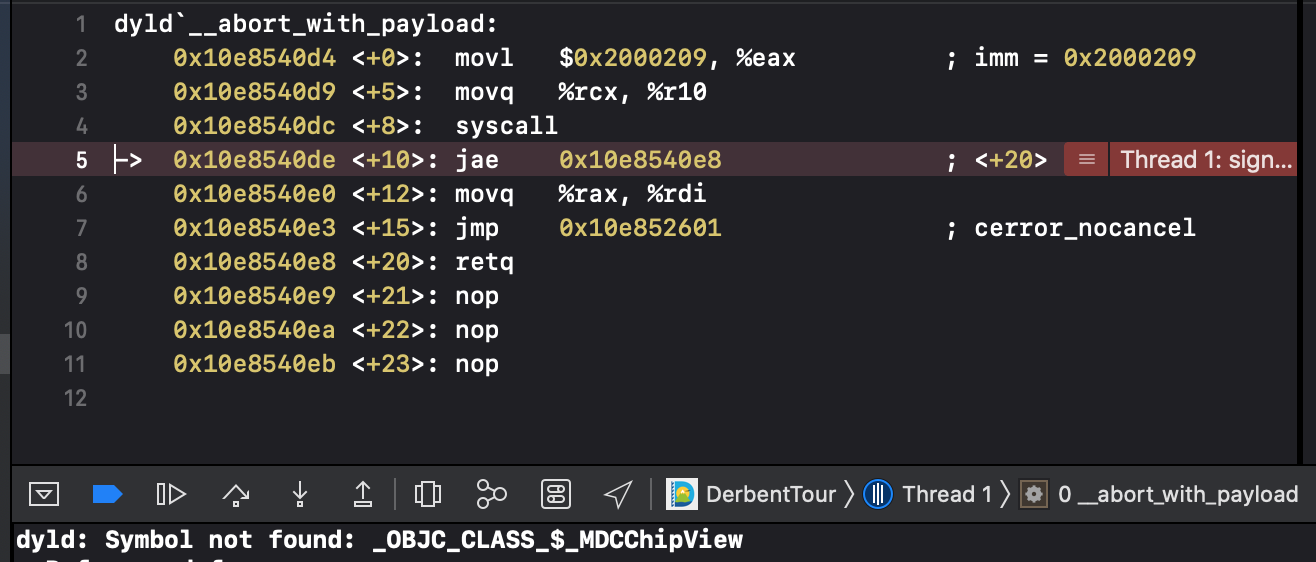
pod 'MaterialComponents/Chips'whenever I running project, app crash. With this error:
dyld: Symbol not found: _OBJC_CLASS_$_MDCChipView
my Podfile:
target 'DerbentTour' do
source 'https://cdn.cocoapods.org/‘

  # Comment the next line if you don't want to use dynamic frameworks
  use_frameworks!
      pod 'SDWebImage'
        pod 'AlamofireObjectMapper'
      pod 'Alamofire', '~> 5.0.0-rc.2'
      pod 'PromiseKit', "~> 6.8"
      pod 'Mapbox-iOS-SDK'
      pod 'RealmSwift'
      pod 'ObjectMapper+Realm'
        pod 'PinLayout'
      pod "CTPanoramaView", "~> 1.3"
      pod 'MaterialComponents/BottomAppBar'
      pod 'MaterialComponents/Chips'
      pod 'DropDown'
      pod 'Cosmos', '~> 20.0'
  target 'DerbentTourTests' do
    inherit! :search_paths
    # Pods for testing
  end

end
Internal data
- Associated internal bug: b/144760283
 muaviya
All 12 comments
The title doesn't have a [Component] prefix.
![material-automation[bot] picture](https://avatars.githubusercontent.com/u/19556314?v=4&s=40) material-automation[bot]
on 18 Nov 2019
material-automation[bot]
on 18 Nov 2019
Thanks for reporting this, @muaviya . Could you run pod update and see if that fixes it? Could you also confirm which version of CocoaPods you're using?
 romoore
on 18 Nov 2019
romoore
on 18 Nov 2019
Thanks for reporting this, @muaviya . Could you run
pod updateand see if that fixes it? Could you also confirm which version of CocoaPods you're using?
pod update doesn't help
pod version 1.8.4
muaviya
on 18 Nov 2019
Unfortunately, MDC-iOS currently supports CocoaPods 1.6.1. Could you try with 1.6.1 and report back on the results?
romoore
on 18 Nov 2019
Unfortunately, MDC-iOS currently supports CocoaPods 1.6.1. Could you try with 1.6.1 and report back on the results?
excuse me, how I can install cocoapods 1.6.1?
muaviya
on 19 Nov 2019
How you switch to 1.6.1 depends on how you installed CocoaPods. I installed using Ruby Gems, so I specified the version I wanted explicitly.
sudo gem install cocoapods -v 1.6.1
Unfortunately, MDC-iOS currently supports CocoaPods 1.6.1. Could you try with 1.6.1 and report back on the results?
it is work for me. Thank you.
Do you plan to upgrade to the latest version cocoaPods ?
muaviya
on 19 Nov 2019
@jverkoey @randallli Do we have plans to support newer versions of CocoaPods this year or early next?
romoore
on 19 Nov 2019
Let's bring this issue and https://github.com/material-components/material-components-ios/issues/75 to the team's attention today.
 jverkoey
on 19 Nov 2019
jverkoey
on 19 Nov 2019
Opened an issue (will be mirrored separately) to bring this to the team's attention.
romoore
on 19 Nov 2019
This bug is now being tracked by https://github.com/material-components/material-components-ios/issues/8997.
Also, for what it's worth, I just tried creating a new project using Cocoapods 1.8.4 and had no problems running pod install or compiling the app.
@muaviya, did you try clearing derived data using option+command+shift+k?
So far I've tried on both the MDC Catalog and a new sample project after clearing derived data, clearing the cocoapods cache (pod cache clean --all), and doing rn -rf ~/.cocoapods and everything has worked.
 andrewoverton
on 19 Nov 2019
andrewoverton
on 19 Nov 2019
This bug is now being tracked by #8997.
Also, for what it's worth, I just tried creating a new project using Cocoapods 1.8.4 and had no problems running pod install or compiling the app.
@muaviya, did you try clearing derived data using option+command+shift+k?
So far I've tried on both the MDC Catalog and a new sample project after clearing derived data, clearing the cocoapods cache (
pod cache clean --all), and doingrn -rf ~/.cocoapodsand everything has worked.
what is the command rn -rf ~/.cocoapods when i run this i get back command not found : rn . @andrewoverton Please can you help
 deepesh-vasthimal-cko
on 2 Nov 2020
deepesh-vasthimal-cko
on 2 Nov 2020
Related issues
 brianjmoore
·
5Comments
brianjmoore
·
5Comments
 material-mirror
·
10Comments
material-mirror
·
10Comments
 ulaserdegor
·
4Comments
romoore
·
5Comments
ulaserdegor
·
4Comments
romoore
·
5Comments
 croccio
·
3Comments
croccio
·
3Comments
Most helpful comment
This bug is now being tracked by https://github.com/material-components/material-components-ios/issues/8997.
Also, for what it's worth, I just tried creating a new project using Cocoapods 1.8.4 and had no problems running pod install or compiling the app.
@muaviya, did you try clearing derived data using option+command+shift+k?
So far I've tried on both the MDC Catalog and a new sample project after clearing derived data, clearing the cocoapods cache (
pod cache clean --all), and doingrn -rf ~/.cocoapodsand everything has worked.