Material-components-ios: [TextFields] MDCTextField does not permit user input
Bug description: When converting a very simple one-screen & one-textfield Xcode Swift App from UITextField to MDCTextField the ability to input data into the text field was lost.
Reproduction steps
Steps to reproduce the behavior:
- Create a simple Xcode workspace with Pods (containing MaterialComponents installed through Cocoapods) and a new Swift single-view project
- Enter Xcode through the Workspace (including the basic Swift project and the Pods)
- Using Interface Builder in main.storyboard add a single UITextField in the centre of the single view and set size and position constraints
- Add an outlet from Interface Builder to View Controller (@IBOutlet weak var helloText: UITextField!)
- Build this basic App (with no errors) and in the Simulator successfully enter text into the UITextField
Convert the App to MaterialComponents - In Interface Builder, change the Class from UITextField to MDCTextField
- In ViewController, use Google's MDC-111 lesson as an example to make these changes:
- a) Type 'import MaterialComponents' below 'import UIKit' (no errors)
- b) Change the type of the outlet declaration (@IBOutlet weak var helloText: MDCTextField!)
- c) Declare a new property (var helloController: MDCTextInputControllerOutlined?)
- d) Add a single statement to 'func viewDidLoad' of: "helloController = MDCTextInputControllerOutlined(textInput: helloText)"
- Build the project and in the Simulator notice that the field displays in nice Material Design style but does not permit the user to enter data.
Expected behavior
A clear and concise description of what you expected to happen.
I expected that the user input would cause the standard Material Design behaviour (keyboard displays, placeholder text moves up and user-input appears on the screen).
Actual behavior
The MDCTextField displayed passively in its default state and did not accept user input
Platform (please complete the following information)
- Xcode 9.4 with Swift 4.1
- Xcode Simulator for iPhone 8 Plus
- MacBook Pro (2014 model)
- Mac OS 10.13.4 High Sierra
Additional context
The Google lesson MDC-111 works correctly with MDCTextField behaving as expected. The only difference that I can see is that MDC-111 appears to have an Objective-C 'Main' and 'AppDelegate' modules. My project is entirely Swift with a single 'AppDelegate.swift' module.
The 'user interaction enabled' flag is set on in Interface Builder. This is the default and I did not change it.
 TriumphT110
All 11 comments
The title doesn't have a [Component] prefix.
![material-automation[bot] picture](https://avatars.githubusercontent.com/u/19556314?v=4&s=40) material-automation[bot]
on 31 May 2018
material-automation[bot]
on 31 May 2018
Hi @TriumphT110, thanks for filing a bug and the detailed reproduction steps!
Because this bug involves a few steps that could be easily accidentally done in a different fashion, it may be helpful to link to a github repo or a zip file of the project if possible.
 jverkoey
on 31 May 2018
jverkoey
on 31 May 2018
OK. I've Pushed the project to GitHub as 'Test CocoaPods' in my 'TriumphT110' Github account. How do I connect you with it? (sorry I'm new to Github)
TriumphT110
on 31 May 2018
I found the repo here: https://github.com/TriumphT110/Test-CocoaPods
jverkoey
on 31 May 2018
Yepp. That's it!
TriumphT110
on 31 May 2018
@romoore Is this something you might be able to take a look at?
jverkoey
on 31 May 2018
@romoore , @jverkoey , this is based on the MDC-iOS codelab MDC-111 so I'll investigate.
 willlarche
on 1 Jun 2018
willlarche
on 1 Jun 2018
Thanks Will!
jverkoey
on 1 Jun 2018
Hey, @TriumphT110 . Thanks for taking the MDC-111 codelab and thanks for reporting this issue. I think I know what's up.
The issue
In Main.storyboard, the text field has a height constraint of 30. But our outline styled text field has an intrinsic height of about 82. So, the frame of the field is not tall enough for all of the elements. They are still drawn but they are outside the frame so they aren't 'touchable'.
See this Reveal where the frame is highlighted in light blue:
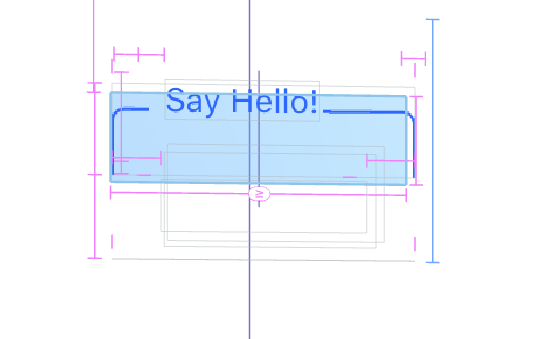
The text field still works if you touch the top 30 points of height like above the "Say Hello!" text.
To fix this
Delete the height constraint. Here's the one I mean:
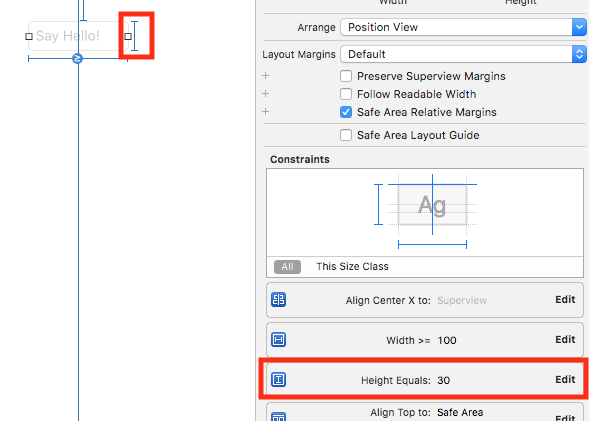
Then the intrinsic height of the text field will expand the frame to the correct height and all parts will be touchable!
Let me know if this doesn't resolve your issue.
willlarche
on 1 Jun 2018
what if i want the height of the textfield to be less than 84, is there a way to customize the height property?
 JukeBoxApp
on 6 Jan 2019
JukeBoxApp
on 6 Jan 2019
@Frankenstein666 I believe you would need to use a different style of Text Field. In this case, it's an Outlined controller with floating placeholders. There is ongoing work to address "density" within Material, but we have not yet built out the new styles for Text Fields.
 romoore
on 7 Jan 2019
romoore
on 7 Jan 2019
Related issues
 material-mirror
·
10Comments
material-mirror
·
10Comments
 shadowsheep1
·
3Comments
jverkoey
·
7Comments
shadowsheep1
·
3Comments
jverkoey
·
7Comments
 Morpheu5
·
7Comments
Morpheu5
·
7Comments
 pokurivijay
·
5Comments
pokurivijay
·
5Comments
Most helpful comment
Hey, @TriumphT110 . Thanks for taking the MDC-111 codelab and thanks for reporting this issue. I think I know what's up.
The issue
In
Main.storyboard, the text field has a height constraint of 30. But our outline styled text field has an intrinsic height of about 82. So, the frame of the field is not tall enough for all of the elements. They are still drawn but they are outside the frame so they aren't 'touchable'.See this Reveal where the frame is highlighted in light blue:

The text field still works if you touch the top 30 points of height like above the "Say Hello!" text.
To fix this
Delete the height constraint. Here's the one I mean:

Then the intrinsic height of the text field will expand the frame to the correct height and all parts will be touchable!
Let me know if this doesn't resolve your issue.