Material-components-android: [BottomNavigationView] incorrect display of itemBackground in android 21 and 22
Description:
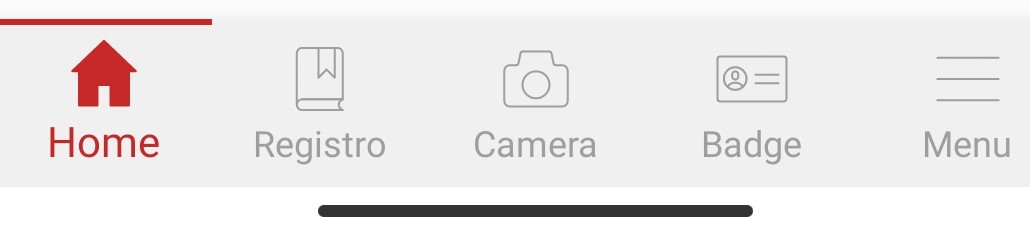
In the bottomnavigationview the drawable inserted in "app: itemBAckground" is not displayed well. This bug is only on android 21 and 22 (see images)
Expected behavior:
Second image
Source code:
In layout:
android:layout_width="match_parent"
android:layout_height="wrap_content"
android:layout_alignParentBottom="true"
android:layout_gravity="bottom"
android:background="?android:attr/windowBackground"
app:itemBackground="@drawable/line"
app:labelVisibilityMode="labeled"
app:menu="@menu/bottom_navigation_menu" />
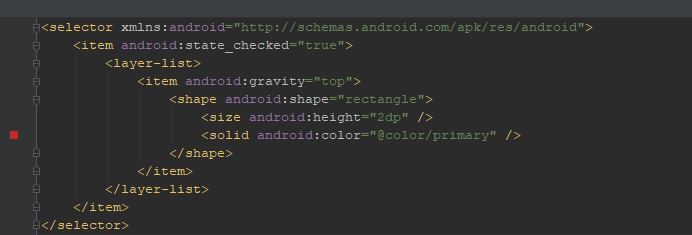
Drawable line:
Android API version:
from android 21 to android 29
Material Library version:
'androidx.appcompat:appcompat:1.3.0-alpha02'
'com.google.android.material:material:1.3.0-alpha03'
Device:
Android Emulator with Android 5.0(SDK 21) and Android 6.0 (sdk 22)
Android 21 & 22:

Android >=23:
 biancaarno8
All 9 comments
Hi @biancaarno8,
It's not a bug, android:gravity attribute in the layer list was added in API 23, so it will be ignored in the older versions.
https://developer.android.com/reference/android/graphics/drawable/LayerDrawable#setLayerGravity(int,%20int)
To fix this, use BitmapDrawable instead of LayerDrawable for API below 23.
<item>
      <bitmap
         android:gravity="top"
         android:src="@drawable/rectangle" />
 </item>
 ar-arvind
on 6 Oct 2020
ar-arvind
on 6 Oct 2020
@ar-arvind thanks very much, what you wrote is also valid for versions after android 23? Or do I have to use 2 different drawables?
biancaarno8
on 6 Oct 2020
@ar-arvind thanks very much, what you wrote is also valid for versions after android 23? Or do I have to use 2 different drawables?
It will work in all android versions.
ar-arvind
on 6 Oct 2020
@ar-arvind sorry, that piece of code you wrote I have to replace to android:gravity?
Or do I have to create two different files?
biancaarno8
on 6 Oct 2020
@ar-arvind sorry, that piece of code you wrote I have to replace to android:gravity?
Or do I have to create two different files?
@biancaarno8, you don't have to create two different files.
Complete sample code:
<?xml version="1.0" encoding="UTF-8"?>
<selector xmlns:android="http://schemas.android.com/apk/res/android">
 <item android:state_checked="true">
  <layer-list>
   <item>
    <bitmap android:src="@drawable/rectangle" android:gravity="top" />
   </item>
  </layer-list>
 </item>
</selector>
@ar-arvind
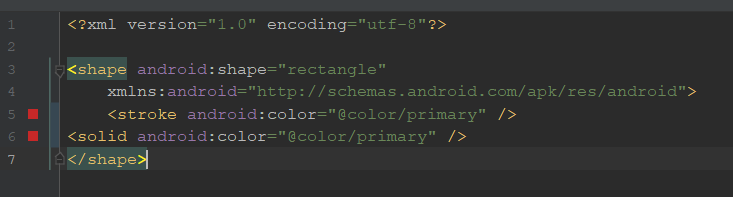
Ok, but drawable/rectangle is like this?
biancaarno8
on 6 Oct 2020
shouldn't I set the height inside bitmap?
or should I set it in drawable / rectangle?
biancaarno8
on 6 Oct 2020
@biancaarno8,
Ok, but drawable/rectangle is like this?
<bitmap android:src="@drawable/rectangle" android:gravity="top" />
No, it should be a image file (png), vector/shape drawable is not supported in the bitmap android:src.
If you want to use shape drawable in android:src, then convert it to bitmap programatically.
Complete code:
//Shape
GradientDrawable gradientDrawable = new GradientDrawable();
gradientDrawable.setShape(GradientDrawable.RECTANGLE);
gradientDrawable.setColor(Color.RED); //Color
gradientDrawable.setSize(120,5); //Size
gradientDrawable.setBounds(0,0,gradientDrawable.getIntrinsicWidth(),gradientDrawable.getIntrinsicHeight());

//Converting shape drawable to bitmap.
Bitmap bitmap = Bitmap.createBitmap(gradientDrawable.getIntrinsicWidth(),gradientDrawable.getIntrinsicHeight(), Bitmap.Config.ARGB_8888);
gradientDrawable.draw(new Canvas(bitmap));

StateListDrawable stateListDrawable = new StateListDrawable();

BitmapDrawable bitmapDrawable = new BitmapDrawable(getResources(), bitmap);
bitmapDrawable.setGravity(Gravity.TOP); //Gravity

stateListDrawable.addState(new int[]{android.R.attr.state_checked}, new LayerDrawable(new Drawable[]{bitmapDrawable}));

bottomNavigationView.setItemBackground(stateListDrawable);
Yes, it works!!!
I'm sorry if I wasted your time, and thank you very much!!!
biancaarno8
on 6 Oct 2020
Related issues
 JavierSegoviaCordoba
·
3Comments
JavierSegoviaCordoba
·
3Comments
 gabrielemariotti
·
3Comments
gabrielemariotti
·
3Comments
 JakeWharton
·
3Comments
JakeWharton
·
3Comments
 ahmaducg
·
3Comments
ahmaducg
·
3Comments
 aarontwf
·
3Comments
aarontwf
·
3Comments