Material-components-android: [Snackbar] Can't change top and bottom padding of snackbar's text view
Description:
Setting <item name="android:padding">0dp</item> changes the start and end padding but the top and bottom remain unchanged.
Setting android:paddingTop and android:paddingBottom has the same effect.

From the layout inspector

Expected behavior:
The top and bottom padding change, similar to start and end.
Source code:
<style name="AppTheme" parent="Theme.MaterialComponents.Light.NoActionBar">
    <item name="snackbarTextViewStyle">@style/AppTheme.Snackbar.TextView</item>
</style>

<style name="AppTheme.Snackbar.TextView" parent="@style/Widget.MaterialComponents.Snackbar.TextView">
    <item name="android:padding">0dp</item>
</style>
Android API version: 29
Material Library version: 1.2.0-alpha05
Device: Android Emulator - Pixel 2
 MarkNjunge
All 9 comments
You can set your theme's snackbarStyle with android:paddingTop and android:paddingBottom to achieve increase the padding.
<style name="AppTheme" parent="Theme.MaterialComponents.DayNight">
<item name="snackbarStyle">@style/Widget.MyApp.Snackbar</item>
</style>
<style name="Widget.MyApp.Snackbar" parent="@style/Widget.MaterialComponents.Snackbar">
<item name="android:layout_margin">45dp</item>
<item name="android:padding">32dp</item>
</style>

Are you trying to remove all top and bottom padding?
 hunterstich
on 6 Apr 2020
hunterstich
on 6 Apr 2020
Yes, I'm trying to remove it.
MarkNjunge
on 6 Apr 2020
Hi, i have the same issue, i want to remove extra top and bottom padding from text when it has more than one line:

 DKKovalev
on 10 Apr 2020
DKKovalev
on 10 Apr 2020
Same here indeed. Can't remove the padding

There are huge paddings in the TextView in the screenshot above, I tried removing them with Widget.MaterialComponents.Snackbar.TextView but no luck.
<style name="Components.Snackbar.TextView" parent="Widget.MaterialComponents.Snackbar.TextView">
<item name="android:textAppearance">@style/TextAppearance.Body2.Regular</item>
<item name="android:textColor">@color/colorWhite</item>
<item name="android:layout_marginEnd">8dp</item>
<item name="lineHeight">20dp</item>
<item name="android:padding">0dp</item>
<item name="android:paddingBottom">0dp</item>
<item name="android:paddingTop">0dp</item>
</style>
The paddings seem twice as big when having a singleline:
 =
=
 DanielMartinus
on 27 May 2020
DanielMartinus
on 27 May 2020
I just went through the source and found a way of updating the padding of the Snackbar. I'll explain the steps that I went through, see tl;dr at the end.
Snackbar.java
In Snackbar.java on line167 you can see it inflating one of two layouts:
R.layout.mtrl_layout_snackbar_include : R.layout.design_layout_snackbar_include
In those layouts you see almost two similar layouts, just different stylings and references. What they have in common though is the TextView and Button. The TextView is named: android:id="@+id/snackbar_text"
However this snackbar_text isn't used anywhere in snackbar.java but after some more investigation I found it's used in SnackbarContentLayout referenced all over the place, but most importantly on line 163 in snackbar.java.
final SnackbarContentLayout content =
        (SnackbarContentLayout)
            inflater.inflate(
                hasSnackbarContentStyleAttrs(parent.getContext())
                    ? R.layout.mtrl_layout_snackbar_include
                    : R.layout.design_layout_snackbar_include,
                parent,
                false);
SnackbarContentLayout
Going into this SnackbarContentLayout I looked for snackbar_text which is assigned to messageView. Following this messageView you quickly find line124 where it's doing a condition if the textview contains a single or multilines updating the bottom and top padding.
Following back where updateViewsWithinLayout is called from (line101) you see it's choosing between a multiLineVPadding or singleLineVPadding.
Following multiLineVPadding you'll see it assigned on line91
final int multiLineVPadding =
        getResources().getDimensionPixelSize(R.dimen.design_snackbar_padding_vertical_2lines);
Finally looking up design_snackbar_padding_vertical_2lines you'll see it has 24dp assigned.
Tl;dr
The padding of the Snackbar varies between singleline (14dp) and multiline (24dp). You need to somehow override this. This can be done by overriding this value in your dimens.xml for example.
<dimen name="design_snackbar_padding_vertical_2lines">14dp</dimen>
This Works for me to add Margin as well as Padding to Snackbar
container_snackbar.xml
<?xml version="1.0" encoding="utf-8"?>
<layer-list xmlns:android="http://schemas.android.com/apk/res/android">
    <!--    Set Margin Here -->
    <item
        android:left="20dp"
        android:right="20dp"
        android:bottom="10dp"
        android:top="10dp">

        <!-- Insert your shape here: -->
        <shape android:shape="rectangle"  >
            <solid android:color="#FE4C4C" />

            <!-- Padding for inner text-->
            <padding android:left="25dp" android:right="10dp" android:bottom="10dp" android:top="10dp" />
            <corners android:radius="5dp" />

        </shape>
    </item>
</layer-list>
And then from Activity set that Drawable
MainActivity.java
Snackbar snack = Snackbar
                 .make(activity,"Hello World 🚀",Snackbar.LENGTH_INDEFINITE);
        snack.getView()
        .setBackground(ContextCompat.getDrawable(getApplicationContext(),R.drawable.contianer_snackbar));
        snack.show();
 bhavindhodia
on 7 Sep 2020
bhavindhodia
on 7 Sep 2020
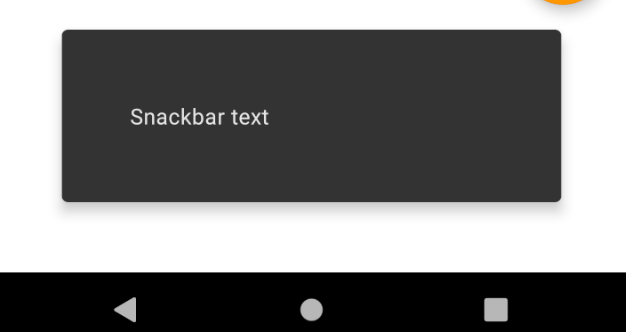
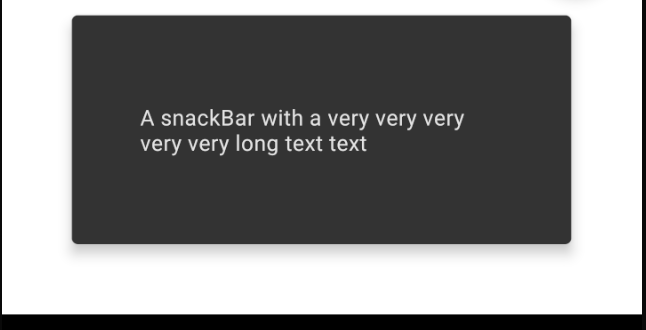
With 1.2.0-1.2.1 and 1.3.0-alpha02:
<style name="AppTheme" parent="Theme.MaterialComponents.DayNight">
    <item name="snackbarStyle">@style/Widget.MyApp.Snackbar</item>
</style>

<style name="Widget.MyApp.Snackbar" parent="@style/Widget.MaterialComponents.Snackbar">
    <!-- Custom margin -->
    <item name="android:layout_margin">45dp</item>
    <!-- Custom padding -->
    <item name="android:padding">32dp</item>
</style>
 gabrielemariotti
on 7 Sep 2020
gabrielemariotti
on 7 Sep 2020
There's a separate issue now specifically about the spacing difference depending on the number of lines of text: https://github.com/material-components/material-components-android/issues/1721
 tfcporciuncula
on 14 Sep 2020
tfcporciuncula
on 14 Sep 2020
With
1.2.0-1.2.1and1.3.0-alpha02:<style name="AppTheme" parent="Theme.MaterialComponents.DayNight"> <item name="snackbarStyle">@style/Widget.MyApp.Snackbar</item> </style> <style name="Widget.MyApp.Snackbar" parent="@style/Widget.MaterialComponents.Snackbar"> <!-- Custom margin --> <item name="android:layout_margin">45dp</item> <!-- Custom padding --> <item name="android:padding">32dp</item> </style>
Looks it only works for that horizontally, no effect for vertical. I'm using 1.2.1.
 fr-jadengu
on 5 Jan 2021
fr-jadengu
on 5 Jan 2021
Related issues
 karan26796
·
3Comments
karan26796
·
3Comments
 JavierSegoviaCordoba
·
3Comments
JavierSegoviaCordoba
·
3Comments
 KelvinPac
·
3Comments
KelvinPac
·
3Comments
 ahmaducg
·
3Comments
ahmaducg
·
3Comments
 zkovar
·
3Comments
zkovar
·
3Comments
Most helpful comment
I just went through the source and found a way of updating the padding of the Snackbar. I'll explain the steps that I went through, see tl;dr at the end.
Snackbar.java
In Snackbar.java on line167 you can see it inflating one of two layouts:
R.layout.mtrl_layout_snackbar_include : R.layout.design_layout_snackbar_includeIn those layouts you see almost two similar layouts, just different stylings and references. What they have in common though is the TextView and Button. The TextView is named: android:id="@+id/snackbar_text"
However this snackbar_text isn't used anywhere in snackbar.java but after some more investigation I found it's used in
SnackbarContentLayoutreferenced all over the place, but most importantly on line 163 in snackbar.java.SnackbarContentLayout
Going into this SnackbarContentLayout I looked for
snackbar_textwhich is assigned tomessageView. Following this messageView you quickly find line124 where it's doing a condition if the textview contains a single or multilines updating the bottom and top padding.Following back where
updateViewsWithinLayoutis called from (line101) you see it's choosing between a multiLineVPadding or singleLineVPadding.Following
multiLineVPaddingyou'll see it assigned on line91Finally looking up
design_snackbar_padding_vertical_2linesyou'll see it has 24dp assigned.Tl;dr
The padding of the Snackbar varies between singleline (14dp) and multiline (24dp). You need to somehow override this. This can be done by overriding this value in your
dimens.xmlfor example.