Material-components-android: [Chip] Chips are blinking in ChipGroup with custom font
Description: I'm trying to update all Chips in ChipGroup but they are blinking for a short time.
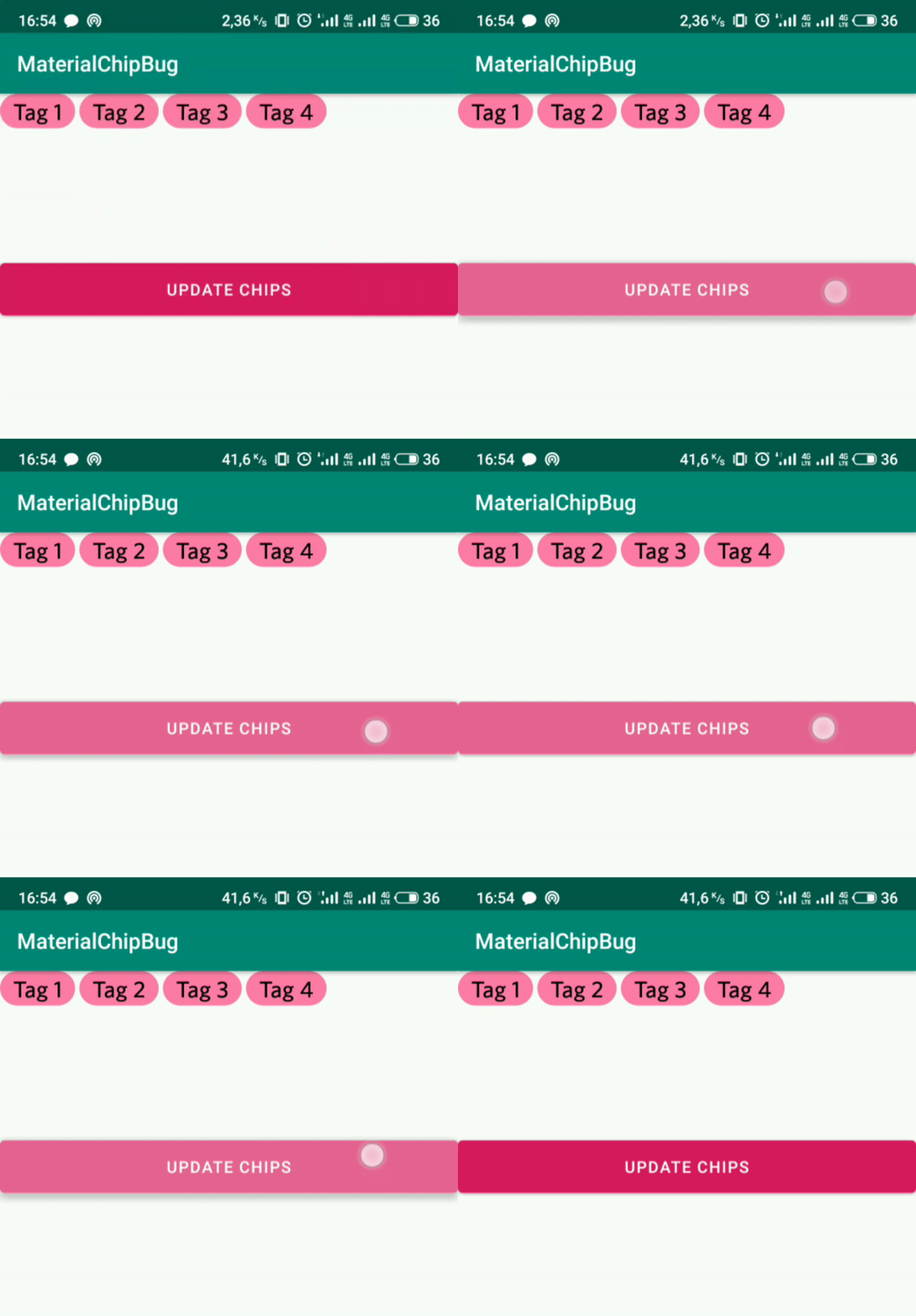
Expected behavior: Chips update without blinking.
Source code:
Chips are created programmatically:
    private fun createChip(context: Context, chipTitle: String): Chip {
        return Chip(context)
            .apply {
                setTextAppearance(R.style.ChipTextStyle)
                text = chipTitle
                isClickable = false
                isFocusable = false
                setChipBackgroundColorResource(R.color.chipColor)
                setTextColor(ContextCompat.getColor(context, R.color.black))
            }
    }
Style with custom font:
    <style name="ChipTextStyle">
        <item name="android:textSize">20sp</item>
        <item name="android:textColor">@color/black</item>
        <item name="android:fontFamily">@font/whitney_medium</item>
    </style>
Update method:
    private fun updateAllChips() {
        chipGroup.removeAllViews()
        val chipsTitles = listOf("Tag 1", "Tag 2", "Tag 3", "Tag 4")
        chipsTitles.forEach { title ->
            val chip = createChip(this, title)
            chipGroup.addView(chip)
        }
    }
Full source code: link to repository
Android API version: 28, 27, 23
Material Library version: 1.1.0
Devices: Meizu 16th api 28, emulators (Nexus 5X api 27, Galaxy Nexus api 23)
 DEcSENT
All 7 comments
I would say this is expected. You are creating Chips with one font and then replacing that. You have different options maybe inflate the chip with the right font in the first place or change your method to:
private fun createChip(context: Context, chipTitle: String): Chip {
return Chip(context)
.apply {
visibility = GONE
setTextAppearance(R.style.ChipTextStyle)
text = chipTitle
isClickable = false
isFocusable = false
setChipBackgroundColorResource(R.color.chipColor)
setTextColor(ContextCompat.getColor(context, R.color.black))
post {
visibility = VISIBLE
}
}
}
 ymarian
on 14 Oct 2019
ymarian
on 14 Oct 2019
@ymarian I wouldn't say it is expected, because when I set custom font manually all works fine:
    private fun createChip(context: Context, chipTitle: String): Chip {
        val customFont = ResourcesCompat.getFont(context, R.font.whitney_medium)
        return Chip(context)
            .apply {
                typeface = customFont
                textSize = 20f
                text = chipTitle
                isClickable = false
                isFocusable = false
                setChipBackgroundColorResource(R.color.chipColor)
                setTextColor(ContextCompat.getColor(context, R.color.black))
            }
    }
@DEcSENT
If getting the font synchronously is ok then you can also do TextAppearanceConfig.setShouldLoadFontSynchronously(true)
It should only matter for the first load I think
ymarian
on 14 Oct 2019
So the fix for this issue is to use TextAppearanceConfig.setShouldLoadFontSynchronously(true) ?
 rmyhal
on 4 Dec 2019
rmyhal
on 4 Dec 2019
I am facing the same issue when I have an action chip on ny recycler view item with custom fonts
 vizsatiz
on 11 Dec 2019
vizsatiz
on 11 Dec 2019
@rmyhal beware that this may cause ANRs if your custom font takes too long to load.
 wcshi
on 11 Dec 2019
wcshi
on 11 Dec 2019
@wcshi yes, I know, thanks!
I set it true -> load my font -> set false
rmyhal
on 16 Jan 2020
Related issues
 zkovar
·
3Comments
zkovar
·
3Comments
 JakeWharton
·
3Comments
JakeWharton
·
3Comments
 Sanusy
·
3Comments
Sanusy
·
3Comments
 aarontwf
·
3Comments
aarontwf
·
3Comments
 jaychang0917
·
3Comments
jaychang0917
·
3Comments
Most helpful comment
@ymarian I wouldn't say it is expected, because when I set custom font manually all works fine: