Material-components-android: [StatusBar] Status bar not respecting primary color in light theme
Description:
I am overriding Theme.MaterialComponents.DayNight, and I set colorPrimary like this:
<item name="colorPrimary">@color/colorPrimary</item>
Every material components respect this, including the top action bar. But the status bar is still in the default purple accent color, like this:
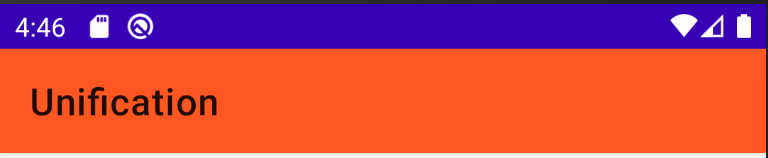
I tried to manually override android:statusBarColor like:
<item name="android:statusBarColor">@color/colorPrimaryVariant</item>
It solved the problem:
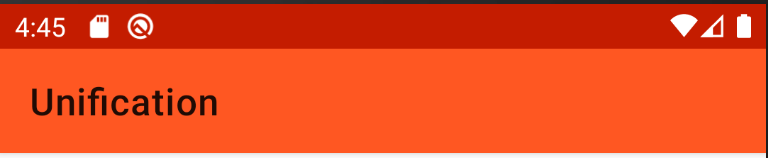
However, when I switch to dark theme, the color remains:

I had searched through the entire project to see if there are any color strings that correspond to the default purple accent color, but I didn't find any.
Is this an expected behavior? Or should this be handled automatically by the parent theme, i.e. DayNight theme?
Expected behavior:
The status bar should behave like this in light theme:
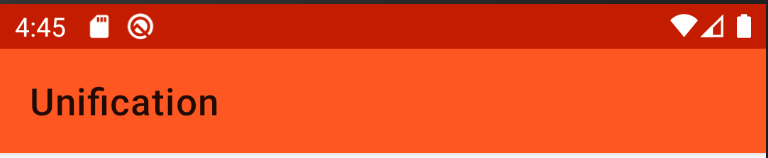
and like this in dark theme:
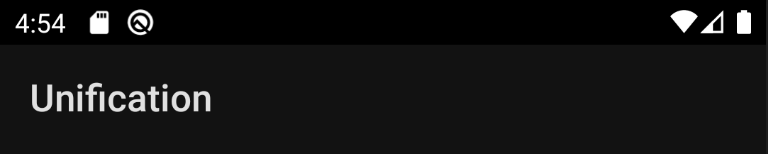
Source code:
styles.xml:
<style name="AppTheme" parent="Theme.MaterialComponents.DayNight">
    <!-- Customize your theme here. -->
    <item name="colorPrimary">@color/colorPrimary</item>
    <item name="colorPrimaryVariant">@color/colorPrimaryVariant</item>
    <item name="colorSecondaryVariant">@color/colorSecondary</item>
    <item name="colorSecondary">@color/colorSecondaryVariant</item>
    <item name="android:navigationBarColor">@android:color/transparent</item>
</style>
colors.xml:
<resources>
    <color name="colorPrimary">#ff5722</color>
    <color name="colorPrimaryVariant">#c41c00</color>
    <color name="colorSecondaryVariant">#03a9f4</color>
    <color name="colorSecondary">#67daff</color>
</resources>
Android API version: 29
Material Library version: 1.2.0-alpha02
Device: Android Emulator: Nexus 5X API 29 x86
 MrCreeper1008
All 3 comments
Same issue occurs when DayNight.NoActionBar is overriden. I would expect the status bar color to be transparnt instead of the default purple accent color.
MrCreeper1008
on 6 Dec 2019
0) create a color resource for your status bar color and point to whatever color you desire in light and dark theme
1) either:
a)
OR
b)
 wcshi
on 9 Dec 2019
wcshi
on 9 Dec 2019
Do I have to override both the light and dark theme? I'm using the DayNight theme which respects system theme but there's no separate attributes for light and dark status bar for me to override.
MrCreeper1008
on 10 Dec 2019
Related issues
 mnayef95
·
3Comments
mnayef95
·
3Comments
 hkchakladar
·
3Comments
hkchakladar
·
3Comments
 Sanusy
·
3Comments
Sanusy
·
3Comments
 magnusfernandes
·
3Comments
magnusfernandes
·
3Comments
 jaychang0917
·
3Comments
jaychang0917
·
3Comments
Most helpful comment
Do I have to override both the light and dark theme? I'm using the
DayNighttheme which respects system theme but there's no separate attributes for light and dark status bar for me to override.