Material-components-android: Add new `Banner` component
 sfdexter
All 16 comments
When is this component coming out?
 joniruokamo
on 1 Aug 2018
joniruokamo
on 1 Aug 2018
Hey, not available yet ?
 KevinGiacomino
on 8 Oct 2018
KevinGiacomino
on 8 Oct 2018
Hi all,
Internally we're not seeing a lot of requests for this component versus using a Card. Can those of you that want to see the component as part of the library provide example use cases where a Card or Dialog with the information would not suffice?
 ldjcmu
on 19 Dec 2018
ldjcmu
on 19 Dec 2018
What about the animation?

I already made a version of this:
https://github.com/cesarferreira/MaterialComponent.Banner
the only issue is a small repetition of the hidding animation (you can check the example)
 cesarferreira
on 20 Dec 2018
cesarferreira
on 20 Dec 2018
Here are a few reasons I feel it would be good to have an official component
- Standard animation between various applications using the component
- Standard styling & layout based on the official guidelines without having to implement them in a DIY style
- Faster implementation of the banner functionality through an existing API
- Stable & bug-free
Let me know what you think of these / if you think of more reasons
 Ferdzz
on 20 Dec 2018
Ferdzz
on 20 Dec 2018
Example use case (for me) would be to show the user that they dont have an internet connection currently. There isn't really a good way currently to communicate to the user about something critical such as internet, let alone other minor informational things that are not disruptive to using the app.
My use case is I have a RecyclerView that takes up the whole screen and I feel that this component could just slide unintrusively in with information. While internet is crucial to updating stuff its not crucial to using the app in the sense that they can continue using the app and things will update later
 tyczj
on 10 Jan 2019
tyczj
on 10 Jan 2019
I was able to achieve this effect using TransitionManager https://developer.android.com/training/transitions/
My xml goes like this (I'll omit the other attributes):
<LinearLayout android:id="@+id/rootContainer">
    <include layout="@layout/toolbar" />
    <androidx.cardview.widget.CardView android:id="@+id/banner" android:visibility="gone"/>
    <!--Other content-->
</LinearLayout>
rootContainer is the root/parent view, which in my case is a vertical LinearLayout
banner is any view you want to show/hide
    private fun showNoConnectionBanner() {
        TransitionManager.beginDelayedTransition(rootContainer, BannerTransition())
        banner.visibility = View.VISIBLE
    }

    private fun hideNoConnectionBanner() {
        TransitionManager.beginDelayedTransition(rootContainer, BannerTransition())
        banner.visibility = View.GONE
    }
You can supply your own transition, what I made looks like this:
BannerTransition.kt
class BannerTransition : TransitionSet() {
    init {
        init()
    }

    private fun init() {
        ordering = TransitionSet.ORDERING_TOGETHER

        addTransition(ChangeBounds())
            .addTransition(Slide(Gravity.TOP))
    }
}
 XyrizTan
on 21 Jan 2019
XyrizTan
on 21 Jan 2019
I've created a library according to the Material design Banners specs (almost).
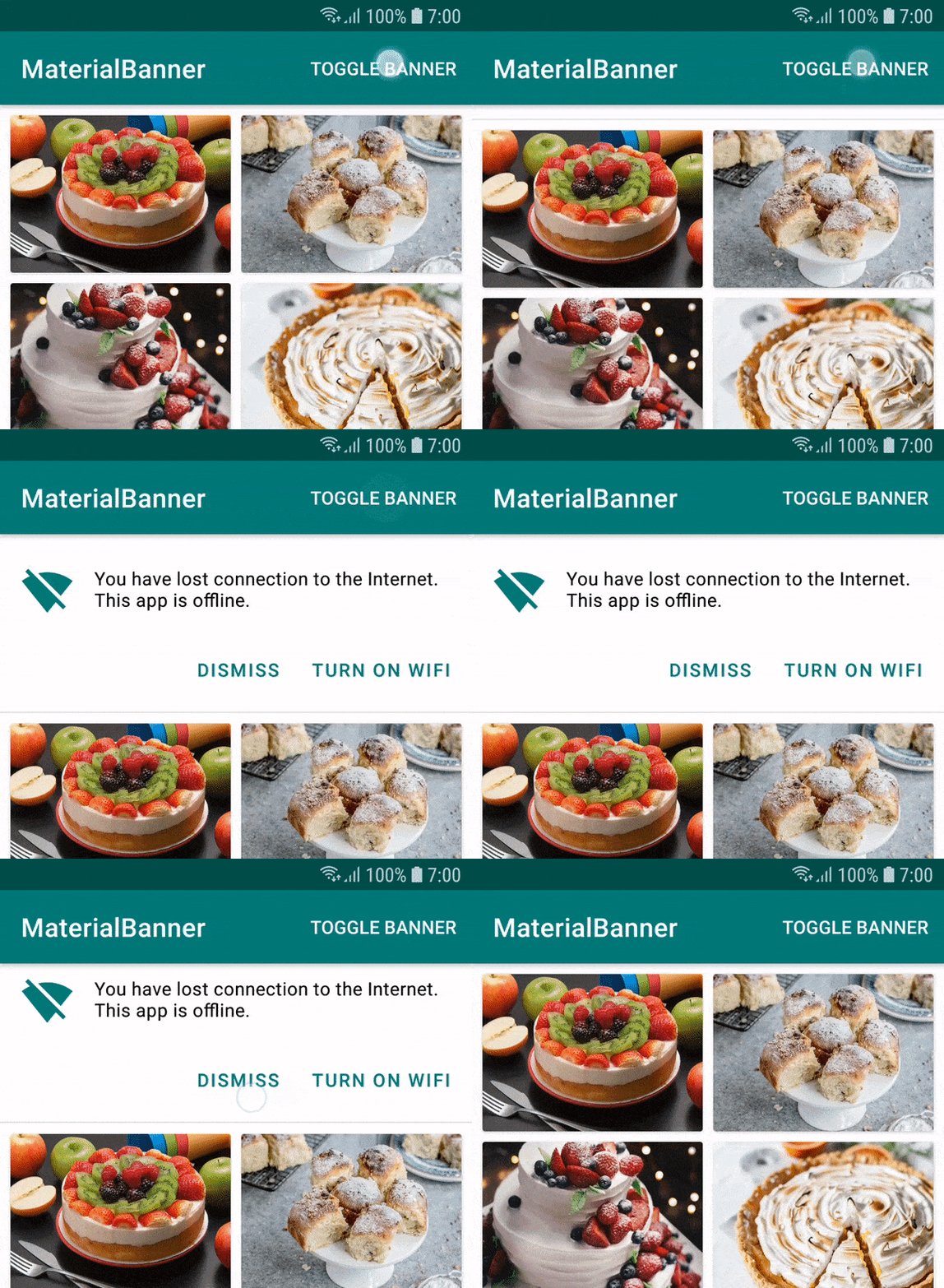
You can check it here:
https://github.com/sergivonavi/MaterialBanner
 sergivonavi
on 4 Apr 2019
sergivonavi
on 4 Apr 2019
@ldjcmu Does the material-components-android project accept PR's for new components?
 joshuamking-driveclutch
on 4 Apr 2019
joshuamking-driveclutch
on 4 Apr 2019
People who created the separate component outside the material repository could create a direct pull request on lib
Maintaining two repositories is kind of complicated to be honest
Although the project was very good, congratulations
 charleston10
on 1 Aug 2019
charleston10
on 1 Aug 2019
Internally we're not seeing a lot of requests for this component versus using a Card. Can those of you that want to see the component as part of the library provide example use cases where a Card or Dialog with the information would not suffice?
@ldjcmu could you elaborate on this a bit? Do you mean —
- that to implement the Banner design pattern we don't need a Banner Android component per se, and we can just use a card somehow?
- that the Banner pattern _itself_ is unneeded as described on the Material Design site?
I think that there's a good use-case outlined for the Banner component on the material.io website, but I'd take guidance if something else should be preferred. (Part of the reason of looking into Material Design is to try and adopt established best practice so definitely not a UX expert).
As someone coming at this new, it's a bit confusing.
 another-dave
on 16 Oct 2019
another-dave
on 16 Oct 2019
I agree it's confusing. I meant to say that we're seeing people workaround it with components like cards and that it's not been coming up as one of the top requests over say, Sliders. We do accept PRs and are happy to take a look at one submitted, hopefully with a catalog demo and tests :)
I'll resurface to our new component product managers the request.
ldjcmu
on 16 Oct 2019
OK, thanks.
When you mention that people are working around it — is that:
- developers saying "I don't need a dedicated Banner component, I can implement it as a card with different styling" or
- the UX designers saying "actually, we're not using Banner as much as we thought, you really only need "Snackbars" and "Dialogs".
Sorry for banging the drum a bit, but the _README_ says the repo is maintained jointly by "a core team of engineers and UX designers at Google", so just trying to find out which angle you're coming from when you say "we" or "internally" (design vs dev).
Don't mind if I need to roll my own (or use one of the ones linked above), but want to make sure I'm about to implement something that's soon to be considered deprecated. Presume that if you're open to taking PRs though it'd be fair to say that the Banner should be used, it's just not highest priority to have a turn-key implementation of?
Thanks
Dave
another-dave
on 17 Oct 2019
Yeah... Banner would be actually really helpful to have!
 Ein6tein
on 9 Dec 2019
Ein6tein
on 9 Dec 2019
Hello!) Do you plan to release banners?
 nikiJava
on 24 Mar 2020
nikiJava
on 24 Mar 2020
Hi! I found custom view similar to banner in IOSched repository. Look at this https://github.com/google/iosched/blob/master/mobile/src/main/res/layout/item_codelabs_information_card.xml

 EvgenyTerebenin
on 6 Aug 2020
EvgenyTerebenin
on 6 Aug 2020
Related issues
 h4h13
·
22Comments
h4h13
·
22Comments
 blu3-b1rd
·
34Comments
blu3-b1rd
·
34Comments
 giangpham96
·
21Comments
giangpham96
·
21Comments
 jeevansurendran
·
49Comments
jeevansurendran
·
49Comments
 Nakuls426
·
21Comments
Nakuls426
·
21Comments
Most helpful comment
Hey, not available yet ?