Mastodon: Erase spaces surrounding user handle on Firefox
Using Firefox 58.0.2 (64-bit) on Windows 10 Pro.
When I triple-click or select by dragging across two lines on a user's user-handle on their page, the resulting copied text has two spaces surrounding the string: one preceding, one succeeding. This can be a flow issue when attempting to follow somebody by copy-pasting a user's full handle into your desired instance account instead of remote-following.
Duplication:
- Head to: https://mastodon.social/@Gargron
- triple-click on or select @[email protected]
- Ctrl-C, Ctrl-V on some text space
- The resulting string has extraneous whitespace.
Additional notes:
If I triple-click on the user handle on the full profile page, the resulting string has a space before and after the handle.
If I select using this motion in either direction to select the user-handle, the resulting string only has a space after the handle.
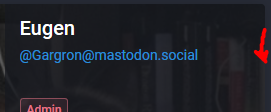
If I triple-click on the user handle on the in-web-client profile, the resulting string only has a space after the handle.
If I select using the same motion as above on the in-web-client profile, the resulting string only has a space after the handle.
- [x ] I searched or browsed the repo’s other issues to ensure this is not a duplicate.
 weavermarquez
>All comments
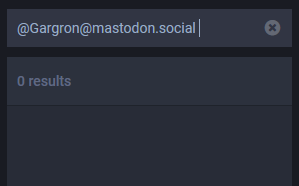
Additional note: The user search does not work if there is only a space after the handle.
i.e., searching "@[email protected] " then pressing enter results in 0 results.
weavermarquez
on 14 Apr 2018
Related issues
 lauramichet
·
3Comments
lauramichet
·
3Comments
 flukejones
·
3Comments
flukejones
·
3Comments
 hugogameiro
·
3Comments
hugogameiro
·
3Comments
 ccoenen
·
3Comments
ccoenen
·
3Comments
 KellerFuchs
·
3Comments
KellerFuchs
·
3Comments
Most helpful comment
Additional note: The user search does not work if there is only a space after the handle.
i.e., searching "@[email protected] " then pressing enter results in 0 results.