Mastodon: Show final file size in size validation error message
Tried uploading a few different gifs as a header, but got 'must be less than 2 MB' error message.
But they're 1.5/1.3mb, so it should be ok.
Also, it states that there are 2 errors, but it displays only 1 error message
After clicking save:

Error on chrome dev

Gifs used:
http://pa1.narvii.com/6546/c4ce4bb8773bfbaca41d70413a646a713405bc7a_hq.gif
EDIT:
Tried another gif. This time I compressed it (using compressor.io) to 860kb, and it's 800x450, so it should be downscaled, and not upscaled. Still... the same error.
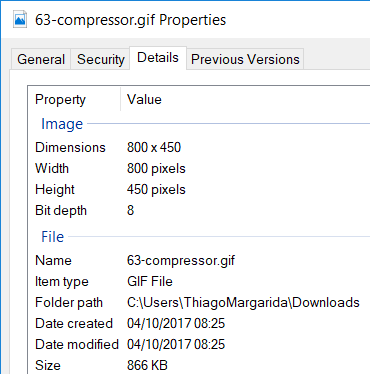
Gif used
https://user-images.githubusercontent.com/12170252/31173514-36b4a806-a8de-11e7-9e60-1dda2e1a54da.gif
- [x] I searched or browsed the repo’s other issues to ensure this is not a duplicate.
 thiagomgd
All 7 comments
- Upload 1.5mb gif
- Server upscales it to 700px wide (!!)
- Then, 2.8mb gif couldn't pass validation
I think it shouldn't upscale small images, as per hints on the profile page...
 unarist
on 4 Oct 2017
unarist
on 4 Oct 2017
Anyway, since we convert uploaded images with static parameters, so resulted file may larger than uploaded file. Your 866KB gif will be converted to 2.93MB (downscaled).
unarist
on 4 Oct 2017
@unarist I thought it would be because of that. But for a user (and especially a non tech savy one), that doesn't matter. As a user, that speaks for a system that it's just plain bad and buggy, because the allowed limit is 2mb, and I've uploaded a 800kb image.
If reworking the conversion system and compressing the result is out of question, them maybe Mastodon would need to specify 500kb as size limit, and internally, allow 2.5mb.
And then, if a gif (<500kb) still exceeds 2.5mb after conversion, display another error message, and not say that the limit is 2mb.
thiagomgd
on 4 Oct 2017
+1. This is very confusing and unintuitive. I tried 10+ times by rescaling and/or increasing optimization parameter when all along it was mastodon itself.
A short term fix is to state the resulting size, and add a note that mastodon does resize uploaded images. I.e. if I upload a 1.6 mb file, and it tells me "too big (2.8 mb)", I will at least realize that it's not just a matter of rounding issues or something (too big it's 2000001 bytes!).
 kallewoof
on 26 Sep 2018
kallewoof
on 26 Sep 2018
This is still happening, right?
 trwnh
on 20 Oct 2018
trwnh
on 20 Oct 2018
There's a lot of issues like these. I can't really do anything to fix it. I can't change imagemagick to anything else, I can't add a gif optimizer to the stack, and I don't think it would overall be a good idea to remove file size check on post-processing output, so this is how it is.
 Gargron
on 20 Oct 2018
Gargron
on 20 Oct 2018
I specifically wrote a short term fix in the comment above, so "can't do anything" sounds a bit off. Perhaps you've been given this advice tons of times and have explained why it is infeasible so many times you can't even bother to explain it again, though.
kallewoof
on 20 Oct 2018
Related issues
 renatolond
·
3Comments
renatolond
·
3Comments
 KellerFuchs
·
3Comments
KellerFuchs
·
3Comments
 flukejones
·
3Comments
flukejones
·
3Comments
 almafeta
·
3Comments
almafeta
·
3Comments
 golbette
·
3Comments
golbette
·
3Comments
Most helpful comment
I think it shouldn't upscale small images, as per hints on the profile page...