Markdown-preview-enhanced: 请问如何调整代码块的字体大小?
如题,谢谢!
 wuhua0871
All 23 comments
运行 Customize Css 命令打开 style.less 编辑如下:
.markdown-preview.markdown-preview {
// modify your style here
// eg: background-color: blue;
pre[class*="language-"] span {
font-size: 24px;
}
}
会更改代码块字体为 24px。你修改成相应的大小就行了。
谢谢
 shd101wyy
on 18 Apr 2019
shd101wyy
on 18 Apr 2019
照着改了,但是没用呢。
wuhua0871
on 18 Apr 2019
可否来张截图,左边是 style.less,右边是预览?
shd101wyy
on 18 Apr 2019
[cid:storage_001B-9622_%E6%88%AA%E5%9B%BE_PNG_1555559184405]
发送自我的三星盖乐世智能手机。
-------- 原始信息 --------
发件人: Yiyi Wang notifications@github.com
日期: 2019/4/18 11:31 (GMT+08:00)
收件人: shd101wyy/markdown-preview-enhanced markdown-preview-enhanced@noreply.github.com
抄送: wuhua0871 wuhua0871@live.cn, Author author@noreply.github.com
主题: Re: [shd101wyy/markdown-preview-enhanced] 请问如何调整代码块的字体大小? (#1110)
可否来张截图,左边是 style.less,右边是预览?
―
You are receiving this because you authored the thread.
Reply to this email directly, view it on GitHubhttps://github.com/shd101wyy/markdown-preview-enhanced/issues/1110#issuecomment-484342956, or mute the threadhttps://github.com/notifications/unsubscribe-auth/AGMFXVZZ6AGJ2HJ5AHSSVCDPQ7TSZANCNFSM4HGVKGYQ.
wuhua0871
on 18 Apr 2019
你手机发送我看不见。等你有时间上电脑法给我吧。顺便试试 font-size: 24px !important 看看有没有用。
shd101wyy
on 18 Apr 2019


wuhua0871
on 18 Apr 2019
Weird... 你试试添加 background-color: red; 看看 preview 的颜色有没有变成红色?
shd101wyy
on 19 Apr 2019
没有,还是跟之前一样
发送自我的三星盖乐世智能手机。
-------- 原始信息 --------
发件人: Yiyi Wang notifications@github.com
日期: 2019/4/19 13:27 (GMT+08:00)
收件人: shd101wyy/markdown-preview-enhanced markdown-preview-enhanced@noreply.github.com
抄送: wuhua0871 wuhua0871@live.cn, Author author@noreply.github.com
主题: Re: [shd101wyy/markdown-preview-enhanced] 请问如何调整代码块的字体大小? (#1110)
Weird... 你试试添加 background-color: red; 看看 preview 的颜色有没有变成红色?
―
You are receiving this because you authored the thread.
Reply to this email directly, view it on GitHubhttps://github.com/shd101wyy/markdown-preview-enhanced/issues/1110#issuecomment-484771615, or mute the threadhttps://github.com/notifications/unsubscribe-auth/AGMFXVYCVAMOH3VIMKIUB2LPRFJ3FANCNFSM4HGVKGYQ.
wuhua0871
on 19 Apr 2019
你右键点击下编辑器右侧的预览然后看看它有没有弹出一个菜单栏?
shd101wyy
on 19 Apr 2019
有的,以下四类:
- 在浏览器中打开
- 格式转换
- 图片助手
- 同步源
发送自我的三星盖乐世智能手机。
-------- 原始信息 --------
发件人: Yiyi Wang notifications@github.com
日期: 2019/4/19 13:38 (GMT+08:00)
收件人: shd101wyy/markdown-preview-enhanced markdown-preview-enhanced@noreply.github.com
抄送: wuhua0871 wuhua0871@live.cn, Author author@noreply.github.com
主题: Re: [shd101wyy/markdown-preview-enhanced] 请问如何调整代码块的字体大小? (#1110)
你右键点击下编辑器右侧的预览然后看看它有没有弹出一个菜单栏?
―
You are receiving this because you authored the thread.
Reply to this email directly, view it on GitHubhttps://github.com/shd101wyy/markdown-preview-enhanced/issues/1110#issuecomment-484773147, or mute the threadhttps://github.com/notifications/unsubscribe-auth/AGMFXVZGAT7NMAVB32MI4V3PRFLFRANCNFSM4HGVKGYQ.
wuhua0871
on 19 Apr 2019
可否来张截图?
shd101wyy
on 19 Apr 2019
发送自我的三星盖乐世智能手机。
wuhua0871
on 19 Apr 2019

wuhua0871
on 19 Apr 2019
你把 font-size 调整大于 24px 也没用?
shd101wyy
on 21 Apr 2019
试了,改大改小都没用
发送自我的三星盖乐世智能手机。
-------- 原始信息 --------
发件人: Yiyi Wang notifications@github.com
日期: 2019/4/21 20:41 (GMT+08:00)
收件人: shd101wyy/markdown-preview-enhanced markdown-preview-enhanced@noreply.github.com
抄送: wuhua0871 wuhua0871@live.cn, Author author@noreply.github.com
主题: Re: [shd101wyy/markdown-preview-enhanced] 请问如何调整代码块的字体大小? (#1110)
你把 font-size 调整大于 24px 也没用?
—
You are receiving this because you authored the thread.
Reply to this email directly, view it on GitHubhttps://github.com/shd101wyy/markdown-preview-enhanced/issues/1110#issuecomment-485248525, or mute the threadhttps://github.com/notifications/unsubscribe-auth/AGMFXV57Q6LAQVPAR5CBTVTPRROJDANCNFSM4HGVKGYQ.
wuhua0871
on 22 Apr 2019
痛心。还有一种方法就是你右键点击预览选择 Open in Browser 打开到你的浏览器之后,手动调整代码块的 css,然后 work 了的话在把你修改过的 css 拷贝到你的 style.less 中。
我有点好奇哈,如果你还用别的 previewTheme 也有这个问题吗?
谢谢
shd101wyy
on 22 Apr 2019
换了一遍所有主题,都一样的没效果。
有个发现,当显示文档前的说明为代码块时,配置对其是起作用的,正文代码块不起作用。
浏览器改样式我还不会操作呢,等回头研学习下。
发送自我的三星盖乐世智能手机。
-------- 原始信息 --------
发件人: Yiyi Wang notifications@github.com
日期: 2019/4/22 16:43 (GMT+08:00)
收件人: shd101wyy/markdown-preview-enhanced markdown-preview-enhanced@noreply.github.com
抄送: wuhua0871 wuhua0871@live.cn, Author author@noreply.github.com
主题: Re: [shd101wyy/markdown-preview-enhanced] 请问如何调整代码块的字体大小? (#1110)
痛心。还有一种方法就是你右键点击预览选择 Open in Browser 打开到你的浏览器之后,手动调整代码块的 css,然后 work 了的话在把你修改过的 css 拷贝到你的 style.less 中。
我有点好奇哈,如果你还用别的 previewTheme 也有这个问题吗?
谢谢
—
You are receiving this because you authored the thread.
Reply to this email directly, view it on GitHubhttps://github.com/shd101wyy/markdown-preview-enhanced/issues/1110#issuecomment-485365426, or mute the threadhttps://github.com/notifications/unsubscribe-auth/AGMFXV64VC2RLVGEVK52AH3PRV3C7ANCNFSM4HGVKGYQ.
wuhua0871
on 22 Apr 2019
稍微折腾了一下,无法修改字体大小的原因在于
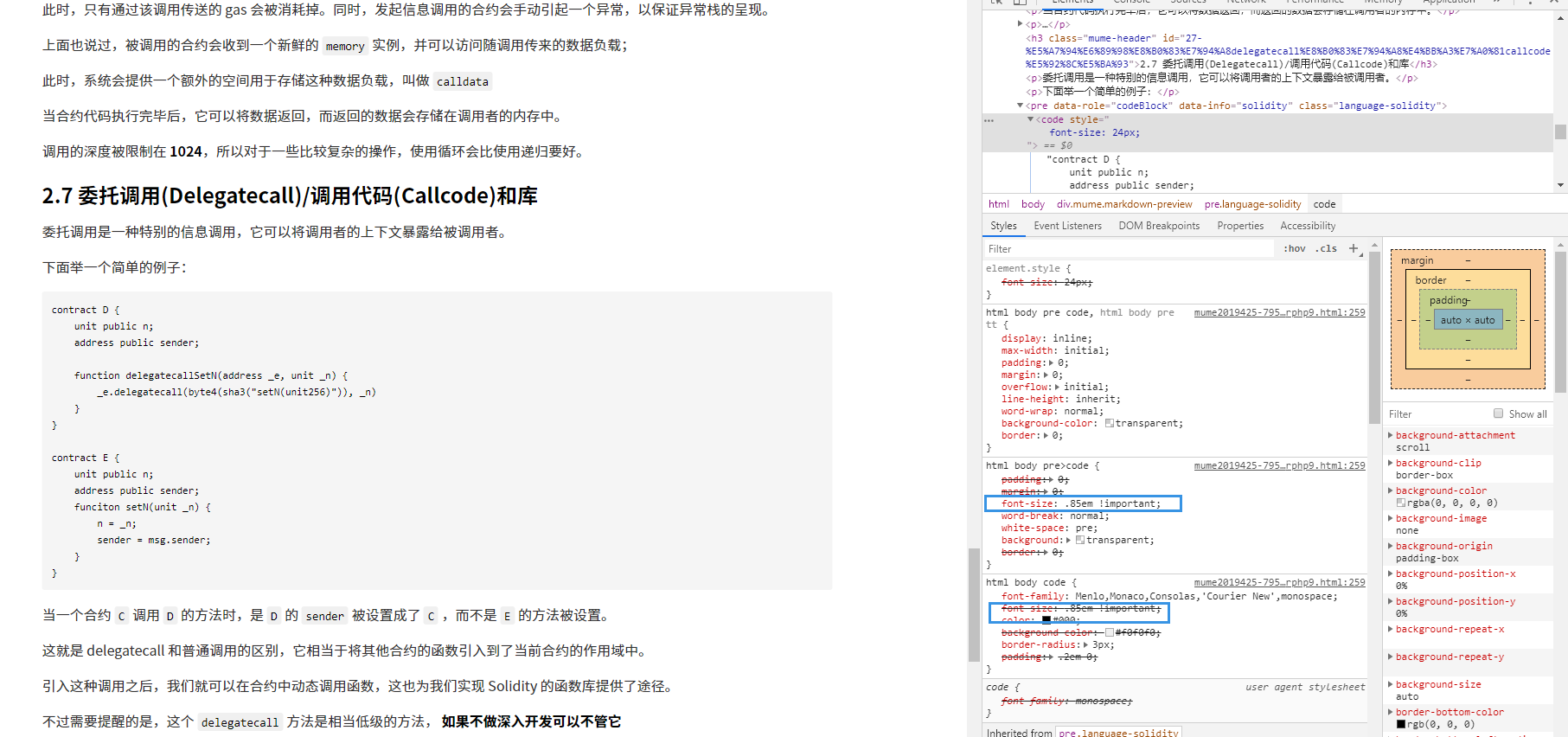
code 的字体大小使用 !important 限制住了,所以自定义的也用 !important 即可
  pre[class*="language-"] span {
    font-size: 24px !important;
  }
 wafer-li
on 25 May 2019
wafer-li
on 25 May 2019
能否请教一下,修改的是哪个文件,哪个地方呢?
谢谢!
发送自我的三星盖乐世智能手机。
-------- 原始信息 --------
发件人: Wafer Li notifications@github.com
日期: 2019/5/25 23:03 (GMT+08:00)
收件人: shd101wyy/markdown-preview-enhanced markdown-preview-enhanced@noreply.github.com
抄送: wuhua0871 wuhua0871@live.cn, Author author@noreply.github.com
主题: Re: [shd101wyy/markdown-preview-enhanced] 请问如何调整代码块的字体大小? (#1110)
稍微折腾了一下,无法修改字体大小的原因在于
[image]https://user-images.githubusercontent.com/12459199/58371108-15fcc680-7f41-11e9-90da-8c1c98ea6151.png
code 的字体大小使用 !important 限制住了,所以自定义的也用 !important 即可
  pre[class*="language-"] span {
    font-size: 24px !important;
  }
—
You are receiving this because you authored the thread.
Reply to this email directly, view it on GitHubhttps://github.com/shd101wyy/markdown-preview-enhanced/issues/1110?email_source=notifications&email_token=AGMFXVYFYFUA7TTJKILR5PTPXFILBA5CNFSM4HGVKGY2YY3PNVWWK3TUL52HS4DFVREXG43VMVBW63LNMVXHJKTDN5WW2ZLOORPWSZGODWHTODI#issuecomment-495925005, or mute the threadhttps://github.com/notifications/unsubscribe-auth/AGMFXV4R5OEG23M6JFXE6J3PXFILBANCNFSM4HGVKGYQ.
wuhua0871
on 25 Jun 2019
@wuhua0871 cmd-shift-p 运行 Markdown Preview Enhanced: Customize Css 命令打开 style.less 在里面编辑即可。
shd101wyy
on 25 Jun 2019
这个已经改了呢的。普通字体大小变了,代码还是默认大小呢
发送自我的三星盖乐世智能手机。
-------- 原始信息 --------
发件人: Yiyi Wang notifications@github.com
日期: 2019/6/25 10:22 (GMT+08:00)
收件人: shd101wyy/markdown-preview-enhanced markdown-preview-enhanced@noreply.github.com
抄送: wuhua0871 wuhua0871@live.cn, Mention mention@noreply.github.com
主题: Re: [shd101wyy/markdown-preview-enhanced] 请问如何调整代码块的字体大小? (#1110)
@wuhua0871https://github.com/wuhua0871 cmd-shift-p 运行 Markdown Preview Enhanced: Customize Css 命令打开 style.less 在里面编辑即可。
―
You are receiving this because you were mentioned.
Reply to this email directly, view it on GitHubhttps://github.com/shd101wyy/markdown-preview-enhanced/issues/1110?email_source=notifications&email_token=AGMFXV7F555G5JKG5MNHMMTP4F6O3A5CNFSM4HGVKGY2YY3PNVWWK3TUL52HS4DFVREXG43VMVBW63LNMVXHJKTDN5WW2ZLOORPWSZGODYOYQ2Q#issuecomment-505251946, or mute the threadhttps://github.com/notifications/unsubscribe-auth/AGMFXV5P36LSBGQABJ5XXR3P4F6O3ANCNFSM4HGVKGYQ.
wuhua0871
on 25 Jun 2019
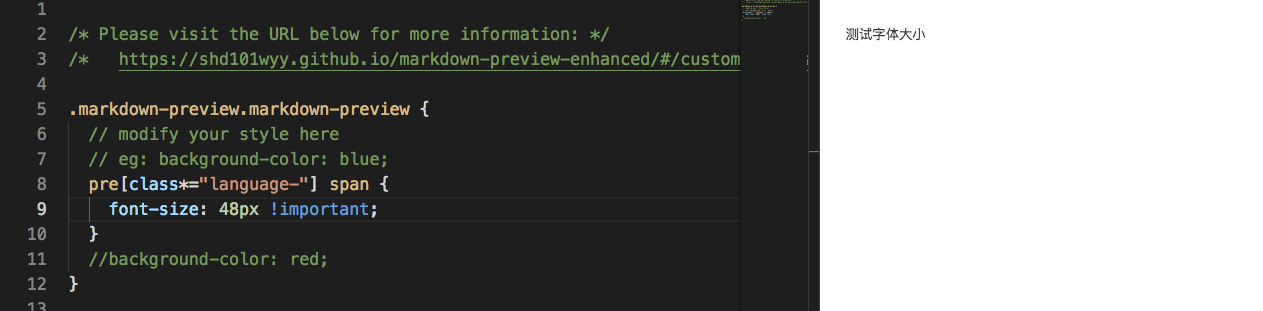
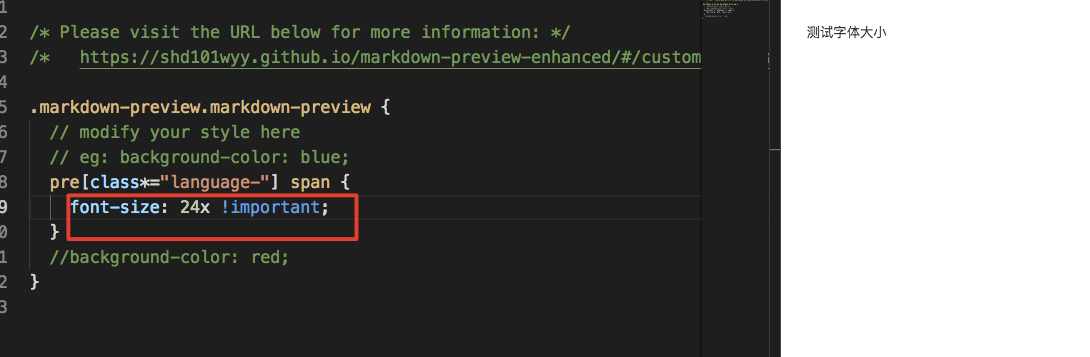
字体没有变化。。。
 Honei
on 6 Mar 2020
Honei
on 6 Mar 2020
我将vs code 更新之后字体变大了。
Honei
on 12 Mar 2020
Related issues
 oneone1995
·
5Comments
oneone1995
·
5Comments
 ajstadlin
·
5Comments
ajstadlin
·
5Comments
 siriuscc
·
3Comments
siriuscc
·
3Comments
 yushukk
·
3Comments
yushukk
·
3Comments
 AdamBear-Me
·
5Comments
AdamBear-Me
·
5Comments
Most helpful comment
稍微折腾了一下,无法修改字体大小的原因在于
code 的字体大小使用
!important限制住了,所以自定义的也用!important即可