Markdown-preview-enhanced: "princexml" is required to be installed in VSCode
 ajstadlin
All 5 comments
You need to close vscode completely and then restart it. If it still
doesn't work, restart your computer. Check whether "prince" command exists
in powershell or not, if not, add it to system path.
On Wed, Aug 23, 2017 at 9:22 PM ajstadlin notifications@github.com wrote:
I installed markdown-preview-enhanced extension and Prince
https://www.princexml.com/ in VSCode in Windows. When I try the PDF
(Prince) option from the Preview, VSCode displays the Error message
"princexml" is required to be installed in VSCode.—
You are receiving this because you are subscribed to this thread.
Reply to this email directly, view it on GitHub
https://github.com/shd101wyy/markdown-preview-enhanced/issues/594, or mute
the thread
https://github.com/notifications/unsubscribe-auth/AB0gf9LMVr6bRczJjKiwHLrKCBLsOFemks5sbN5OgaJpZM4PAzzl
.
 shd101wyy
on 24 Aug 2017
shd101wyy
on 24 Aug 2017
I'm sorry, but I really have been trying to figure out how to "add the command to system path" in windows 10, and still can't learn how to do it.
Prince is not a command in my system, I restarted everything but Atom still returns me the same "princexml" message when trying to export the md preview to PDF. So if you could give any advice on how I add it as a system path? Pretty please? :)
EDIT
Ok, I finally managed it after choosing the right words to search. Anyway, if other ~dumb~ newbie users like me stumble upon this topic, take a look at this page to easily enable prince as a command in Windows 10. Now it's working.
 cyranowebdev
on 5 Apr 2018
cyranowebdev
on 5 Apr 2018
@cyranodesale glad that it works for you now. Feel free to ask questions. Thank you.
shd101wyy
on 6 Apr 2018
I have a solution
- download and install prince , https://www.princexml.com/download/
- add the command to system path , C:Program Files (x86)Princeenginebin
- restart vscode
 luojie1024
on 7 Aug 2018
luojie1024
on 7 Aug 2018
Thanks to cyranowebdev and luojie1024 , I finally fix it.
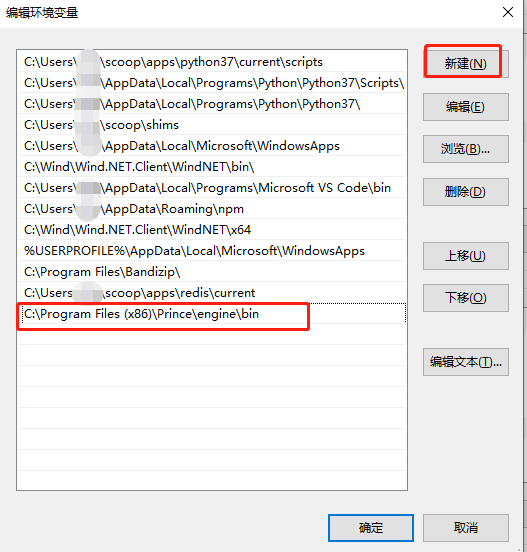
As luojie1024 said, after install prince, it's necessary to add the'C:\Program Files (x86)\Prince\engine\bin' to the system path.
As cyranowebdev said, I find how to add it to the systme path.
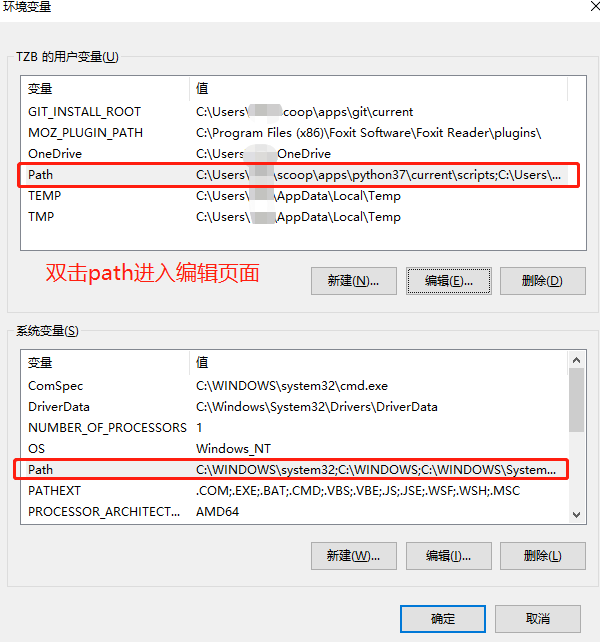
First open the 'advanced system setting(高级系统设置)',
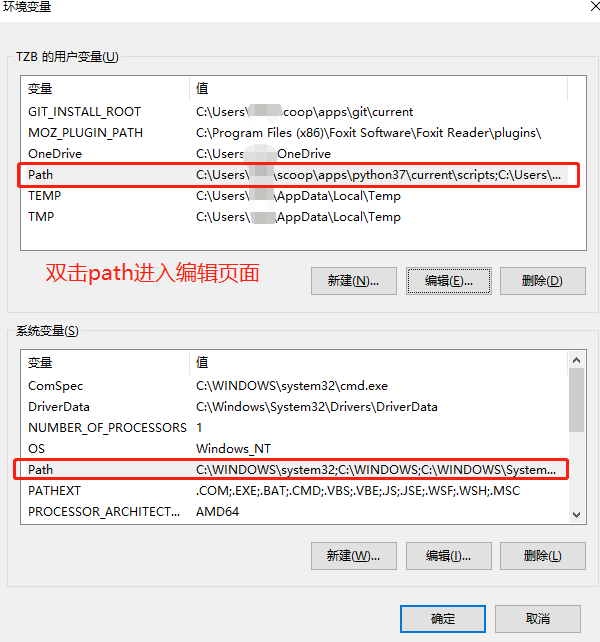
then open 'Environment Variables(环境变量) ' in advance tag(高级) ,
then click "Path" in 'system variable' and ‘user' variable’,
at last paste 'C:\Program Files (x86)\Prince\engine\bin' in both Path.
Restart vscode.
Screenshot
https://github.com/FelicityYiran/Picture/blob/main/%E4%B8%BA%E4%BA%86%E5%9C%A8VScode%E4%B8%AD%E7%94%A8princexml1.png?raw=true
 FelicityYiran
on 12 Nov 2020
FelicityYiran
on 12 Nov 2020
Related issues
 saeidamiri1
·
3Comments
saeidamiri1
·
3Comments
 AdamBear-Me
·
5Comments
AdamBear-Me
·
5Comments
 rcmalli
·
4Comments
rcmalli
·
4Comments
 adamaltmejd
·
5Comments
adamaltmejd
·
5Comments
 oneone1995
·
5Comments
oneone1995
·
5Comments
Most helpful comment
I have a solution